

Close Menu

    Subscribe to Updates

    Get the latest creative news from FooBar about art, design and business.

    What's Hot

    Presidio’s Resonate uses agentic AI to turn sports archives into searchable inventory

    September 6, 2026

    CT Tamburello’s Estranged Wife Catalina White Reacts to Phaedra Parks Romance 

    September 6, 2026

    12 Pop Culture-Inspired Group Halloween Costumes For 2026 To Wear With Your Crew

    September 6, 2026
    Facebook X (Twitter) Instagram
    Facebook X (Twitter) Instagram YouTube TikTok
    Comic Vibe
    Sunday, September 6
    • Home
    • Comics
      • Comic Vibe News
    • Gaming
    • Movies
    • TV
    • Anime
    • Toys & Collectibles
    • Cosplay
    • Tech
    • Digital Culture
      • Creators & Fan Culture
      • Creator Economy & Fan-Driven Platforms
      • Digital Fandom & Online Communities
      • Metaverse & Virtual Worlds
      • NFTs & Digital Collectibles
      • Virtual Events & Online Conventions
      • Virtual Identity & Avatars
    • Shop
    Comic Vibe
    • Home
    • Contact Us
    • Terms & Conditions
    • Advertise With Us
    • DMCA Policy
    • Privacy Policy
    • About Us
    Home»Gaming»You Can Set Your PlayStation 5 To Auto-Update, Here’s How
    Gaming

    You Can Set Your PlayStation 5 To Auto-Update, Here’s How

    JamesBy JamesSeptember 6, 2026No Comments4 Mins Read
    Facebook Twitter
    You Can Set Your PlayStation 5 To Auto-Update, Here’s How
    Share
    Facebook Twitter

    Many of the gadgets we use that have an operating system have a way to enable automatic updates. These update their software so you’re always on the latest version, enjoying the latest features, performance improvements, and security patches, and Sony’s PlayStation 5 is no different.

    As long as the auto-update feature is enabled in settings and the PS5 is turned on, it’ll automatically pick up the latest update as soon as it’s available — no need to manually check. Furthermore, you can enable it so this happens in rest mode, when the PS5’s indicator light turns solid orange, so the console downloads and installs the update while you’re, for example, at work or asleep.

    While automatic updates are enabled by default for every console, there are several scenarios where you can find them turned off. For instance, another user could have toggled them off in their profile, affecting you since this setting applies globally and is not tied to a single profile. You could have disabled it yourself and forgotten where to re-enable it since the PS5’s menus are so dense. Whatever the case, the toggle is easy to find. Furthermore, you might have to toggle some extra settings when you find that the automatic updates are disrupting your gameplay experience.

    Enabling system and game updates on PS5
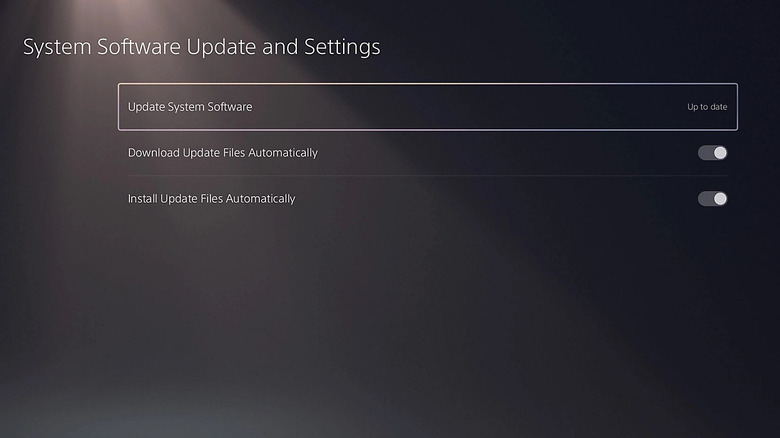
    Enabling automatic updates on PS5

    Automatic updates are a huge time saver. Remember, you can’t play an online game or visit the PlayStation Store on your PS5 if your console firmware isn’t updated. That means you’ll have to wait while it downloads the update so you can access these things. But if it all happens behind the scenes, especially in rest mode, you might experience no downtime.

    To enable automatic updates on your PS5, do the following:

    1. Select Settings.

    2. Select System.

    3. Select System Software.

    4. Select System Software Update and Settings.

    5. Toggle on Download Update Files Automatically.

    To ensure that the PS5 updates system and game updates in rest mode or even downloads PS5 games when you’re not home so you can find them ready to play, do the following:

    1. Go to Settings.

    2. Select System.

    3. Select Power Saving.

    4. Select Features Available in Rest Mode.

    5. Toggle on Stay Connected to the Internet.

    You can also enable automatic updates for games as well. These ensure that you always have the latest patches that add new features, tweak the game balancing, or improve performance and stability, among other things. This is important, considering there are several instances of high-profile games launching broken, like “Cyberpunk 2077,” “Battlefield 2042,” and “Code Violet.” Also, a game’s online features don’t work if it’s outdated (even if the system is updated).

    To enable automatic updates for games on your PS5, do the following:

    1. Go to Settings.

    2. Select Saved Data and Game/App Settings.

    3. Select Automatic Updates.

    4. Enable Auto-Download.

    Common problems with PS5 auto updates
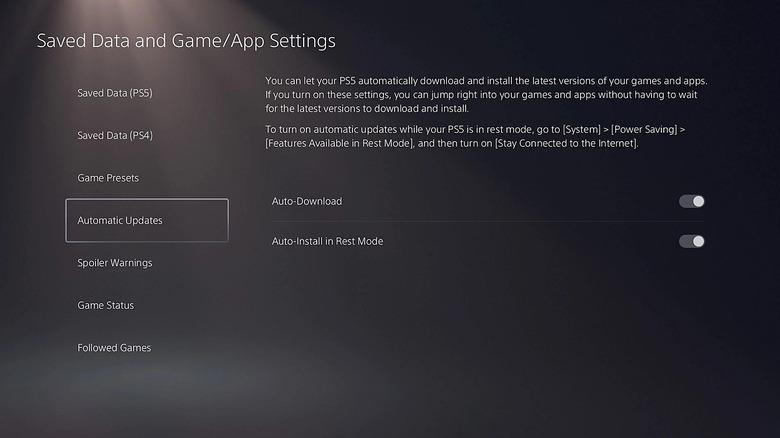
    Turning on automatic updates for PS5 games

    People turn off automatic updates for several reasons, with data caps being the most common. If your internet data is limited, this might not be the best option, considering game updates can be as big as 50GB. Controlling the process yourself can also be a good idea if you want to see how other users are receiving the update, since some updates can introduce more problems before they’re patched later on. But as long as you have enough or unlimited internet data and you understand an update can sometimes lead to issues, it helps to have automatic updates enabled.

    One thing that can cause a major interruption is when the system or game updates while you’re in the middle of a play session. For instance, Housemarque shared a post on X warning people to disable auto-updates so their run in “Returnal” isn’t interrupted after they release a patch. Games you left open, hoping to continue where you left off, can also be closed when the update happens in rest mode. This can lead to lost progress, which is especially frustrating in games with no autosaves like “Subnautica” and “Nier Automata.”

    Luckily, you can tweak this behavior. In the same place where you enable system auto-updates, toggle off Install Update Files Automatically. For game auto-updates, toggle off Auto-Install in Rest Mode. Telling the PS5 to install an already-available update is significantly faster than waiting for the entire thing to download.

    AutoUpdate Heres PlayStation your
    Share. Facebook Twitter
    Previous ArticleGreen Lantern Corps #20 Preview: Jo Mullein’s Bar Fight
    Next Article 12 Pop Culture-Inspired Group Halloween Costumes For 2026 To Wear With Your Crew
    James

    Related Posts

    PS5 vs. Xbox: Which Console Is Best for Playing GTA 6? I Ran the Numbers

    September 6, 2026

    Microsoft reclassifies Xbox in new business segment, reporting metrics unchanged

    September 6, 2026

    Hot Wheels: Infinite Rush Review

    September 6, 2026

    Hot Wheels Infinite Rush Review, Gameplay Impressions, Videos and Top Features

    September 6, 2026
    Leave A Reply Cancel Reply

    Our Picks

    Presidio’s Resonate uses agentic AI to turn sports archives into searchable inventory

    September 6, 2026

    CT Tamburello’s Estranged Wife Catalina White Reacts to Phaedra Parks Romance 

    September 6, 2026

    12 Pop Culture-Inspired Group Halloween Costumes For 2026 To Wear With Your Crew

    September 6, 2026

    You Can Set Your PlayStation 5 To Auto-Update, Here’s How

    September 6, 2026
    • Facebook
    • Twitter
    • Instagram
    • YouTube
    • TikTok
    • Telegram
    Don't Miss
    Toys & Collectibles

    Hidden Collectibles? How to Obtain Shards of Corruption

    By JamesJuly 10, 20260

    In Sol: Enchantment (hereinafter ‘Sol’), Hit is one of the most important stats for progressing to higher-level hunting grounds. If your Hit is insufficient, you will often find yourself unable to land attacks on mobs, preventing you from gaining any EXP or Nine, even if your other stats are high enough

    New TV shows and movies to stream this weekend

    July 10, 2026

    Hollywood live-action Naruto movie announces global search for its Naruto, Sasuke, and Sakura

    July 10, 2026

    McFarlane Toys Celebrates Superman’s First Appearance With New ‘Action Comics #1’ 3D Metal Pin

    July 10, 2026

    Subscribe to Updates

    Get the latest creative news from SmartMag about art & design.

    About Us
    About Us

    Comic Vibe is a pop-culture destination created for fans who live and breathe comics, movies, anime, TV shows, gaming, tech, cosplay, and collectibles.

    Our mission is to deliver engaging news, reviews, features, guides, and opinions that celebrate geek culture in all its forms. From the latest comic releases and blockbuster films to anime trends, gaming updates, cutting-edge tech, and collector culture, Comic Vibe brings everything together in one vibrant hub.

    Our Picks

    Presidio’s Resonate uses agentic AI to turn sports archives into searchable inventory

    September 6, 2026

    CT Tamburello’s Estranged Wife Catalina White Reacts to Phaedra Parks Romance 

    September 6, 2026

    12 Pop Culture-Inspired Group Halloween Costumes For 2026 To Wear With Your Crew

    September 6, 2026

    Subscribe to Updates

    Get the latest comics, anime, movies, TV, gaming, cosplay, and pop culture news delivered directly to your inbox. No spam—just the stories every fan should know.

    Facebook X (Twitter) Instagram YouTube TikTok
    • Home
    • Contact Us
    • Terms & Conditions
    • Advertise With Us
    • DMCA Policy
    • Privacy Policy
    • About Us
    © 2026 Comic Vibe. Designed by Comic Vibe.

    Type above and press Enter to search. Press Esc to cancel.