


Close Menu

    Subscribe to Updates

    Get the latest creative news from FooBar about art, design and business.

    What's Hot

    McFarlane Batman and Robin Gold Label Drops: 2 Deluxe Figures

    July 24, 2026

    Hunter Schafer, Michelle Yeoh star in ‘Blade Runner 2099’ teaser trailer

    July 24, 2026

    Elder Scrolls Online Team Faces ‘Bandwidth’ Shortage After Cuts

    July 24, 2026
    Facebook X (Twitter) Instagram
    Facebook X (Twitter) Instagram YouTube TikTok
    Comic Vibe
    Friday, July 24
    • Home
    • Comics
      • Comic Vibe News
    • Gaming
    • Movies
    • TV
    • Anime
    • Toys & Collectibles
    • Cosplay
    • Tech
    • Digital Culture
      • Creators & Fan Culture
      • Creator Economy & Fan-Driven Platforms
      • Digital Fandom & Online Communities
      • Metaverse & Virtual Worlds
      • NFTs & Digital Collectibles
      • Virtual Events & Online Conventions
      • Virtual Identity & Avatars
    • Shop
    Comic Vibe
    • Home
    • Contact Us
    • Terms & Conditions
    • Advertise With Us
    • DMCA Policy
    • Privacy Policy
    • About Us
    Home»Tech»What Is GPU Scaling And Why Do You Need It If You’re A Retro Gaming Fan?
    Tech

    What Is GPU Scaling And Why Do You Need It If You’re A Retro Gaming Fan?

    JamesBy JamesJuly 24, 2026No Comments3 Mins Read
    Facebook Twitter
    What Is GPU Scaling And Why Do You Need It If You’re A Retro Gaming Fan?
    Share
    Facebook Twitter

    SlashGear

    Fri, July 24, 2026 at 12:45 AM UTC

    <img src="https://comicvibe.com/wp-content/uploads/2026/07/7197ce40-f6a0-446d-abe4-8011744f2d75.jpg" alt="Guy sitting at his computer playing video games”>

    Using a NVIDIA or AMD graphics card, you might have noticed a little feature called GPU scaling. This is a handy feature to enable on your graphics card if you play video games at an aspect ratio other than 16:9, the native aspect ratio found on the coolest PC monitors you can buy today. With GPU scaling, your display will keep a game’s original aspect ratio rather than stretching it to fit the display, letting you enjoy your games as they were intended to be played.

    Those with an AMD card will be able to choose between “Preserve aspect ratio,” “”Full panel,” and “Center.” Preserving the aspect ratio is best for games that aren’t 16:9 natively, expanding the game to fit the monitor but maintaining its original aspect ratio. Full panel, on the other hand, will stretch out the image to fill the entire screen. This isn’t going to give the best results for older games. Choosing “Center” turns off scaling. NVIDIA users will see similar options labeled as “Aspect ratio,” “Full-screen,” and “No scaling.” Retro game enthusiasts will want to enable GPU scaling every time they play one their favorite childhood games.

    Why retro gamers want GPU scaling
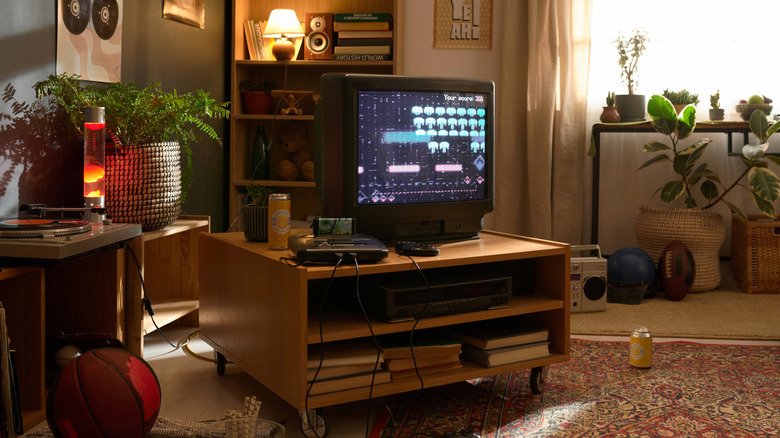
    An old CRT TV with a retro console connected

    Whether you were playing video games at an arcade or in the comfort of your own home on a TV, the dawn of the video game age was played on either on 4:3 or 5:4 aspect ratio. The screens were essentially squares. Games made for 4:3, however, start to look a little funny on newer widescreen displays. Just about everything from home TVs to computer monitors use 16:9 aspect ratio, which stretches those games not made for widescreens. If you remember playing “Castlevania: Symphony of the Night” or “Goldeneye” on your old TV, and have tried on modern screens, you know it just doesn’t look right. <a href="https://www.slashgear.com/1334579/reason-crt-tvs-making-a-comeback/” rel=”nofollow noopener” target=”_blank”>Old CRT TVs might be making a comeback, but you don’t need one to play your favorite childhood video games.

    GPU scaling lets you enjoy those old school games at 4:3 without an old CRT monitor or TV. You can play on your widescreen monitor and as long as you have GPU scaling enabled, your game will launch in its originally intended aspect ratio. While this is a helpful feature for old games, it’s not the best idea to have it enabled while playing newer games because it will create input lag. Especially if you like to play competitive games like “Rainbow Six: Siege,” “Valorant,” or “Call of Duty,” GPU scaling will sour your gameplay. 

    Want the latest in tech and auto trends? Subscribe to our free newsletter for the latest headlines, expert guides, and how-to tips, one email at a time. You can also add us as a preferred search

    Read the original article on SlashGear.

    Need Retro Scaling What Youre
    Share. Facebook Twitter
    Previous ArticleIron Maiden’s Bruce Dickinson at San Diego Comic
    Next Article To You in the Beyond Film: Cast, Plot, Release Date
    James

    Related Posts

    LEGO Goes Retro with New Functioning Donkey Kong Arcade Set

    July 24, 2026

    Do advisors need to understand collectible luxury markets to serve HNW clients?

    July 24, 2026

    Amazon gaming boss predicts that consoles will become a thing of the past

    July 24, 2026

    Tepper S&E’s tech-advanced experience center opens in support of Bank of America Stadium renovation

    July 24, 2026
    Leave A Reply Cancel Reply

    Our Picks

    McFarlane Batman and Robin Gold Label Drops: 2 Deluxe Figures

    July 24, 2026

    Hunter Schafer, Michelle Yeoh star in ‘Blade Runner 2099’ teaser trailer

    July 24, 2026

    Elder Scrolls Online Team Faces ‘Bandwidth’ Shortage After Cuts

    July 24, 2026

    Adam Wingard’s Onslaught is officially “in the same universe” as The Guest (Comic

    July 24, 2026
    • Facebook
    • Twitter
    • Instagram
    • YouTube
    • TikTok
    • Telegram
    Don't Miss
    Toys & Collectibles

    New humanoid robots from China look like creepy pop star action figures – complete with slightly dodgy lip

    By JamesJuly 4, 20260

    One of China’s emerging humanoid robotics companies has launched its most-realistic looking models yet and says it has already taken over 13,000 orders for the $17,600/ £13,300 machines

    Grand Theft Auto 6 to feature community hosted servers under a ‘Creator Platform’

    July 4, 2026

    Lisa Nandy quits X over fears Musk-owned site pushes ‘abuse and misinformation’

    July 4, 2026

    The Limits of Creativity in Modis Creator Economy

    July 4, 2026

    Subscribe to Updates

    Get the latest creative news from SmartMag about art & design.

    About Us
    About Us

    Comic Vibe is a pop-culture destination created for fans who live and breathe comics, movies, anime, TV shows, gaming, tech, cosplay, and collectibles.

    Our mission is to deliver engaging news, reviews, features, guides, and opinions that celebrate geek culture in all its forms. From the latest comic releases and blockbuster films to anime trends, gaming updates, cutting-edge tech, and collector culture, Comic Vibe brings everything together in one vibrant hub.

    Our Picks

    McFarlane Batman and Robin Gold Label Drops: 2 Deluxe Figures

    July 24, 2026

    Hunter Schafer, Michelle Yeoh star in ‘Blade Runner 2099’ teaser trailer

    July 24, 2026

    Elder Scrolls Online Team Faces ‘Bandwidth’ Shortage After Cuts

    July 24, 2026

    Subscribe to Updates

    Get the latest comics, anime, movies, TV, gaming, cosplay, and pop culture news delivered directly to your inbox. No spam—just the stories every fan should know.

    Facebook X (Twitter) Instagram YouTube TikTok
    • Home
    • Contact Us
    • Terms & Conditions
    • Advertise With Us
    • DMCA Policy
    • Privacy Policy
    • About Us
    © 2026 Comic Vibe. Designed by Comic Vibe.

    Type above and press Enter to search. Press Esc to cancel.