
Close Menu

    Subscribe to Updates

    Get the latest creative news from FooBar about art, design and business.

    What's Hot

    MSPO 2026 – Canada’s OVA showcases StellarX, the AI-powered no-code platform revolutionising military training

    September 10, 2026

    Everything is Everything: Tom Wilson and Pop Music in 1966

    September 10, 2026

    PlayStation Plus confirms 10 new games for September 2026 including day one launch

    September 10, 2026
    Facebook X (Twitter) Instagram
    Facebook X (Twitter) Instagram YouTube TikTok
    Comic Vibe
    Thursday, September 10
    • Home
    • Comics
      • Comic Vibe News
    • Gaming
    • Movies
    • TV
    • Anime
    • Toys & Collectibles
    • Cosplay
    • Tech
    • Digital Culture
      • Creators & Fan Culture
      • Creator Economy & Fan-Driven Platforms
      • Digital Fandom & Online Communities
      • Metaverse & Virtual Worlds
      • NFTs & Digital Collectibles
      • Virtual Events & Online Conventions
      • Virtual Identity & Avatars
    • Shop
    Comic Vibe
    • Home
    • Contact Us
    • Terms & Conditions
    • Advertise With Us
    • DMCA Policy
    • Privacy Policy
    • About Us
    Home»Digital Culture»Metaverse & Virtual Worlds»‘Roblox Roll to Defend’ Codes July 2026: Defend Your Base and Save Up For Tower Defense Upgrades
    Metaverse & Virtual Worlds

    ‘Roblox Roll to Defend’ Codes July 2026: Defend Your Base and Save Up For Tower Defense Upgrades

    JamesBy JamesJuly 11, 2026No Comments3 Mins Read
    Facebook Twitter
    ‘Roblox Roll to Defend’ Codes July 2026: Defend Your Base and Save Up For Tower Defense Upgrades
    Share
    Facebook Twitter

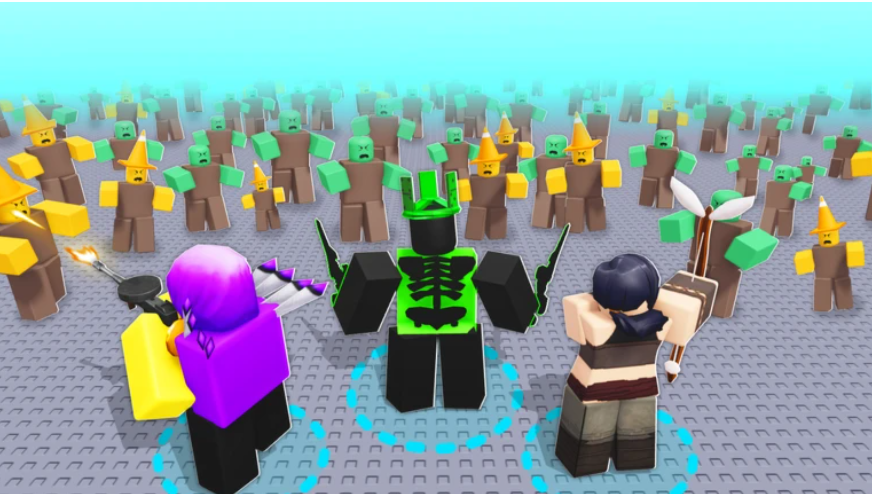
    Tower defense games are a no-brainer for strategy fans. “Roll to Defend” is a popular “Roblox” tower defense game that combines RNG mechanics with strategic gameplay. Players roll for powerful units, defend their base against waves of enemies, and unlock new upgrades to strengthen their teams

    To help players progress faster, the developers occasionally release redeemable codes that award free Coins, Brains, Luck Boosts, and Roll Boosts. These rewards can save hours of grinding and improve your chances of obtaining stronger units

    All Working ‘Roll to Defend’ Codes

    ‘Roblox Roll to Defend’ Codes <a href="https://comicvibe.com/all-active-free-roblox-codes-and-rewards-for-july-2026/” title=”All Active Free Roblox Codes and Rewards for July 2026″>July 2026

    D:/Drive

    The following code is currently working:

    • ROLL – Redeem for 100,000 Coins, 250 Brains, 1 Luck Boost, and 1 Roll Boost

    These rewards are especially useful for new players looking to build stronger teams, while experienced players can use the boosts to increase their chances of rolling rare units

    Since “Roblox game” codes often expire without warning, it’s a good idea to redeem them as soon as possible

    Expired ‘Roll to Defend’ Codes

    The following codes are no longer active:

    • ADMINABUSED
    • JULY4TH

    If you attempt to redeem an expired code, the game will display an invalid or expired code message

    How to Redeem ‘Roll to Defend’ Codes

    Redeeming codes in “Roll to Defend” is quick and easy. Just follow these steps:

    1. Launch “Roll to Defend” on “Roblox.”
    2. Click the Shop button on the left side of the screen.
    3. Scroll to the bottom of the Shop menu.
    4. Enter an active code into the redemption box.
    5. Click Redeem to claim your rewards.

    If the code is valid, your free rewards will be added to your account immediately

    Why ‘Roll to Defend’ Codes Are Worth Using

    Redeemable codes provide valuable rens can be used for upgrades and other in-game purchases, while Brains support various progression systems

    Meanwhile, Luck Boosts increase your chances of rolling stronger units, and Roll Boosts help maximize your opportunities to obtain rare characters. Using these bonuses during long play sessions can make a noticeable difference, especially when tackling more difficult waves

    How to Get More ‘Roll to Defend’ Codes

    According to Rockpapershotgun, developers usually release new “Roll to Defend” codes during major updates, seasonal events, milestone celebrations, or when the game reaches community goals. Because codes often expire after a limited time, checking for updates regularly is the best way to avoid missing free rewards

    You can also follow the game’s official Roblox page, Discord server, or social media channels for the latest announcements

    Why Isn’t My ‘Roll to Defend’ Code Working?

    Your code may have expired, been entered incorrectly, or already been redeemed on your account. Double-check the spelling and make sure you’re using a currently active code

    For more games, check “Roblox Dragon Soul” and “Roblox Crab Tycoon.”

    codes Defend July Roblox Roll
    Share. Facebook Twitter
    Previous ArticleLee Se-young stuns fans with bold cosplay and striking silhouette
    Next Article Sony CEO sells $4.7 million worth of stock days after PlayStation announces disc phase out
    James

    Related Posts

    Lil Wayne’s Fortnite Collab Is On The Way

    September 10, 2026

    Roblox (NYSE:RBLX) Insider Sells 5,773 Shares

    September 10, 2026

    Squingle Arcade Is Available Now For Free On PC VR

    September 10, 2026

    The Lightkeepers Impressions: This Unique Co

    September 10, 2026

    Comments are closed.

    Our Picks

    MSPO 2026 – Canada’s OVA showcases StellarX, the AI-powered no-code platform revolutionising military training

    September 10, 2026

    Everything is Everything: Tom Wilson and Pop Music in 1966

    September 10, 2026

    PlayStation Plus confirms 10 new games for September 2026 including day one launch

    September 10, 2026

    Elan Fest 2026 brings free music, nature and culture together

    September 10, 2026
    • Facebook
    • Twitter
    • Instagram
    • YouTube
    • TikTok
    • Telegram
    Don't Miss
    Digital Fandom & Online Communities

    McConnell’s Health Fuels Speculation; Widow Sightings and Discord Gaming Community

    By JamesJuly 10, 20260

    Los residentes de Lexington discutieron en redes sociales especulaciones sobre la hospitalización del senador Mitch McConnell, avistamientos de viudas negras en el área y temas comunitarios más ligeros. Mientras McConnell ha estado hospitalizado durante tres semanas sin claridad sobre su condición, un comentarista afirmó haber hablado con él el martes sobre Irán, Ucrania e historia…

    Gakuran codes (July 2026)

    July 10, 2026

    ‘Star Trek’ Celebrating 60th Anniversary With Panels and Events at Comic-Con

    July 10, 2026

    Dplus Kia VP Joon Lee exits as esports org navigates Web3 fan token strategy

    July 10, 2026

    Subscribe to Updates

    Get the latest creative news from SmartMag about art & design.

    About Us
    About Us

    Comic Vibe is a pop-culture destination created for fans who live and breathe comics, movies, anime, TV shows, gaming, tech, cosplay, and collectibles.

    Our mission is to deliver engaging news, reviews, features, guides, and opinions that celebrate geek culture in all its forms. From the latest comic releases and blockbuster films to anime trends, gaming updates, cutting-edge tech, and collector culture, Comic Vibe brings everything together in one vibrant hub.

    Our Picks

    MSPO 2026 – Canada’s OVA showcases StellarX, the AI-powered no-code platform revolutionising military training

    September 10, 2026

    Everything is Everything: Tom Wilson and Pop Music in 1966

    September 10, 2026

    PlayStation Plus confirms 10 new games for September 2026 including day one launch

    September 10, 2026

    Subscribe to Updates

    Get the latest comics, anime, movies, TV, gaming, cosplay, and pop culture news delivered directly to your inbox. No spam—just the stories every fan should know.

    Facebook X (Twitter) Instagram YouTube TikTok
    • Home
    • Contact Us
    • Terms & Conditions
    • Advertise With Us
    • DMCA Policy
    • Privacy Policy
    • About Us
    © 2026 Comic Vibe. Designed by Comic Vibe.

    Type above and press Enter to search. Press Esc to cancel.