
Close Menu

    Subscribe to Updates

    Get the latest creative news from FooBar about art, design and business.

    What's Hot

    SK shieldus boosts on-site safety with training, vetting, and VR programs

    November 5, 2026

    Cynthia Ervio joins cast of Snoop Dogg biopic as Tupac Shakur’s mother

    November 5, 2026

    Preview Two New Ways to Play with XBOX Cloud Gaming

    November 5, 2026
    Facebook X (Twitter) Instagram
    Facebook X (Twitter) Instagram YouTube TikTok
    Comic Vibe
    Thursday, November 5
    • Home
    • Comics
      • Comic Vibe News
    • Gaming
    • Movies
    • TV
    • Anime
    • Toys & Collectibles
    • Cosplay
    • Tech
    • Digital Culture
      • Creators & Fan Culture
      • Creator Economy & Fan-Driven Platforms
      • Digital Fandom & Online Communities
      • Metaverse & Virtual Worlds
      • NFTs & Digital Collectibles
      • Virtual Events & Online Conventions
      • Virtual Identity & Avatars
    • Shop
    Comic Vibe
    • Home
    • Contact Us
    • Terms & Conditions
    • Advertise With Us
    • DMCA Policy
    • Privacy Policy
    • About Us
    Home»Gaming»Preview Two New Ways to Play with XBOX Cloud Gaming
    Gaming

    Preview Two New Ways to Play with XBOX Cloud Gaming

    JamesBy JamesNovember 5, 2026No Comments3 Mins Read
    Facebook Twitter
    Share
    Facebook Twitter

    Starting today, we’re rolling out two previews for XBOX Cloud Gaming. On supported Smart TVs, you can use your phone as a controller when you don’t have one nearby. In the US, you can also preview cloud connect with the new XBOX Nano Controller. It uses Wi-Fi to connect directly to your cloud gaming session, which can help make gameplay feel more responsive.

    Both experiences are still being tested. Availability and supported games or devices may be limited while we learn from your feedback.
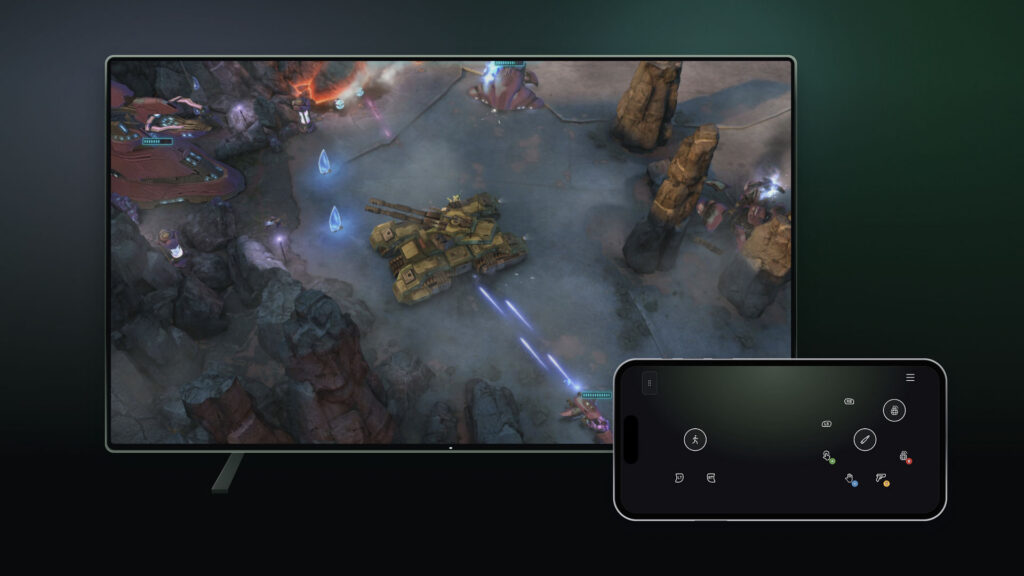
    XBOX Cloud Gaming Inputs

    Use your phone as a controller on a Smart TV

    Want to play a cloud game on your TV but don’t have a controller handy? In this preview, you can use a supported Android or iOS phone as your controller on a supported Smart TV. The controls open in your phone’s browser, so you don’t need a separate controller. Some games will also have controls tailored to how they play.

    To try it, turn on Preview Features under Settings > Account in the latest supported Smart TV experience. When you launch a game without a physical controller connected, you’ll see an option to use your phone for that session.

    The preview is rolling out today on supported TVs, in countries where XBOX Cloud Gaming is supported.
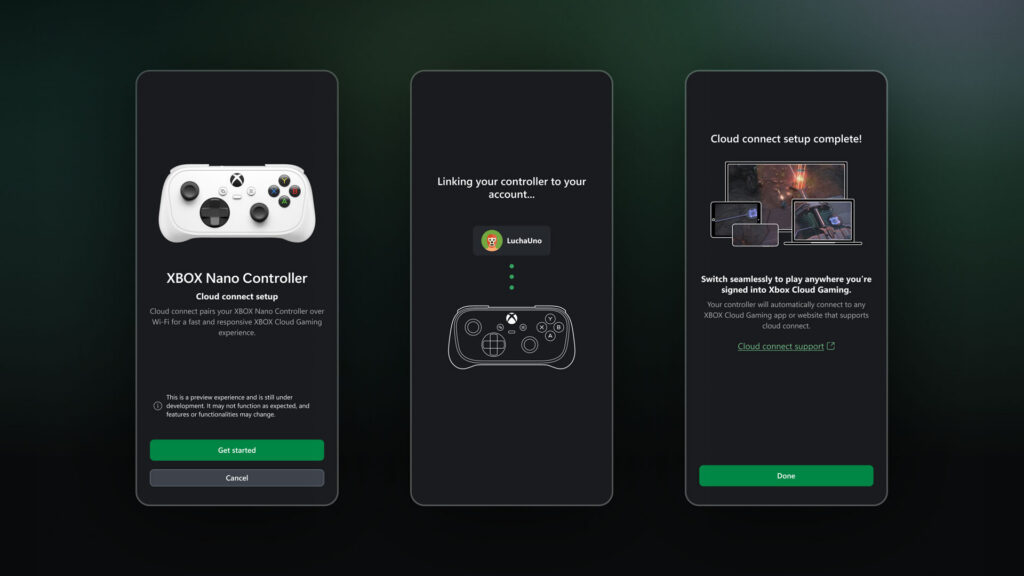
    XBOX Cloud Gaming Inputs

    Try cloud connect with the XBOX Nano Controller

    Players in the U.S. can preview cloud connect with the XBOX Nano Controller starting today. Instead of a Bluetooth connection to your TV, cloud connect uses your Wi-Fi to connect directly to the cloud server running your game. That can help reduce input latency, so gameplay may feel more responsive.

    Cloud connect is still an early test, so it won’t work with every cloud gaming experience yet. For now, you can try it on supported Smart TVs and the web.

    Ready to try it?

    • Set up your controller: Use the XBOX beta app on Android, or the Xbox Accessories app on PC, to set up cloud connect on your XBOX Nano Controller. XBOX Insider enrollment is required for setup through the PC app.
    • Connect to Wi-Fi: Follow the steps in the app to connect your controller to your Wi-Fi network.
    • Start playing: Open a supported XBOX Cloud Gaming experience and sign in with the same XBOX account used during setup. Your controller will connect through cloud connect.

    Check out the cloud connect setup guide for detailed instructions: https://support.xbox.com/en-US/help/hardware-network/controller/cloud-connect.

    Help shape what comes next

    We’re testing both experiences to learn what works well and what needs improvement. If you have a suggestion or run into an issue, please share your feedback through the preview experience. We’ll use what we learn to help shape future updates.

    • For phone controller, you can share feedback right from your phone or through a supported Smart TV app:
      • On Your Phone:After scanning the QR code displayed on your TV to connect your phone as a controller, tap the Xbox icon in the top-left corner and select “Give Feedback.”
      • On Your TV:
        • Open the Guide by pressing the XBOX button on your controller or pressing the XBOX icon in the top left corner and selecting Give Feedback.
        • In the XBOX app’s main menu, click on the profile icon in the top right corner and select “Give Feedback”.
    • For cloud connect, you can submit feedback through the XBOX Accessories app on PC or the XBOX mobile app by selecting the “Feedback” icon.
    cloud Play Preview Ways Xbox
    Share. Facebook Twitter
    Previous ArticleFlutter Entertainment (FLUT) Stock Sees Modest Fair Value Cut As Analysts Lower Targets
    Next Article Cynthia Ervio joins cast of Snoop Dogg biopic as Tupac Shakur’s mother
    James

    Related Posts

    Have the PS5 and Xbox Console Shortages Been Exaggerated Ahead of the GTA 6 Launch?

    November 5, 2026

    Missouri woman sits in her recliner playing video games, then her son allegedly stands behind her and shoots her with what he took from the kitchen

    November 5, 2026

    Playable Zelda: Ocarina of Time ocarina now available at Nintendo stores in Japan, new photos shared

    November 5, 2026

    10 of the Best PC Gaming Controllers for 2026

    November 5, 2026
    Leave A Reply Cancel Reply

    Our Picks

    SK shieldus boosts on-site safety with training, vetting, and VR programs

    November 5, 2026

    Cynthia Ervio joins cast of Snoop Dogg biopic as Tupac Shakur’s mother

    November 5, 2026

    Preview Two New Ways to Play with XBOX Cloud Gaming

    November 5, 2026

    Flutter Entertainment (FLUT) Stock Sees Modest Fair Value Cut As Analysts Lower Targets

    November 5, 2026
    • Facebook
    • Twitter
    • Instagram
    • YouTube
    • TikTok
    • Telegram
    Don't Miss
    Anime

    Japan’s Top 10 Manga Revealed in New Survey

    By JamesJuly 20, 20260

    A new survey from Japanese news website Oriconhas revealed which manga series are in the country’s top 10 and, spoiler alert, One Pieceisn’t in the top spot.

    Free Nintendo Switch Online Is Yours To Claim For A Very Limited

    July 20, 2026

    FIFA World Cup 2026: Amitabh Bachchan reacts to Messi losing the final match

    July 20, 2026

    Marc Spector: Moon Knight #6 Preview: Blade Slashes Into Town

    July 20, 2026

    Subscribe to Updates

    Get the latest creative news from SmartMag about art & design.

    About Us
    About Us

    Comic Vibe is a pop-culture destination created for fans who live and breathe comics, movies, anime, TV shows, gaming, tech, cosplay, and collectibles.

    Our mission is to deliver engaging news, reviews, features, guides, and opinions that celebrate geek culture in all its forms. From the latest comic releases and blockbuster films to anime trends, gaming updates, cutting-edge tech, and collector culture, Comic Vibe brings everything together in one vibrant hub.

    Our Picks

    SK shieldus boosts on-site safety with training, vetting, and VR programs

    November 5, 2026

    Cynthia Ervio joins cast of Snoop Dogg biopic as Tupac Shakur’s mother

    November 5, 2026

    Preview Two New Ways to Play with XBOX Cloud Gaming

    November 5, 2026

    Subscribe to Updates

    Get the latest comics, anime, movies, TV, gaming, cosplay, and pop culture news delivered directly to your inbox. No spam—just the stories every fan should know.

    Facebook X (Twitter) Instagram YouTube TikTok
    • Home
    • Contact Us
    • Terms & Conditions
    • Advertise With Us
    • DMCA Policy
    • Privacy Policy
    • About Us
    © 2026 Comic Vibe. Designed by Comic Vibe.

    Type above and press Enter to search. Press Esc to cancel.