
Close Menu

    Subscribe to Updates

    Get the latest creative news from FooBar about art, design and business.

    What's Hot

    5 Best TV Shows Like Blade Runner 2099

    November 29, 2026

    Willem Dafoe Was The Best Part Of This Controversial Netflix Live-Action Anime Movie

    November 29, 2026

    GameStop (GME) After The Collectibles Pivot Looks Near Fair Value

    November 29, 2026
    Facebook X (Twitter) Instagram
    Facebook X (Twitter) Instagram YouTube TikTok
    Comic Vibe
    Sunday, November 29
    • Home
    • Comics
      • Comic Vibe News
    • Gaming
    • Movies
    • TV
    • Anime
    • Toys & Collectibles
    • Cosplay
    • Tech
    • Digital Culture
      • Creators & Fan Culture
      • Creator Economy & Fan-Driven Platforms
      • Digital Fandom & Online Communities
      • Metaverse & Virtual Worlds
      • NFTs & Digital Collectibles
      • Virtual Events & Online Conventions
      • Virtual Identity & Avatars
    • Shop
    Comic Vibe
    • Home
    • Contact Us
    • Terms & Conditions
    • Advertise With Us
    • DMCA Policy
    • Privacy Policy
    • About Us
    Home»Gaming»How to check and fix your PlayStation Network connectivity issues
    Gaming

    How to check and fix your PlayStation Network connectivity issues

    JamesBy JamesNovember 29, 20261 Comment4 Mins Read
    Facebook Twitter
    Share
    Facebook Twitter

    Figure out who’s to blame when PSN isn’t working, and what to do if it’s because of your home network.

    Could there have been a worse time for PlayStation Network to go down than the day before Grand Theft Auto 6 finally dropped? Aside from the actual launch day, probably not. Adding to the long list of mid-November outages, plenty of gamers faced service issues on November 18. While the highly anticipated launch went well, problems can still happen, like the July 2026 PSN outage. Or ask anyone who owned a PS3 circa 2011, and they’ll likely look back at you with a thousand-yard stare.

    If your PlayStation 5 suddenly won’t let you sign in, or your console won’t get online at all, you’re probably wondering who’s at fault among Sony, your internet provider and your home network. Fortunately, it’s easy to figure out whether this is a PlayStation problem or an issue on your end, and what to do if it’s on you.

    How to check PSN’s service status
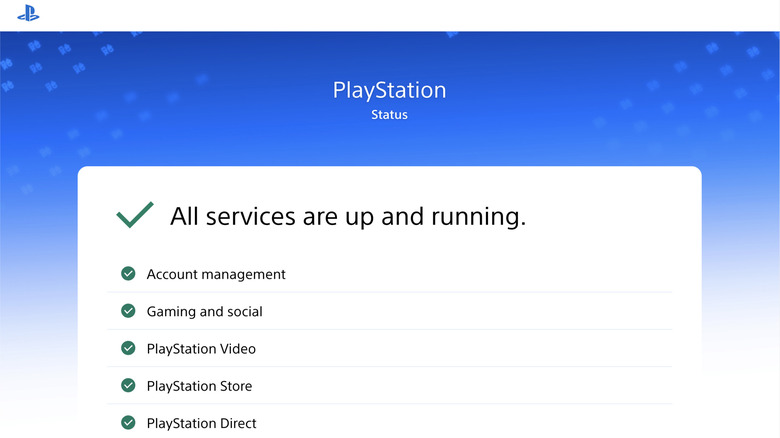
    The PlayStation Service Status page as of November 19.

    Confirming whether PlayStation Network is down is easy. Simply visit the PlayStation Service Status page, which shows any issues across the company’s multiple services, as pictured above.

    You don’t need to sign in to view it, so it works even when your console can’t get online. A string of green checks means that the service is running normally on PlayStation’s end, while a warning icon means the company knows there are outages. It’s also worth checking Downdetector, which tracks outages across thousands of online services from user reports.

    If there’s no sign of a widespread outage, like people complaining across social media or any official word on these pages, you can take a few steps to see whether something’s wrong on your end.

    What you can do to troubleshoot PlayStation connectivity problems
    A man holding his PS5 DualSense controller.

    For starters, reboot your router; this quick potential fix should clear up any minor problems. Fully turn off your console (don’t just put it into rest mode), then unplug the router (followed by unplugging the modem, if you have separate units). Plug the modem back in after about a minute, give it a few moments to initialize, then plug your router back in. Give it all a couple of minutes to get running before heading back to your PlayStation to see if you’re able to reconnect as normal.

    If that doesn’t work, run your console’s built-in connection test; navigate to Settings > Network > Connection Status > Test Internet Connection. This shows if your PS5 can get an IP address from your router, connect to the internet and sign into PSN. If your console can’t get online but the rest of your network works fine, go to Settings > Network > Set Up Internet Connection. Highlight your network, hit Options on your controller, and choose Forget, then add it again. If your NAT type is Type 3 (Strict), you’ll need to forward ports on your router for consistent in-game performance.

    It’s also worth checking for a pending system software update, as some online features won’t work until you install any pending ones. The Welcome Hub will typically let you know if this is necessary, but you can check anytime at Settings > System > System Software > System Software Update and Settings. Similarly, at times, you might not be able to sign into PSN until you accept updated terms of service. A prompt should appear after you restart your console, if you aren’t seeing it when you try to go online.

    If your console currently connects using Wi-Fi, using an Ethernet cable can rule out wireless internet issues. There are ways to get wired internet without running cables if distance is a concern. Finally, if you’re successfully logged into PlayStation Network but are having an issue accessing a specific game’s online modes, check the developer’s server status page, like those for Rockstar Games, NBA 2K, Epic Games or Activision. 

    Check Connectivity Network PlayStation your
    Share. Facebook Twitter
    Previous ArticleMom Says Disney Has ‘Overcorrected’ on Girl Heroes After Taking Her Son to ‘Hexed’
    Next Article Dakota Johnson, MGK Take Major Step in Their Romance
    James

    Related Posts

    Amazon Says the PlayStation DualSense Edge Wireless Controller Deal Will Be Gone Soon, but Stock Is Already Running Low

    November 29, 2026

    New Xbox Helix Details Could Drastically Challenge The PS6

    November 29, 2026

    Pastor Plays GTA 6 During Church, Then Asks, ‘How Do I Punch?’

    November 29, 2026

    Sony reveals 6 games leaving PlayStation Plus in December 2026

    November 29, 2026

    1 Comment

    1. Pingback: 5 Best TV Shows Like Blade Runner 2099 - Comic Vibe

    Leave A Reply Cancel Reply

    Our Picks

    5 Best TV Shows Like Blade Runner 2099

    November 29, 2026

    Willem Dafoe Was The Best Part Of This Controversial Netflix Live-Action Anime Movie

    November 29, 2026

    GameStop (GME) After The Collectibles Pivot Looks Near Fair Value

    November 29, 2026

    Dakota Johnson, MGK Take Major Step in Their Romance

    November 29, 2026
    • Facebook
    • Twitter
    • Instagram
    • YouTube
    • TikTok
    • Telegram
    Don't Miss
    Gaming

    Dragon Ball: Sparking Zero’s Super Limit

    By JamesJuly 23, 20260

    Dragon Ball: Sparking Zero made its mark in 2024 as the latest installment of the Budokai Tenkaichi series after 17 years. The game launched with more than 180 characters on day one and currently has over 200 playable characters! 

    I Only Needed One Episode of This Show to Know We’re in for Some Messy Chaos

    July 23, 2026

    Will Forte represents Wile E. Coyote in ‘Coyote vs. Acme’ final trailer

    July 23, 2026

    My Little Pony x Polly Pocket Compact brings two nostalgic toy worlds together

    July 23, 2026

    Subscribe to Updates

    Get the latest creative news from SmartMag about art & design.

    About Us
    About Us

    Comic Vibe is a pop-culture destination created for fans who live and breathe comics, movies, anime, TV shows, gaming, tech, cosplay, and collectibles.

    Our mission is to deliver engaging news, reviews, features, guides, and opinions that celebrate geek culture in all its forms. From the latest comic releases and blockbuster films to anime trends, gaming updates, cutting-edge tech, and collector culture, Comic Vibe brings everything together in one vibrant hub.

    Our Picks

    5 Best TV Shows Like Blade Runner 2099

    November 29, 2026

    Willem Dafoe Was The Best Part Of This Controversial Netflix Live-Action Anime Movie

    November 29, 2026

    GameStop (GME) After The Collectibles Pivot Looks Near Fair Value

    November 29, 2026

    Subscribe to Updates

    Get the latest comics, anime, movies, TV, gaming, cosplay, and pop culture news delivered directly to your inbox. No spam—just the stories every fan should know.

    Facebook X (Twitter) Instagram YouTube TikTok
    • Home
    • Contact Us
    • Terms & Conditions
    • Advertise With Us
    • DMCA Policy
    • Privacy Policy
    • About Us
    © 2026 Comic Vibe. Designed by Comic Vibe.

    Type above and press Enter to search. Press Esc to cancel.