

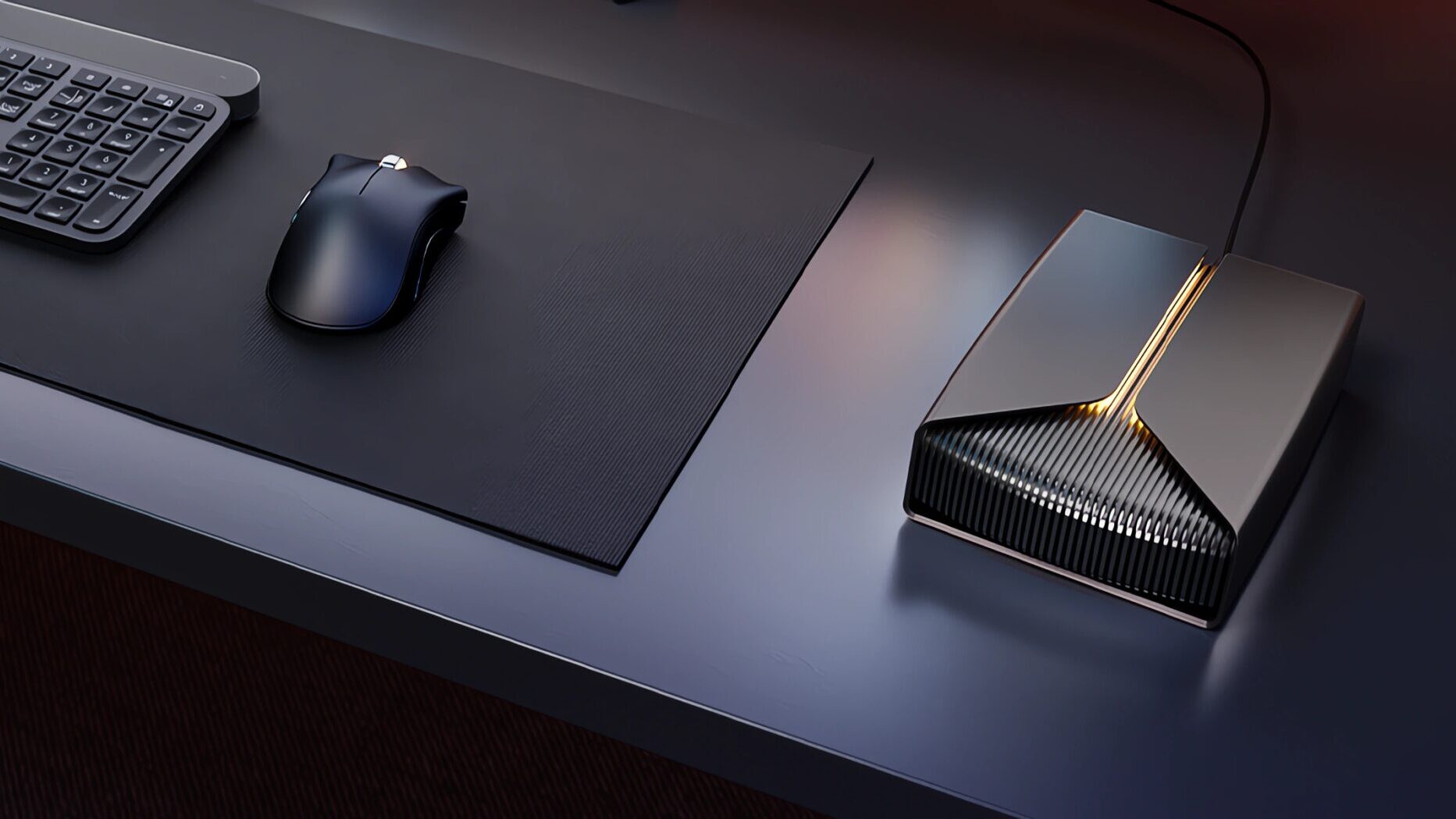
Modern game installs, creator projects, and high‑resolution captures continue to grow in size, and external storage has become essential for anyone managing large libraries. Seagate’s FireCuda X Vault 8TB is built for that reality, offering a bus‑powered USB C design, Xbox certification, and subtle RGB lighting in a sturdy desktop enclosure. It focuses on dependable capacity rather than speed, and that clarity helps it settle naturally into everyday gaming and creator workflows.
Design
The FireCuda X Vault has a clean, modern look with a grey finish and subtle RGB lighting that supports Windows Dynamic Lighting. It is a sizeable unit at 18.7 by 13.2 by 4cm and just over a kilogram, but the weight helps it stay planted on a desk. The enclosure feels solid and well made, with a reassuring sense of density that suggests long‑term durability. The RGB strip runs along the front edge and provides a soft ambient glow rather than a bright accent, which suits both gaming setups and more understated workspaces.
The 3.5‑inch mechanical drive inside is insulated well enough to keep noise levels low. During operation, the unit produces only a gentle hum and a faint rotational sound that is typical of large‑capacity HDDs. It is quiet enough to sit beside a PC or console without becoming distracting, even during long transfers. There is occasional clicking during heavy access, which is normal for a drive of this size, but it never becomes intrusive. The casing has no flex, and the drive does not introduce vibration into the desk surface, which is important for users who keep audio equipment nearby.
The overall design is practical rather than flashy. It fits neatly alongside consoles, desktops and laptops, and the RGB lighting adds a touch of personality without overwhelming the look. It is clear that Seagate intended the X Vault to blend into a setup rather than dominate it, and that approach works well for a device that will likely remain in place for years. The only drawback is its physical footprint: it is not a portable drive, and users looking for something travel‑friendly will find it too large and heavy for regular movement.
Connectivity
The hub connects over USB-C and requires a 15W USB-C power source, which is worth noting for users with older hubs or low‑power ports. If the port cannot supply enough power, the drive may fail to mount or disconnect under load, so users should ensure their device supports full‑power USB-C. Once connected, it behaves like a standard external HDD with plug‑and‑play support on Windows, Linux and macOS. The USB 3.0 interface provides the expected bandwidth for a mechanical drive, and the connection remains stable during large transfers.
The bus‑powered design is one of the FireCuda X Vault’s strongest qualities. Many 3.5‑inch external drives rely on bulky power bricks, which add clutter and limit portability. The X Vault avoids this entirely, running from a single cable that handles both data and power. This makes it easy to move between devices, and it suits users who regularly switch between a desktop, laptop ,and console. The single‑cable setup also keeps desk layouts tidy, especially for users who prefer minimal wiring.
Xbox on PC certification ensures smooth use with Game Pass titles, and the drive appears immediately in Windows without requiring additional software. For users who maintain large libraries across multiple platforms, the X Vault’s simple connectivity helps it slot into a workflow without friction. The only limitation is that the drive does not offer hub functionality despite the name; there are no additional ports or daisy‑chain options, so it remains a single‑purpose storage device.
Performance
This is a 5400RPM mechanical drive, so its strengths lie in capacity rather than speed. Read speeds sit around 120MB/s, which is typical for an 8TB HDD. It is not intended for running demanding games directly, and load times are noticeably slower than SSDs or internal NVMe storage. Texture streaming can lag, and some titles may stutter if run from the drive. As a result, the X Vault is best used as a cold‑storage solution for titles you rotate in and out of active use.
Modern games frequently exceed 100GB, and some push past 200GB, so having 8TB available makes it easier to manage large libraries without constantly uninstalling content. The X Vault is also well suited to creator workflows. High‑resolution footage, raw video files and project archives can quickly consume space, and the drive’s large capacity makes it ideal for storing completed projects or long‑term media collections. It is not fast enough for editing directly from the drive, but it is perfect for archiving footage once a project is complete.
During long transfers, the drive remains consistent and does not show signs of throttling. The enclosure stays cool enough for desk setups, and the noise level remains low even when moving large batches of files. For users who regularly back up game libraries or transfer multi‑gigabyte media folders, the X Vault provides a stable and predictable experience. The mechanical nature of the drive means it is more vulnerable to shock than SSDs, so it is best kept stationary on a desk rather than moved frequently.
Features
The RGB lighting adds a subtle accent and integrates neatly with Windows Dynamic Lighting for ambient effects. Users can match the lighting to their desktop theme, game colours or room setup, and the glow is soft enough to avoid becoming distracting. The lighting is simple rather than deeply configurable, but it suits the understated design.
The inclusion of a one‑month Xbox Game Pass Ultimate trial is a small bonus, and the Xbox certification makes the hub feel like a natural fit for expanding PC‑based Xbox libraries. It is not a performance upgrade for Xbox titles, but it provides a convenient way to offload captures, media and older games. Seagate’s Rescue Data Recovery Service and a three‑year manufacturer warranty provide welcome reassurance for long‑term use. For a drive intended to hold large libraries and important media, having recovery support adds meaningful value. The X Vault does not include hardware encryption, which some competing drives offer, but the recovery service helps offset that omission.
Reliability
Seagate’s FireCuda line has a strong reputation for durability, and the FireCuda X Vault continues that trend. The enclosure feels sturdy, the drive maintains consistent behaviour over time, and the bus‑powered design reduces the number of components that could fail. The mechanical drive inside is built for long‑term storage rather than constant active use, and it performs well in that role. For users who need dependable high‑capacity storage without moving into pricier SSD territory, the X Vault offers a balanced option that has held up well in extended use. It is a practical, reliable device that suits both gaming and creator workflows, and its simple design makes it easy to integrate into a wide range of setups.
Key Info
| Seagate FireCuda X Vault 8TB | |
|---|---|
| Product | Seagate FireCuda X Vault / Gaming Hub 8TB |
| Model | STNL8000400 / 763649187944 |
| Capacity | 8TB |
| Drive Type | 3.5-inch mechanical HDD (5400RPM) |
| Interface | USB 3.0 via USB C |
| Power | Bus-powered, requires 15W USB C |
| Read Speed | Approx. 120MB/s |
| Lighting | RGB with Windows Dynamic Lighting support |
| Platform Compatibility | PC, Linux, macOS, Xbox Series X |
| Use Case | Gaming libraries, media archiving, creator project storage |
| Warranty | 3-year manufacturer + Rescue Data Recovery Services |
| Dimensions | 18.7 × 13.2 × 4cm |
| Weight | 1176g |
| Colour | Grey |
Cubed3 Summary
Seagate’s FireCuda X Vault 8TB is a dependable high‑capacity drive that suits modern gaming and creator needs. It delivers quiet operation, stable performance, and a simple single‑cable setup that keeps desk layouts tidy. The mechanical drive is not built for fast game loading or active editing, but it excels as a long‑term library companion for large installs, media archives, and completed projects. With RGB lighting, Xbox certification and reassuring recovery support, it stands out as a practical and reliable storage option for users who need space without moving into SSD territory.
About this Score
Add a Comment
