

Those USB ports are for more than topping off your controller battery.
We may receive a commission on purchases made from links.
It’s not as immediately apparent what to do with your PS5’s USB ports compared to the many uses for your phone’s USB port or everything they can do on your PC. And while you might have used them for some basic purposes, there are others you may not have considered yet.
All PS5 variations have two 10 Gbps USB-A ports on their rear, but the front USB ports are slightly different depending on which model you have. On the original PS5, there’s one USB-A 2.0 port and a 10 Gbps USB-C port. On the PS5 Slim and PS5 Pro, the front USB 2.0 port is USB-C instead. Avoid the slow USB 2.0 port for speed-sensitive purposes like external storage.
Add more storage
It’s easy to run out of space on your PS5 given how much storage modern games take. The best long-term solution is adding an M.2 SSD to your console, but that can be prohibitively expensive given the current cost of storage. Another option is connecting an external SSD or HDD to expand your system’s available room.
Unfortunately, you can’t play PS5 games from an external drive, as they’re designed to run only from speedy internal storage or M.2 SSDs that meet Sony’s requirements. Instead, you’re able to move PS5 games from your console storage to an external drive for archival purposes, then shift a title back over to your system when you’re ready to play it again. It’s an especially helpful option if your home internet is slow or has a data cap. You can play PS4 games from external storage.
To use a drive for game storage, it must be at least USB 5 Gbps (USB 3.0) and between 250GB and 8TB in size. You can’t use more than one at a time, and it won’t work if connected to a USB hub. Go to Settings > Storage > USB Extended Storage > Format as USB Extended Storage with a drive connected to format it, which will erase any existing data.
The other major use for external drives is storing screenshots and video clips from your console. You can’t use a single drive for both, though. You must format a drive as USB Extended Storage for your PS5 to store games on it, compared to a standard exFAT or FAT32 drive for screenshots. Consider two drives if you need long-term storage for both games and media, or use a flash drive for quick transfers to your computer.
Charge and pair controllers
The most immediately obvious way to use the USB ports on your PS5 is for charging your controllers, either at the end of a play session or connecting permanently if you don’t want any latency. It’s also easy to forget that connecting a DualSense controller to your PS5 is the fastest way to pair the two.
This hopefully isn’t something you’ll need to do often, but it’s relevant if you take the controller to a friend’s house, use it with your PC or have a second console in another room. It’s thus worth having a cable plugged into the slow USB 2.0 port on the front so you don’t have to hunt for one when you need it.
If this is how you charge your PS5 controller most of the time, make sure you have the right power option selected under Settings > System > Power Saving > Features Available in Rest Mode. Choose 3 Hours to shut off the ports after this time in Rest mode. Choosing Always will waste energy beyond that point. On the PS5 Slim and Pro, you can instead choose Adaptive to automatically stop supplying power when the controller is charged.
Connect other peripherals
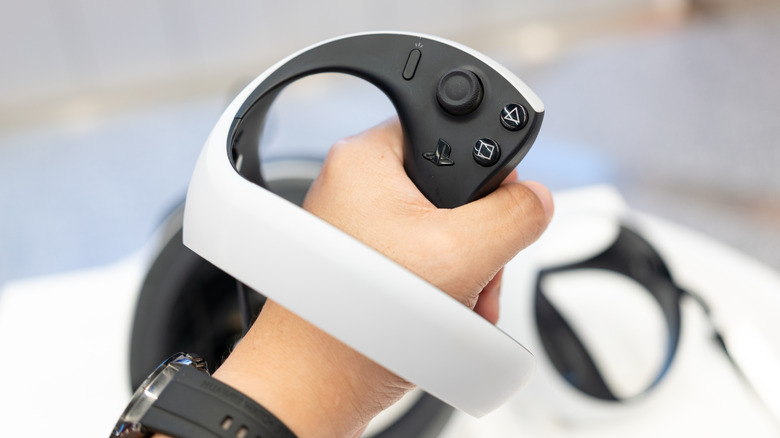
Beyond standard controllers, the PS5 has a lot of input options to change how you interact with games. The biggest one is PlayStation VR2, which uses a much simpler connection than the original model. You must plug its single USB-C cable into the speedy port on the front of the console (the bottom one on Slim and Pro consoles). The original PS VR works on PS5, but only with the PS4 camera, which you’ll need an adapter for since the PS5 lacks its proprietary connection. Sony stopped giving away these adapters in 2024.
The PS5 HD Camera is another USB accessory, though one with limited usefulness. It isn’t needed for PS VR2 and doesn’t work with the original PS VR. Its main purpose is showing your face while streaming to Twitch or YouTube, so if you don’t do that, there’s not much use to it. Third-party cameras don’t work on PS5 natively.
The USB ports are also vital for connecting gaming headsets, whether they’re fully wired or use a dongle for wireless transmission. For example, my SteelSeries Arctis Nova Pro Wireless headset uses a transmitter that initially connects to PS5 (and other consoles)
Additionally, some types of games can get a more authentic experience by using different controller formats. Racing wheels and fight sticks are two solid options if you enjoy those types of games.
While you don’t typically associate a keyboard and mouse with console gaming, many PS5 games support them. Connect your USB dongle for a wireless keyboard to send messages to friends orboard/mouse combo for supported games. This varies by title; for example, Overwatch has a toggle for KB/M mode, which disables aim assist and puts you into PC lobbies
Other ways to put those USB ports to use
If you don’t have a PlayStation Plus subscription or want an extra copy of your PS5 data, you can back it up to a USB drive. After connecting a FAT32- or exFAT-formatted drive (it can’t be one set up for storing games), go to Settings > System > System Software > Back Up and Restore > Back Up Your PS5. Choose what you want to back up, then proceed through the process to do so.
Note that this doesn’t back up some data (trophies and M.2 storage are excluded). Importantly, it’s all-or-nothing; you can’t choose individual games to back up, and the Restore Your PS5 option requires you to reset your system. You’re able to back up individual PS4 game save data to a USB drive under Settings > Saved Data and Game/App Settings > Saved Data (PS4).
If you’re so inclined, the PS5 also supports video playback from a USB drive, though you’ll need to follow Sony’s instructions for correct formatting and folder naming. In case you need to connect more USB devices to your PS5, a USB hub is a possibility, though not all devices will work with a hub. And if you need to capture more footage (without streaming) than the built-in tools offer, hooking up a capture card to your PS5 is also an option.
If you have any other random USB devices, plug them into your PS5 and see if they work. At worst, you’ll see a “not compatible” message, or nothing will happen. Don’t forget about other great PS5 accessories, too.

2 Comments
Pingback: Discover The World's First Foldable Portable PlayStation 2 - Comic Vibe
Pingback: Which AMD CPU Is Equivalent To The PlayStation 5? - Comic Vibe