
Close Menu

    Subscribe to Updates

    Get the latest creative news from FooBar about art, design and business.

    What's Hot

    ‘Happy to be out there again’: Tiger Shroff on returning to the stage more than a month after the attack on his car

    November 23, 2026

    Spider-Man/Hulk: Fire and Brimstone #4 Preview: Cured?

    November 23, 2026

    Quasimodo and The Mosquito Bowl: New Streaming Releases for Your Weekend

    November 23, 2026
    Facebook X (Twitter) Instagram
    Facebook X (Twitter) Instagram YouTube TikTok
    Comic Vibe
    Monday, November 23
    • Home
    • Comics
      • Comic Vibe News
    • Gaming
    • Movies
    • TV
    • Anime
    • Toys & Collectibles
    • Cosplay
    • Tech
    • Digital Culture
      • Creators & Fan Culture
      • Creator Economy & Fan-Driven Platforms
      • Digital Fandom & Online Communities
      • Metaverse & Virtual Worlds
      • NFTs & Digital Collectibles
      • Virtual Events & Online Conventions
      • Virtual Identity & Avatars
    • Shop
    Comic Vibe
    • Home
    • Contact Us
    • Terms & Conditions
    • Advertise With Us
    • DMCA Policy
    • Privacy Policy
    • About Us
    Home»Digital Culture»Metaverse & Virtual Worlds»‘Roblox Sell Ores’ Codes September 2026: Become the Richest Merchant Through Your Ores
    Metaverse & Virtual Worlds

    ‘Roblox Sell Ores’ Codes September 2026: Become the Richest Merchant Through Your Ores

    JamesBy JamesSeptember 4, 2026No Comments3 Mins Read
    Facebook Twitter
    ‘Roblox Sell Ores’ Codes September 2026: Become the Richest Merchant Through Your Ores
    Share
    Facebook Twitter

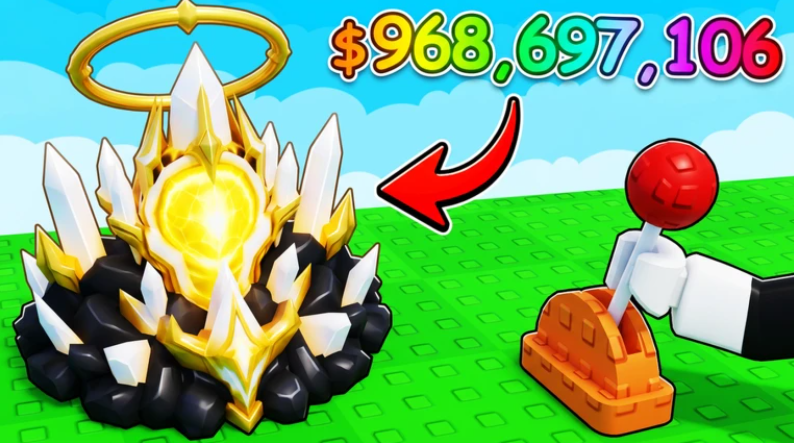
    Need some extra freebies in “Sell Ores?” Active codes can give you useful rewards without making you grind for every upgrade.

    “Sell Ores” is a “Roblox” game with a mining-focused twist. Instead of planting crops or building a farm, you create valuable ores and let an automatic drill do the hard work.

    The ores can then be sold for cash. That money can be used to improve your setup and grow your mining operation.

    Progress can still take time, though. This is where “Sell Ores” codes can help. Depending on the code, you can get cash, growth gems, or time skips to speed things along.

    All Working ‘Sell Ores’ Codes

    <a href="https://www.roblox.com/games/122572082932179/Sell-Ores” rel=”nofollow noopener” target=”_blank”>Roblox Sell Ores

    The Ore Drillers

    Here are the currently listed active “Sell Ores” codes and their rewards:

    • FINALE — Free rewards
    • SECRETCODE — Free rewards
    • ROBLOXSERVERS — Free rewards
    • ANOTHERONE — Free rewards
    • ALMIGHTY — 6-hour time skip
    • SORRYFORDATA — 24-hour time skip
    • BALANCE — 6-hour time skip
    • EXPANSION — 1 Small Growth Gem
    • PETFUSION — 1 Devil Growth Gem
    • RELEASE — 500 Cash

    Use these codes when you can. Roblox game codes can disappear without much notice, especially after updates or events.

    Expired ‘Sell Ores’ Codes

    There are currently no expired “Sell Ores codes listed.

    That can change as the game receives new updates. When an active code stops working, it can be moved to the expired section.

    If you like Roblox games built around mining and reet, Idle Obelisk Miner, and The Forge

    How to Redeem ‘Sell Ores’ Codes

    Claiming your freebies is straightforward. Follow these steps from Beebom:

    1. Launch “Sell Ores” through “Roblox.”
    2. Click the Settings icon in the upper-right corner.
    3. Scroll down until you see the Codes section.
    4. Enter a working code in the Enter Code… box.
    5. Click Redeem to claim the reward.

    Pay close attention when entering a code. Capitalization can matter, so copying the code directly can help prevent mistakes.

    Why Are My ‘Sell Ores’ Codes Not Working?

    A code may fail for several reasons.

    First, check that you entered it correctly. Copying and pasting the code can eliminate simple spelling errors.

    If it still does not work, restart Roblox and try again.

    The code may have expired. You may also have already redeemed it on your account.

    Roblox codes are generally limited to one redemption per account, so previously claimed rewards cannot normally be collected again.

    With that in mind, redeem new codes as soon as you spot them. A useful time skip or a handful of extra cash can make your next upgrades much easier to reach.

    Where to Find More ‘Sell Ores’ Codes

    New “Sell Ores” codes may appear when the game receives an update, reaches a milestone, or launches an event.

    One simple way to keep track of them is to bookmark this page and check back for updates.

    The game’s official social channels can also be useful. Players can check the Sell Ores Discord server for announcements and newly released codes.

    For more games like this, check “100 Days At Sea” and “Runaways.”

    codes Ores Roblox sell September
    Share. Facebook Twitter
    Previous ArticleSydney Sweeney, Scooter Braun pack on PDA during romantic gondola ride in Venice
    Next Article One of the funniest shows in TV history is officially coming to Netflix
    James

    Related Posts

    Oppenheimer Forecasts Strong Price Appreciation for Roblox (NYSE:RBLX) Stock

    November 23, 2026

    Defeat Ragdolls for Powers Codes (November 2026) – Defeat Ragdolls for Powers [Roblox] Guide

    November 23, 2026

    Spotlight: Step into a new world of entertainment at Dragon Lady VR in Sudbury

    November 23, 2026

    Counter-Strike Was a Mod, and VR’s Mod Boom Is Not a Sign of Decay

    November 23, 2026

    Comments are closed.

    Our Picks

    ‘Happy to be out there again’: Tiger Shroff on returning to the stage more than a month after the attack on his car

    November 23, 2026

    Spider-Man/Hulk: Fire and Brimstone #4 Preview: Cured?

    November 23, 2026

    Quasimodo and The Mosquito Bowl: New Streaming Releases for Your Weekend

    November 23, 2026

    NVIDIA RTX 3070 8GB Review: Is It Still Worth Buying in 2026?

    November 23, 2026
    • Facebook
    • Twitter
    • Instagram
    • YouTube
    • TikTok
    • Telegram
    Don't Miss
    Tech

    US Video Game Spending Fell 21% In June 2026

    By JamesJuly 22, 20260

    The latest data from Circana revealed that US consumers spent $4.5 billion on gaming software, subscriptions, hardware, and accessories. That was down from the $5.7 billion last year.

    ‘The Exorcist’ Is Finally Getting the Collectibles Horror Fans Have Been Waiting 50 Years For

    July 22, 2026

    Zimbabwe vs India T20 series: Dates, schedule, squads, TV channel and live stream details for three

    July 22, 2026

    Watch the Anime Rap Showcase with NoneLikeJoshua and Mike Drop from Florida Supercon 2026!

    July 22, 2026

    Subscribe to Updates

    Get the latest creative news from SmartMag about art & design.

    About Us
    About Us

    Comic Vibe is a pop-culture destination created for fans who live and breathe comics, movies, anime, TV shows, gaming, tech, cosplay, and collectibles.

    Our mission is to deliver engaging news, reviews, features, guides, and opinions that celebrate geek culture in all its forms. From the latest comic releases and blockbuster films to anime trends, gaming updates, cutting-edge tech, and collector culture, Comic Vibe brings everything together in one vibrant hub.

    Our Picks

    ‘Happy to be out there again’: Tiger Shroff on returning to the stage more than a month after the attack on his car

    November 23, 2026

    Spider-Man/Hulk: Fire and Brimstone #4 Preview: Cured?

    November 23, 2026

    Quasimodo and The Mosquito Bowl: New Streaming Releases for Your Weekend

    November 23, 2026

    Subscribe to Updates

    Get the latest comics, anime, movies, TV, gaming, cosplay, and pop culture news delivered directly to your inbox. No spam—just the stories every fan should know.

    Facebook X (Twitter) Instagram YouTube TikTok
    • Home
    • Contact Us
    • Terms & Conditions
    • Advertise With Us
    • DMCA Policy
    • Privacy Policy
    • About Us
    © 2026 Comic Vibe. Designed by Comic Vibe.

    Type above and press Enter to search. Press Esc to cancel.