
Close Menu

    Subscribe to Updates

    Get the latest creative news from FooBar about art, design and business.

    What's Hot

    Salim Khan once dreamed of becoming a cricketer and trained as a commercial pilot before Bollywood

    November 24, 2026

    Exclusive: First guest announced for inaugural Hawaiian Islands Comic Art Festival

    November 24, 2026

    ‘SAKAMOTO DAYS’ manga ends after six years, final volume set for April 2027

    November 24, 2026
    Facebook X (Twitter) Instagram
    Facebook X (Twitter) Instagram YouTube TikTok
    Comic Vibe
    Tuesday, November 24
    • Home
    • Comics
      • Comic Vibe News
    • Gaming
    • Movies
    • TV
    • Anime
    • Toys & Collectibles
    • Cosplay
    • Tech
    • Digital Culture
      • Creators & Fan Culture
      • Creator Economy & Fan-Driven Platforms
      • Digital Fandom & Online Communities
      • Metaverse & Virtual Worlds
      • NFTs & Digital Collectibles
      • Virtual Events & Online Conventions
      • Virtual Identity & Avatars
    • Shop
    Comic Vibe
    • Home
    • Contact Us
    • Terms & Conditions
    • Advertise With Us
    • DMCA Policy
    • Privacy Policy
    • About Us
    Home»Gaming»PS5 owners can free up storage without deleting a single game with this simple trick
    Gaming

    PS5 owners can free up storage without deleting a single game with this simple trick

    JamesBy JamesNovember 4, 2026No Comments3 Mins Read
    Facebook Twitter
    Share
    Facebook Twitter

    With Call of Duty: Modern Warfare 4 out now and GTA VI on the way, PS5 console storage space is more precious than ever. Thankfully, there’s a simple trick to free up PS5 storage space without deleting your favourite games.

    As video games become more sophisticated, they also demand more storage. Call of Duty games, for example, can take up anywhere from 160GB to over 300GB on PS5, depending on the content installed.

    With GTA VI arriving on November 19, storage could become an even bigger concern. Rockstar hasn’t confirmed the file size, but recent reports suggest it could reach 210GB at launch. That could leave players deciding what to keep and what to delete.

    The most common way to free up PS5 storage space is to delete a game entirely. However, if you want to play it again later, you’ll have to redownload it, which can take a while depending on its size.

    Alternatively, you can transfer it to an external hard drive and move it back to your PS5 when you’re ready to play. You can’t play PS5 games directly from USB extended storage, but transferring them back is much quicker than downloading them again.

    However, this simple PS5 trick could save you a lot of pre-launch stress and help clear storage

    How to free up PS5 storage space without deleting games

    1. Go to Settings from your PS5 Home Screen.
    2. Select Storage, followed by Console Storage.
    3. Choose Games and Apps and find a game with the Customise option next to its name.
    4. Select Customise and choose which add-ons or parts of the game you want to remove.
    5. Confirm your selection to free up storage space.
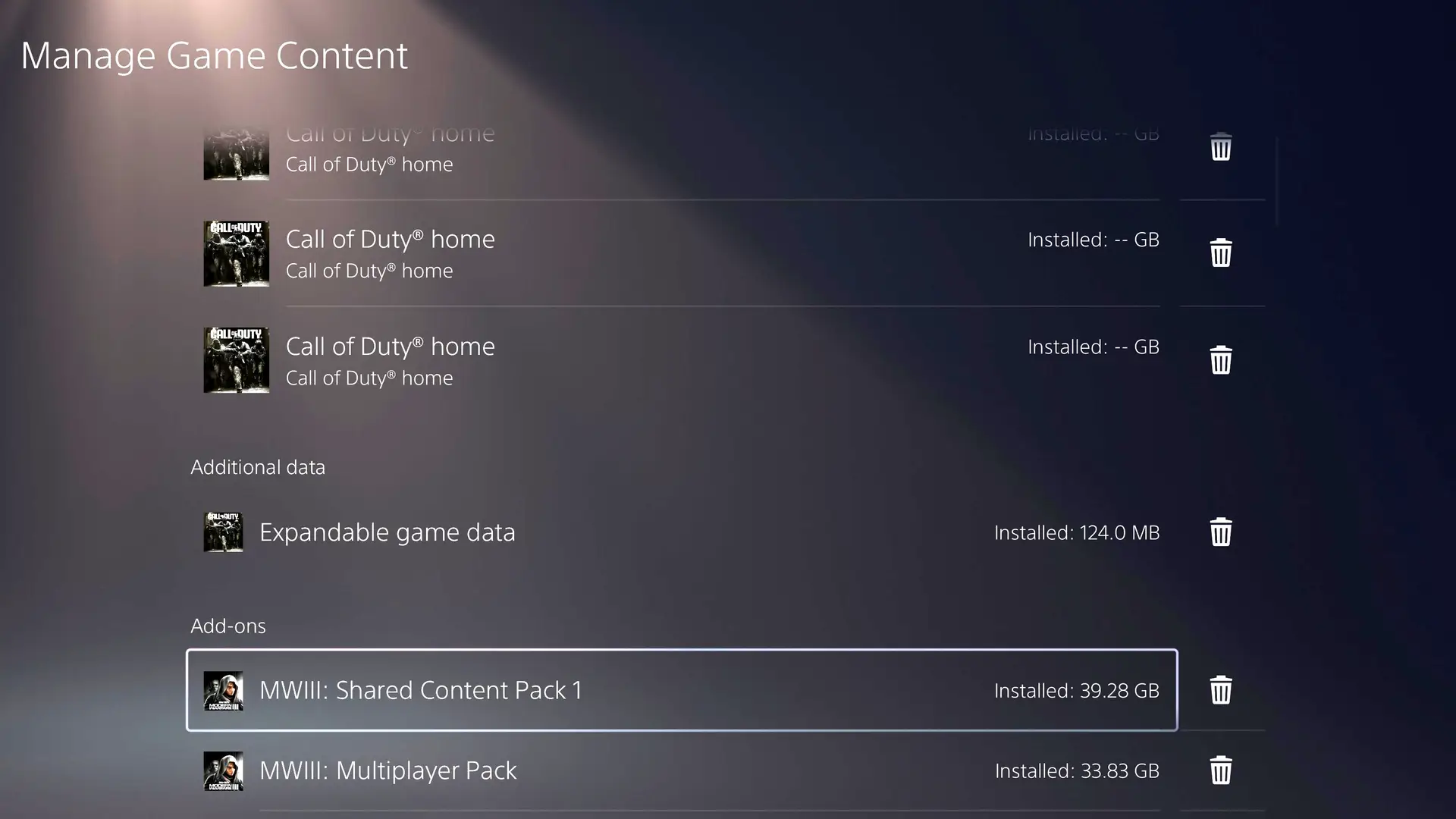
    An alternative way to save PS5 storage space,

    It’s worth noting that not every game supports this feature. However, where available, it lets you remove content you no longer need while keeping the rest of the game installed. You can always redownload the add-ons later if you want to play them again.

    How to delete additional game content from the PS5 Home Screen

    • From the PS5 Home Screen, move the cursor over the game tile you want to manage and press the Options button on your DualSense controller.
    • Select Manage Game Content from the menu that appears on screen.
    • You’ll see a list of available add-ons and DLC for that game, including content you may not have downloaded yet. You can use this menu to download any missing add-ons or remove ones you no longer need.
    • Select the content you want to delete, confirm your choice, and you’ve just freed up some valuable PS5 storage space.

    It’s worth noting that this option isn’t available for every game, but it does appear to be supported by many titles with additional downloadable content. You might also want to consider deleting surplus captures, including those taken every single time you unlock a trophy achievement.

    Featured Image Credit: Bloomberg

    Deleting Free owners Storage Without
    Share. Facebook Twitter
    Previous ArticleWeekly NFT sales fall 44% to $37.69 million as Base gains 31%
    Next Article ‘Hot Mess’: M. Night Shyamalan Delivers Good & Bad News on Next Movie After Remain
    James

    Related Posts

    Today’s Nintendo Switch Online update finally introduces a feature players have been asking for since 2018

    November 24, 2026

    5 Comic Books That Came Free With Your Favorite Toys, Including Some That Created Entire Fictional Universes

    November 24, 2026

    Jake Paul breaks silence on GTA 6 troll

    November 24, 2026

    GTA 6 IS Officially the Biggest PlayStation Launch Ever

    November 24, 2026
    Leave A Reply Cancel Reply

    Our Picks

    Salim Khan once dreamed of becoming a cricketer and trained as a commercial pilot before Bollywood

    November 24, 2026

    Exclusive: First guest announced for inaugural Hawaiian Islands Comic Art Festival

    November 24, 2026

    ‘SAKAMOTO DAYS’ manga ends after six years, final volume set for April 2027

    November 24, 2026

    Rob Liefeld’s Newmen As Part Of A New Marvel Comics Presents

    November 24, 2026
    • Facebook
    • Twitter
    • Instagram
    • YouTube
    • TikTok
    • Telegram
    Don't Miss
    TV

    How to Watch Tyler Perry’s The Oval Season 7, Episode 10

    By JamesJuly 22, 20260

    A brand-new episode of the seventh season of Tyler Perry’s The Oval is set to premiere on Wednesday night on BET, which is available to stream live on Fubo. The synopsis of the series reads as follows: “Written, directed and executive produced by Tyler Perry, The Oval is a political drama series. It tells the story of U.S President…

    Manga Day at the Museum of Ethnography

    July 22, 2026

    Where to find Northern Virginia’s version of Comic Con

    July 22, 2026

    Marvel Comics’ Official October 2026 Solicits Aside From SDCC Reveals

    July 22, 2026

    Subscribe to Updates

    Get the latest creative news from SmartMag about art & design.

    About Us
    About Us

    Comic Vibe is a pop-culture destination created for fans who live and breathe comics, movies, anime, TV shows, gaming, tech, cosplay, and collectibles.

    Our mission is to deliver engaging news, reviews, features, guides, and opinions that celebrate geek culture in all its forms. From the latest comic releases and blockbuster films to anime trends, gaming updates, cutting-edge tech, and collector culture, Comic Vibe brings everything together in one vibrant hub.

    Our Picks

    Salim Khan once dreamed of becoming a cricketer and trained as a commercial pilot before Bollywood

    November 24, 2026

    Exclusive: First guest announced for inaugural Hawaiian Islands Comic Art Festival

    November 24, 2026

    ‘SAKAMOTO DAYS’ manga ends after six years, final volume set for April 2027

    November 24, 2026

    Subscribe to Updates

    Get the latest comics, anime, movies, TV, gaming, cosplay, and pop culture news delivered directly to your inbox. No spam—just the stories every fan should know.

    Facebook X (Twitter) Instagram YouTube TikTok
    • Home
    • Contact Us
    • Terms & Conditions
    • Advertise With Us
    • DMCA Policy
    • Privacy Policy
    • About Us
    © 2026 Comic Vibe. Designed by Comic Vibe.

    Type above and press Enter to search. Press Esc to cancel.