
Close Menu

    Subscribe to Updates

    Get the latest creative news from FooBar about art, design and business.

    What's Hot

    Maren Morris flaunts bikini body in photodump from her girls trip to Bali

    September 26, 2026

    The Best Deals Today: Fire Emblem: Fortune’s Weave, Metroid Prime 4, Nintendo Switch 2, and More

    September 26, 2026

    Apple Watch Series 12 one week later: There’s so much more than meets the eye

    September 26, 2026
    Facebook X (Twitter) Instagram
    Facebook X (Twitter) Instagram YouTube TikTok
    Comic Vibe
    Saturday, September 26
    • Home
    • Comics
      • Comic Vibe News
    • Gaming
    • Movies
    • TV
    • Anime
    • Toys & Collectibles
    • Cosplay
    • Tech
    • Digital Culture
      • Creators & Fan Culture
      • Creator Economy & Fan-Driven Platforms
      • Digital Fandom & Online Communities
      • Metaverse & Virtual Worlds
      • NFTs & Digital Collectibles
      • Virtual Events & Online Conventions
      • Virtual Identity & Avatars
    • Shop
    Comic Vibe
    • Home
    • Contact Us
    • Terms & Conditions
    • Advertise With Us
    • DMCA Policy
    • Privacy Policy
    • About Us
    Home»Gaming»PS5 common ‘not enough storage’ error can be fixed with this simple trick
    Gaming

    PS5 common ‘not enough storage’ error can be fixed with this simple trick

    JamesBy JamesSeptember 6, 20261 Comment3 Mins Read
    Facebook Twitter
    PS5 common ‘not enough storage’ error can be fixed with this simple trick
    Share
    Facebook Twitter

    There’s a problem that’s been plaguing me for several years now, and from trips to sites like Reddit, I know I’m not alone.

    PlayStation 5 consoles have a habit of telling you you don’t have enough console storage when you most definitely do.

    Just yesterday, my copy of Fortnite needed to install an update which required just over 10GB of data.

    I have the launch model of the PlayStation 5, which comes with around 825GB of data and as of last night, I had around 350GB of that free and unoccupied.

    There’s no reason why, then, a 10GB update should be saying “error” and “not enough storage”, prompting me to “free up space” when I actually have over 35 times what’s required.

    Thousands, if not millions, of PlayStation 5 gamers will likely have encountered this bug.
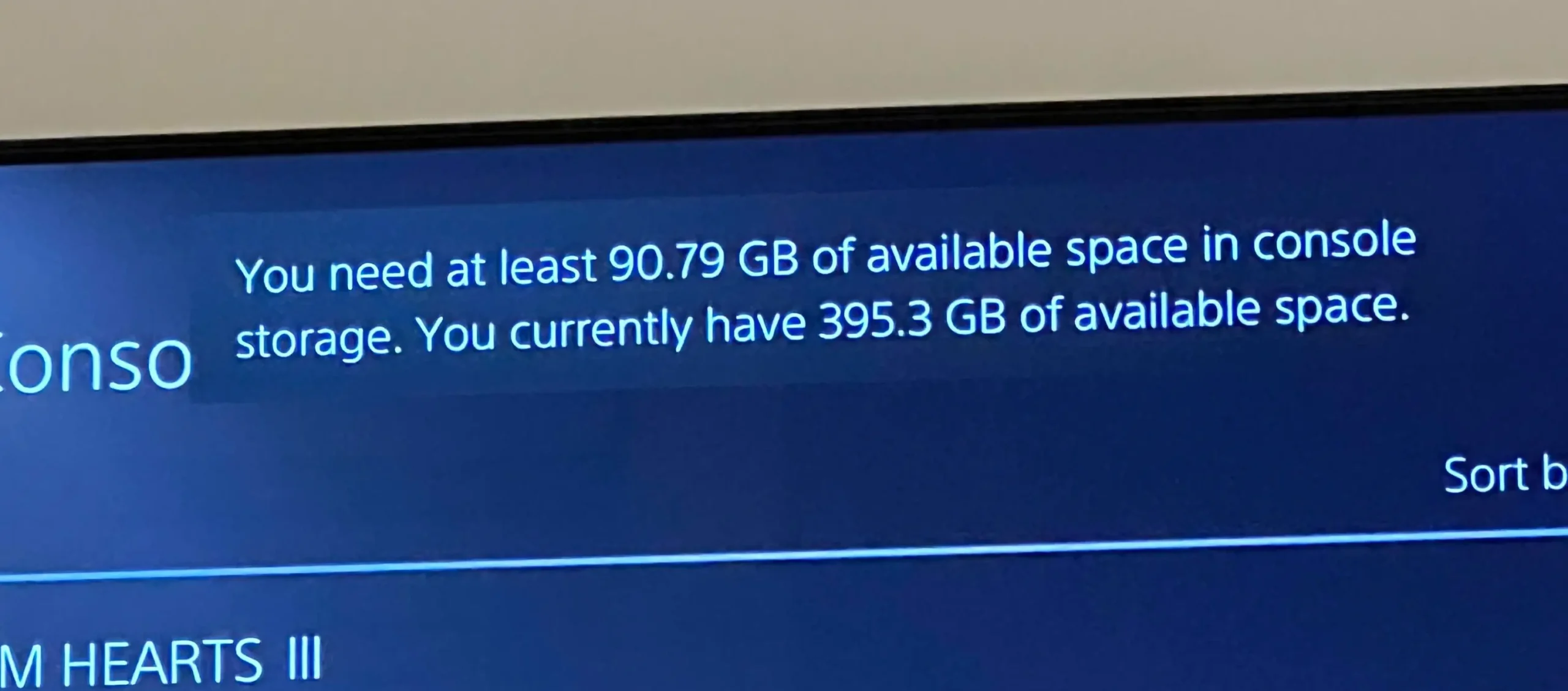
    femalefemora via Reddit

    Pressing free up space doesn’t take you to the usual screen; instead, it prompts the update to start again, which, in turn, prompts the error message again.

    You get stuck in a frustrating cycle where nothing except needlessly clearing your games rectifies the issue.

    If you’re reading this plagued with the very same problem, there is actually a solution that I can attest instantly solves the error, and my god, I wish I’d known about this earlier.

    How to fix PlayStation 5’s “not enough storage” bug when storage is free

    It goes without saying that this fix only works if you genuinely do have ample storage available.

    For those who tick that box, power off your PlayStation 5 completely. Do not use rest mode.

    Then, hold the power button on the console and keep your finger pressed down. You’ll hear the normal start-up beep, but the trick is to wait until a second beep sounds; then you can remove your finger.

    This boots up the console in safe mode. Your PlayStation 5 will prompt you to plug in your DualSense controller’s lead.

    You can then use the DualSense’s D-pad to navigate down a short menu to where it says “repair console storage”.

    Press that and allow the repair to begin. It’ll show a progress bar, which should only take a few short moments to complete.

    After this, you’re free to use your PlayStation 5 as normal again, and you’ll likely notice that whatever broken installation was plaguing you will have immediately started downloading without issue.

    Since applying this fix, the error certainly hasn’t bothered me.

    As for why PS5 storage can need repairing, it’s usually linked back to if the console has suffered an improper shutdown.

    That might concern a power cut or being switched off at the mains, for example, without being powered down first.

    Oftentimes, such abrupt shutdowns are out of your hands, but it’s good to know that hidden within a secret menu is a fix that can safely rectify the problem.

    It doesn’t require any technical knowledge to apply this fix, and it is repeatable should the issue surface again.

    External storage costs an arm and a leg these days, so making the most of what’s built into your console is of utmost importance.

    Hopefully this solution eases your woes as much as it has eased mine.

    Common enough Error Fixed Storage
    Share. Facebook Twitter
    Previous Article10 Best Corrupt Cop TV Shows Of All Time, Ranked
    Next Article 15 Years Later, One of The Greatest Psychological Horrors Still Needs an Anime Remake
    James

    Related Posts

    The Best Deals Today: Fire Emblem: Fortune’s Weave, Metroid Prime 4, Nintendo Switch 2, and More

    September 26, 2026

    Best early Prime Day gaming deals 2026: Shop PS5, Xbox, Nintendo Switch, and more

    September 26, 2026

    5 Best Mario Spin-Off Games, Ranked

    September 26, 2026

    Nintendo Switch eShop charts – September 26, 2026

    September 26, 2026

    1 Comment

    1. Pingback: Musk: You'll Be Able to Plug Xbox or PlayStation Into Cybercab - Comic Vibe

    Leave A Reply Cancel Reply

    Our Picks

    Maren Morris flaunts bikini body in photodump from her girls trip to Bali

    September 26, 2026

    The Best Deals Today: Fire Emblem: Fortune’s Weave, Metroid Prime 4, Nintendo Switch 2, and More

    September 26, 2026

    Apple Watch Series 12 one week later: There’s so much more than meets the eye

    September 26, 2026

    Sylvester Stallone shares harrowing new details about abusive childhood

    September 26, 2026
    • Facebook
    • Twitter
    • Instagram
    • YouTube
    • TikTok
    • Telegram
    Don't Miss
    Comics

    Preview: Get a sneak peek at THE ADVENTURE ZONE grand finale

    By JamesJuly 13, 20260

    On Tuesday, the seventh and final volume of The Adventure Zone graphic novel series, Story and Song, will hit shelves, bringing the adaptation of the ‘Balance’ arc from the beloved actual-play TTRPG podcast to a close. Today, The Beat can reveal a preview of the highly anticipated book

    Marvel Rivals Announces San Diego Comic

    July 13, 2026

    Re Aura Codes (July 2026)

    July 13, 2026

    PlayStation Plus Premium July 2026 Game Revealed Early

    July 13, 2026

    Subscribe to Updates

    Get the latest creative news from SmartMag about art & design.

    About Us
    About Us

    Comic Vibe is a pop-culture destination created for fans who live and breathe comics, movies, anime, TV shows, gaming, tech, cosplay, and collectibles.

    Our mission is to deliver engaging news, reviews, features, guides, and opinions that celebrate geek culture in all its forms. From the latest comic releases and blockbuster films to anime trends, gaming updates, cutting-edge tech, and collector culture, Comic Vibe brings everything together in one vibrant hub.

    Our Picks

    Maren Morris flaunts bikini body in photodump from her girls trip to Bali

    September 26, 2026

    The Best Deals Today: Fire Emblem: Fortune’s Weave, Metroid Prime 4, Nintendo Switch 2, and More

    September 26, 2026

    Apple Watch Series 12 one week later: There’s so much more than meets the eye

    September 26, 2026

    Subscribe to Updates

    Get the latest comics, anime, movies, TV, gaming, cosplay, and pop culture news delivered directly to your inbox. No spam—just the stories every fan should know.

    Facebook X (Twitter) Instagram YouTube TikTok
    • Home
    • Contact Us
    • Terms & Conditions
    • Advertise With Us
    • DMCA Policy
    • Privacy Policy
    • About Us
    © 2026 Comic Vibe. Designed by Comic Vibe.

    Type above and press Enter to search. Press Esc to cancel.