
Close Menu

    Subscribe to Updates

    Get the latest creative news from FooBar about art, design and business.

    What's Hot

    I wasn’t even excited for VisionQuest, but ironically, I think it might save Marvel for me

    September 7, 2026

    Venice Festival Highlights: War Warnings, Rock Star Reunions, and Activism Controversies

    September 7, 2026

    PlayStation 5: How to fix pesky “not enough storage” error with simple fix

    September 7, 2026
    Facebook X (Twitter) Instagram
    Facebook X (Twitter) Instagram YouTube TikTok
    Comic Vibe
    Monday, September 7
    • Home
    • Comics
      • Comic Vibe News
    • Gaming
    • Movies
    • TV
    • Anime
    • Toys & Collectibles
    • Cosplay
    • Tech
    • Digital Culture
      • Creators & Fan Culture
      • Creator Economy & Fan-Driven Platforms
      • Digital Fandom & Online Communities
      • Metaverse & Virtual Worlds
      • NFTs & Digital Collectibles
      • Virtual Events & Online Conventions
      • Virtual Identity & Avatars
    • Shop
    Comic Vibe
    • Home
    • Contact Us
    • Terms & Conditions
    • Advertise With Us
    • DMCA Policy
    • Privacy Policy
    • About Us
    Home»Gaming»PlayStation 5: How to fix pesky “not enough storage” error with simple fix
    Gaming

    PlayStation 5: How to fix pesky “not enough storage” error with simple fix

    JamesBy JamesSeptember 7, 2026No Comments2 Mins Read
    Facebook Twitter
    PlayStation 5: How to fix pesky “not enough storage” error with simple fix
    Share
    Facebook Twitter

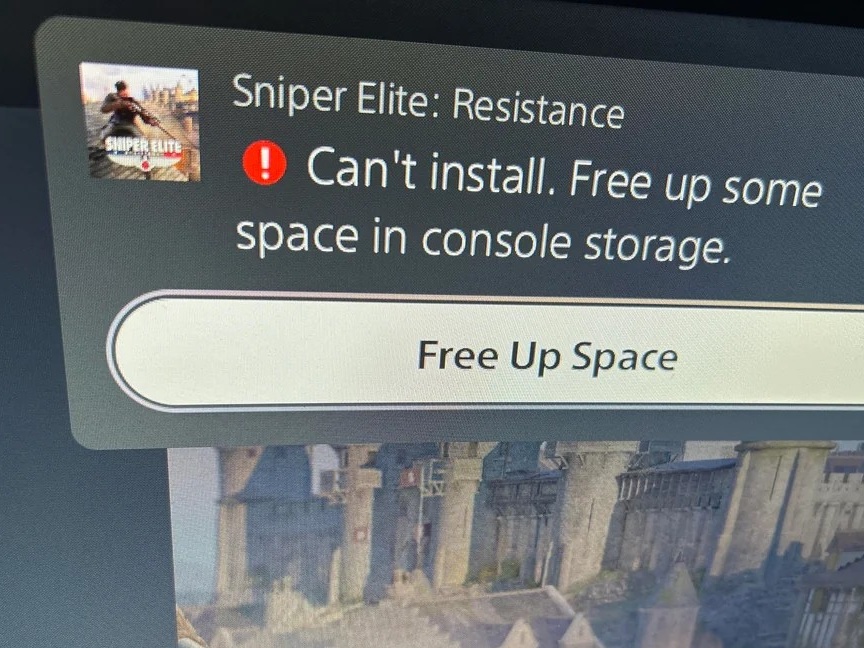
    An unspecified number of PS5 users (1, 2, 3, 4, 5) continue to experience a recurring glitch on their consoles, namely that they lack storage space even when hundreds of gigabytes might be free. GamingBible reports experiencing the problem while attempting to install a Fortnite update of just over 10GB, despite having approximately 350GB available. The frustrating error repeatedly prompts users to free up space, even when deleting games should not be necessary.

    There is a workaround: Users should shut down the console down fully, then hold the power button. Upon hearing the normal start-up beep, keep the button pressed until a second beep sounds. This boots PS5 into safe mode, whereupon connecting a wired DualSense reveals an option to “repair console storage.” Selecting this option reportedly clears the fault within moments, letting stalled downloads resume.

    The underlying cause appears tied to improper shutdowns rather than actual capacity limits. That such a disruptive, widely reported bug requires digging into a hidden diagnostic menu rather than being addressed through a straightforward system update is a somewhat strange oversight on Sony’s part. Either way, the repair option can be repeated if the problem returns.

    ⟨
    Previous article
    Humble launches new bundle with 10 Steam Deck-friendly games for just $13
    Next article
    Noise and Bose team up on affordable, futuristic open-ear earbuds
    ⟩
    > Expert reviews and news on laptops, smartphones and tech innovations > News > News Archive > Newsarchive 2026 09 > PlayStation 5: How to fix pesky “not enough storage” error with simple fix
    Jacob Fisher, 2026-09- 6 (Update: 2026-09- 7)

    enough Error pesky PlayStation Storage
    Share. Facebook Twitter
    Previous ArticleEveryone’s a Suspect, No One’s Innocent — ‘Shaque: Trust No One’ Premieres September 24 on Netflix
    Next Article Venice Festival Highlights: War Warnings, Rock Star Reunions, and Activism Controversies
    James

    Related Posts

    The Vooks Guide to the Best Nintendo Switch 2 Accessories

    September 7, 2026

    Resident Evil developer returns with slick new RPG that’s free to try on PS5

    September 7, 2026

    Blast off on an out-of-this-world adventure in Orbitals!

    September 7, 2026

    Start Your EA SPORTS NHL 27 Season Now With EA Play

    September 7, 2026
    Leave A Reply Cancel Reply

    Our Picks

    I wasn’t even excited for VisionQuest, but ironically, I think it might save Marvel for me

    September 7, 2026

    Venice Festival Highlights: War Warnings, Rock Star Reunions, and Activism Controversies

    September 7, 2026

    PlayStation 5: How to fix pesky “not enough storage” error with simple fix

    September 7, 2026

    Everyone’s a Suspect, No One’s Innocent — ‘Shaque: Trust No One’ Premieres September 24 on Netflix

    September 7, 2026
    • Facebook
    • Twitter
    • Instagram
    • YouTube
    • TikTok
    • Telegram
    Don't Miss
    Toys & Collectibles

    Hidden Collectibles? How to Obtain Shards of Corruption

    By JamesJuly 10, 20260

    In Sol: Enchantment (hereinafter ‘Sol’), Hit is one of the most important stats for progressing to higher-level hunting grounds. If your Hit is insufficient, you will often find yourself unable to land attacks on mobs, preventing you from gaining any EXP or Nine, even if your other stats are high enough

    New TV shows and movies to stream this weekend

    July 10, 2026

    Hollywood live-action Naruto movie announces global search for its Naruto, Sasuke, and Sakura

    July 10, 2026

    McFarlane Toys Celebrates Superman’s First Appearance With New ‘Action Comics #1’ 3D Metal Pin

    July 10, 2026

    Subscribe to Updates

    Get the latest creative news from SmartMag about art & design.

    About Us
    About Us

    Comic Vibe is a pop-culture destination created for fans who live and breathe comics, movies, anime, TV shows, gaming, tech, cosplay, and collectibles.

    Our mission is to deliver engaging news, reviews, features, guides, and opinions that celebrate geek culture in all its forms. From the latest comic releases and blockbuster films to anime trends, gaming updates, cutting-edge tech, and collector culture, Comic Vibe brings everything together in one vibrant hub.

    Our Picks

    I wasn’t even excited for VisionQuest, but ironically, I think it might save Marvel for me

    September 7, 2026

    Venice Festival Highlights: War Warnings, Rock Star Reunions, and Activism Controversies

    September 7, 2026

    PlayStation 5: How to fix pesky “not enough storage” error with simple fix

    September 7, 2026

    Subscribe to Updates

    Get the latest comics, anime, movies, TV, gaming, cosplay, and pop culture news delivered directly to your inbox. No spam—just the stories every fan should know.

    Facebook X (Twitter) Instagram YouTube TikTok
    • Home
    • Contact Us
    • Terms & Conditions
    • Advertise With Us
    • DMCA Policy
    • Privacy Policy
    • About Us
    © 2026 Comic Vibe. Designed by Comic Vibe.

    Type above and press Enter to search. Press Esc to cancel.