

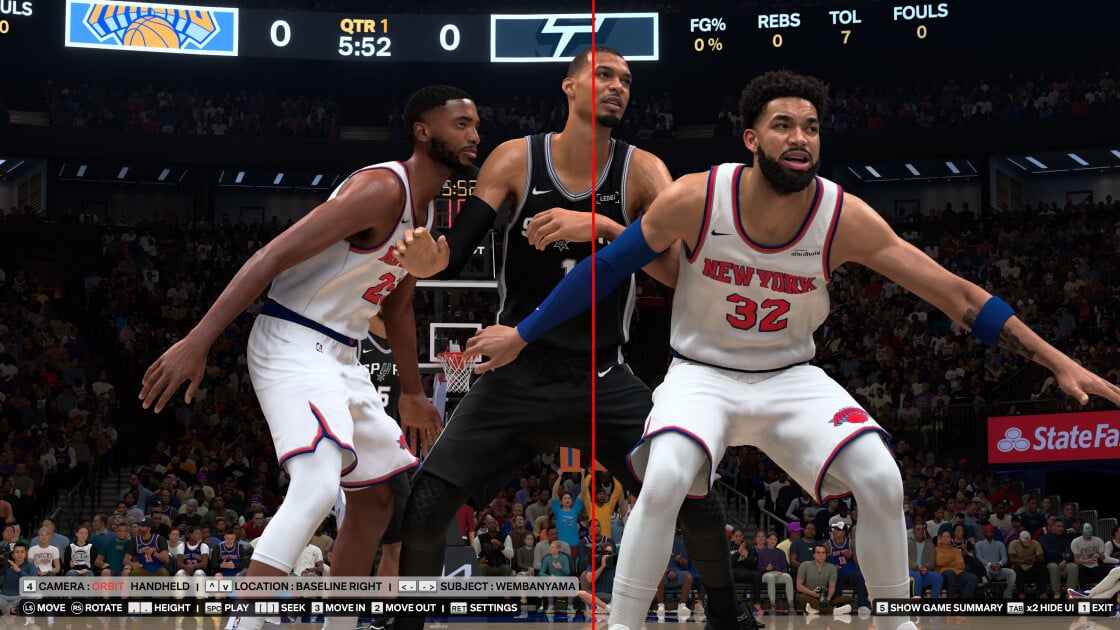
If you aren’t hyped for the release of Nvidia’s new DLSS 5 real-time neural rendering (RTNR) technology, I’ve seen the reasons why you should be. Unlike earlier versions of DLSS that focused on performance, DLSS 5 aims at improved image quality. The DLSS 5 difference is potentially revolutionary, making in-game graphics look more lifelike than ever before. I tested this feature with an Nvidia GeForce RTX 5090graphics card and game developer 2K’s NBA 2K27, the first title to support the new DLSS 5 AI models. Trust me, my in-game screenshots show its massive potential for PC gaming.


Nvidia’s Computex Keynote in 12 Minutes
How DLSS 5 Changes the Game
Each new version of DLSS (known as Deep Learning Super Sampling) ships with a key defining feature. The key feature for DLSS 5 is referred to as real-time neural rendering, or RTNR. RTNR uses AI models to enhance the image quality of games in real-time. If you are familiar with DLSS, you might be wondering how this differs from previous versions of DLSS, which also relied heavily on AI. It all comes down to what the AI hardware is processing.
In DLSS 1 and 2, the AI hardware improved frame rates and image quality by upscaling rendered frames. If you set your in-game resolution to 3,840 by 2,160 (4K) and utilize DLSS 1 or DLSS 2, the game renders internally at a lower resolution to improve performance. Then, the GPU’s AI hardware upscales the image to match your target 4K resolution. The image quality isn’t as sharp as running the game at 4K natively, but still sharper than rendering natively at a lower resolution.
Nvidia’s DLSS 3 and 4 technologies were both focused on frame generation. Here, the AI takes two rendered images from the game, analyzes them to see what changed, and then creates an artificial image that fits between the two original frames. This makes motion look more fluid in games and creates a higher frame rate. DLSS 4 extended this with up to an x4 frame multiplier.
In DLSS 5, we see the AI hardware take the images rendered by the graphics card and actively work to enhance them by inserting more realistic lighting and textures. The web has been flooded with AI-generated images since generative AI took off, and you’ve likely seen some of these before. Those AI images are each syntheses of millions of real pictures, an attempt to create an enhanced image based on that data. This is essentially what DLSS 5 carries out in-game, in real-time.
This is how Nvidia aims to make graphics in games more photorealistic, blurring the line between the artificially created game world and real-life images. This is the most reon of the technology until now to support it. This means you can use frame generation and resolution upscaling to help offset the performance impact of DLSS 5’s real-time neural rendering
The DLSS 5 Effect on NBA 2K27 Frame Rates
To gauge DLSS 5 performance and image quality, I tested it out while running NBA 2K27. For this test, I kept the resolution set to 4K resolution, and I used the Ultra graphics preset with a few modifications. Nvidia recommended disabling motion blur and depth of field for this test, which are typically on with the Ultra preset. These features create a more immersive experience, but that also blurs images, which isn’t ideal when trying to compare screenshots. I turned both off, but also turned on Nvidia’s Deep Learning Anti-Aliasing (DLAA) feature for the best image quality.
I also tested the game in motion with frame generation off, at x4 and at x6, but this appeared to have little impact on the image results, likely because the GPU and AI hardware were already fully utilized by the game. Performance dropped slightly with x6 frame generation on, as the hardware was tied up generating artificial frames rather than rendering the frames outright, which signifies that if you are gaming at 4K with max settings and DLSS 5, you should test with frame generation off or at a lower multiplier to determine the best frame rate.
I noticed something else odd about DLSS 5 performance while testing. A new game of NBA 2K27 begins with the camera hanging suspended over the basketball court and relatively far from the players in order to give you a full view of the court. When I paused the game and zoomed in closer to the players for the higher-detail screenshots of the players, the frame rate dropped significantly when DLSS 5 was enabled.
This didn’t happen with DLSS 5 off, and performance was roughly the same whether I was looking at the characters up close or from an overhead viewpoint. Also, I checked the frame rate with DLSS 5 on from the more distant overhead view while testing, but here, the new rendering tech had little impact on performance, and I observed about the same frame rate with DLSS 5 on or off. Rendering the improved DLSS 5 image clearly leads to a significant hit on frame rates, hence the difference you see in the chart.
I also recorded the GPU’s power consumption during this test using the Nvidia App overlay, which shows that using DLSS 5 significantly increases the power draw.
The DLSS 5 Difference in Still Images
The performance figures in the chart above were recorded from the same vantage point from which the screenshots were taken. I find this to be the most useful information to show, as it gives you the worst-case scenario performance difference between having DLSS 5 on or off. Here’s a first round of screenshots showing how DLSS 5 elevates the raw rendered image.
I think these screenshots largely speak for themselves. The difference activating DLSS 5 makes is night and day. I thought the game looked sharp and detailed when I first started it up with DLSS turned off. However, after seeing the game with DLSS 5 on, I can’t help but feel the characters look more artificial without DLSS 5 enabled.
Prior to testing DLSS 5 in NBA 2K27, I didn’t have an opinion on DLSS 5. While Nvidia showed off the feature earlier this year, what was shown early often doesn’t match the final product on launch day. At the time of the announcement, I heard complaints about DLSS 5 looking excessively artificial, but I don’t feel that is the case with NBA 2K27.
Nvidia indicated that it wants to maintain artist intent while also improving image quality, and from NBA 2K27 it appears the company has moved closer toward that goal. The DLSS 5 image enhancements do not look exceedingly artificial or skewed from how the game looks with DLSS 5 off. Instead, the graphics appear more detailed in a way that just makes them seem more realistic to me.
Which Hardware and Games Support DLSS 5?
In order for a game to support any version of DLSS, it requires the game developer to train the AI for that game. For this reason, not many games will support DLSS 5 upon its release. NBA 2K27 is the only title that works with it at this time, but more games will support it in the future. We already know that Resident Evil Requiem, EA Sports FC, Starfield, and Hogwarts Legacy will be among the first to support DLSS 5. Here are some more games expected to adopt the technology in the coming months:
-
The Elder Scrolls IV: Oblivion Remastered
It’s possible that training for DLSS 5 may take longer than earlier versions of DLSS, which is why we only have a single game that supports it at launch. This is a first, as all earlier versions of DLSS had support for a few games at launch, and previous DLSS versions launched with support for dozens of games. Nvidia mentioned that since it first showed off DLSS 5 in March, it has achieved a fivefold increase in performance, which has likely come from optimizations made to the AI model through intensive training.
To use DLSS 5, however, you need an Nvidia GeForce RTX 50-series graphics card. You don’t necessarily need to have an RTX 5090, though. Nvidia provided performance figures for almost the entire RTX 50-series lineup while running this game. The only graphics card that Nvidia didn’t show as capable of running DLSS 5 was the Nvidia GeForce RTX 5050. It’s unclear if it simply left the 5050 out of this round of testing or if that GPU is underpowered for running DLSS 5, but the GeForce RTX 5060 can run DLSS 5 just fine at 1080p.
Nvidia will expand DLSS 5 support backward to the RTX 40 series later, but at this time, the RTX 40 series is not supported.
Recommended by Our Editors
Nvidia’s DLSS 4.5 Level-Up Explained: 6x More Frames, More Detailed Graphics
The Best Graphics Cards for 2026
I Watched Nvidia’s Controversial DLSS 5 Turn ‘Potato Faces’ Into Photorealistic Characters
Don’t Have an RTX 50-Series GPU? You Can Try DLSS 4.5
If you don’t own an Nvidia GeForce RTX 50-series graphics card, you have Nvidia’s recently released DLSS 4.5 as an alternative. The key feature in DLSS 4.5 is a second-generation AI transformer model that can process 20% more parameters and has 35% more computational power than Nvidia’s first transformer model, which was released with DLSS 4.
DLSS 4.5 works in 30 games so far, and RTX GPUs going back to the 20 series support everything but multi-frame generation, meaning all Nvidia RTX GPUs benefit from these enhanced models.
The new DLSS 4.5 doesn’t improve frame rates while gaming. Instead, the additional power provided by the second-gen transformer model is used to more accurately calculate in-game lighting effects. The following comparison photos from Resident Evil Requiem will help to give you an idea of how this differs from DLSS 4 in terms of image quality.
In the first set of screenshots below, which show a car window, you can see more detail reflected on the glass, particularly the reflections of the two people standing nearby.
The second set of comparison pictures shows the hood of a black car. In the DLSS 4.5 screenshot, dark colors like black are richer, the chrome on the bumper is more clear, and the light reflections on the hood have less noise. In many ways, this version does look better, but if you look at less zoomed-in copies of this image, you may feel differently.
In this third set of comparison pictures, the most notable detail is the red light that reflects off the car. Here again, the DLSS 4.5 version looks more clear with a darker, more detailed image. I think the DLSS 4 version looks better, however, as it looks more realistic to me. This light is coming from a nearby building, and the level of clarity in the DLSS 4 image looks more appropriate to my eye for this sort of reflection.
The game looks gorgeous either way, and while you can see some differences between DLSS 4 and DLSS 4.5 in Resident Evil Requiem, many of the details I’ve called out here aren’t really noticeable unless you deliberately slow down to admire them. I’m not even sure which I would use if I play this game, and at this point, I feel like you would be equally well off with either of the two.
Even Reined In, DLSS 5 Is Still a Massive Change to Graphics Rendering
Nvidia’s DLSS 5 technology is easily the most radical version of DLSS released to-date. While previous versions of DLSS were predominantly focused on improving performance, the fifth iteration instead introduces a groundbreaking visual enhancement that moves the needle on image fidelity closer to photorealism than ever before. I’ve only tested this feature in one game so far, but I am cautiously optimistic about the impact it will have on games going forward.
Likely, AMD and Intel will also begin work on their own versions of Nvidia’s AI rendering tech. If you own an RTX 50-series graphics card, look out for updates in the aforementioned games to try it for yourself for the best idea of the difference it can make.
About Our Expert
Michael Justin Allen Sexton
Senior Writer, Hardware
Experience
I have been interested in science and technology for as long as I can remember, spurred on by a fondness for video games. I learned to work in Windows and manipulate files to get buggy games to work, and I learned to build and upgrade PCs for better performance.
In my role at PCMag for the past four years, I’ve deeply enjoyed the opportunity to share my knowledge and expertise. Before PCMag, I wrote for Tom’s Hardware for three years, where I covered tech news, deals, and wrote some hands-on reviews. After working as a PCMag contributor for a time reviewing desktops, PC cases, budget processors, and motherboards, I now focus on testing and reviewing processors and graphics cards and sharing my insights on the industry.
Areas of Expertise
Latest By Michael Justin Allen Sexton
- Asus ProArt GeForce RTX 5090 32GB GDDR7 OC Edition Review: The Ultimate Creator Card
- AMD Ryzen 9 9950X3D2 Dual Edition Review: The Ultimate 3D V-Cache Chip for Creators, Not Gamers
- AMD Ryzen 9 9950X3D vs. Intel Core Ultra 7 270K Plus: The Winner of This CPU Face-Off Shocked Me
- AMD Ryzen 7 9850X3D vs. Intel Core Ultra 5 250K Plus: AMD Wins Games, Intel Wins Everything Else
- These 4 DIY Builds Blow Away Valve’s Steam Machine, and One Saves You $150
- More from Michael Justin Allen Sexton
