

The PlayStation 5 Pro, Sony’s mid-generation refresh of the PlayStation 5, is one of the most expensive consoles on the market. Getting one will set you back $899 at official retailers, but you will undoubtedly be getting the best the 9th generation of consoles has to offer. There are several reasons why the PS5 Pro is worth the price, but the biggest benefit over the base PS5 is that you will be able to run <a href="https://comicvibe.com/5-best-valve-games-of-all-time-ranked/” title=”5 Best Valve Games Of All Time, Ranked”>games at both high resolutions and frame rates. However, one of its biggest downsides (besides the price) is that it doesn’t have a disc drive like the base PS5.
You don’t need to worry, though, because the PS5 Disc Drive add-on released alongside the slim versions of the PS5 works with the PS5 Pro. You can purchase it for $79, and it’s fairly easy to use. It’s as simple as removing one of the bottom covers, installing the disc drive add-on, and attaching the included faceplate. A PS5 with a disc drive is also worth it because you can actually own the games you buy. Other benefits include borrowing games from friends, buying cheaper physical editions on eBay, and trading in or selling the disc after you’re done playing it. But you first need to know how to install it.
How do I install a disc drive on my PS5 Pro?
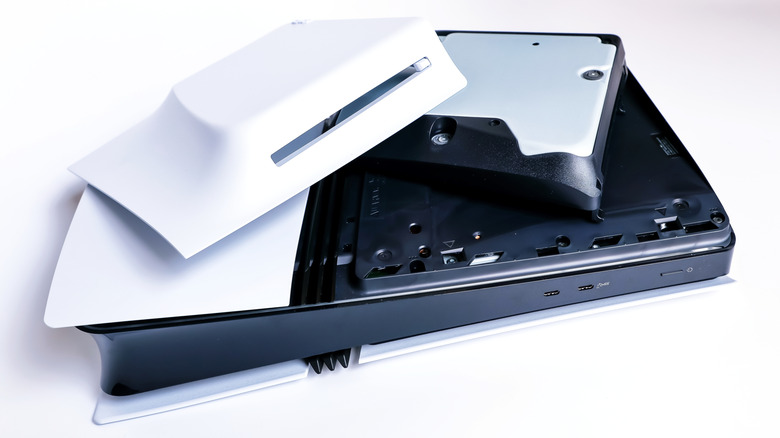
With PlayStation ending physical disc production in 2028, the conversation around game ownership has never been more important. A disc drive is now more important than ever if you want to build a library that can never be taken away. The add-on comes with the disc drive and a faceplate with a bulge. So once you have those in hand, here’s how the installation goes:
-
Turn off the PS5 Pro.
-
Turn it over so the PlayStation logo is on the bottom.
-
Pull in the top-left corner of the bottom plate.
-
Slowly lift the cover; you will hear the clips detach as you remove it.
-
Line up the tabs on the disc drive unit with the holes on the PS5 Pro and insert it. Make sure you hear a click.
-
With the connectors aligned, push down gently until you hear a click.
-
Insert the plate that comes with the disc drive, making sure everything clicks into place.
You can now start using the disc drive with the PS5 Pro. Keep in mind that the disc drive will make the console bulkier, and you will need an internet connection for the initial pairing of the disc drive and PS5 Pro. Also keep in mind that even physical games will be installed on the SSD, but you will need a disc to launch them.

2 Comments
Pingback: NYCC '26: Marvel MANGA WOOOOOOW - Comic Vibe
Pingback: Here`s why you need to indulge in these unique experiences online - Comic Vibe