
Close Menu

    Subscribe to Updates

    Get the latest creative news from FooBar about art, design and business.

    What's Hot

    Sameera Reddy shares her mantra for self

    October 17, 2026

    Return Of The Living Dead in American Mythology December 2026 Solicits

    October 17, 2026

    Double Fine’s first post-Xbox title, first-person Soulslikes and other new indie games worth checking out

    October 17, 2026
    Facebook X (Twitter) Instagram
    Facebook X (Twitter) Instagram YouTube TikTok
    Comic Vibe
    Saturday, October 17
    • Home
    • Comics
      • Comic Vibe News
    • Gaming
    • Movies
    • TV
    • Anime
    • Toys & Collectibles
    • Cosplay
    • Tech
    • Digital Culture
      • Creators & Fan Culture
      • Creator Economy & Fan-Driven Platforms
      • Digital Fandom & Online Communities
      • Metaverse & Virtual Worlds
      • NFTs & Digital Collectibles
      • Virtual Events & Online Conventions
      • Virtual Identity & Avatars
    • Shop
    Comic Vibe
    • Home
    • Contact Us
    • Terms & Conditions
    • Advertise With Us
    • DMCA Policy
    • Privacy Policy
    • About Us
    Home»Gaming»Android Nintendo DS Launcher NitroDeck Is Getting An Update For Dual
    Gaming

    Android Nintendo DS Launcher NitroDeck Is Getting An Update For Dual

    JamesBy JamesSeptember 27, 2026No Comments3 Mins Read
    Facebook Twitter
    Android Nintendo DS Launcher NitroDeck Is Getting An Update For Dual
    Share
    Facebook Twitter

    🤝
    Don’t want to see ads? Become a premium member for $3 a month and support an independent publication today!

    We’ve covered a lot of Mr. Rubik’s creations in the past. He’s known for creating interesting Android applications and launchers that look like that of old school software; he’s made a PS2 Launcher changing your Android’s look to that of the <a href="https://comicvibe.com/playstation-patent-describes-controller-acting-as-a-credit-card-reader/” title=”PlayStation patent describes controller acting as a credit‑card reader”>PlayStation 2, he’s done the same with Nintendo Wii U and the PSP, now he’s turning his attention to dual-screen Android handhelds, and more specifically the ANBERNIC RG DS.

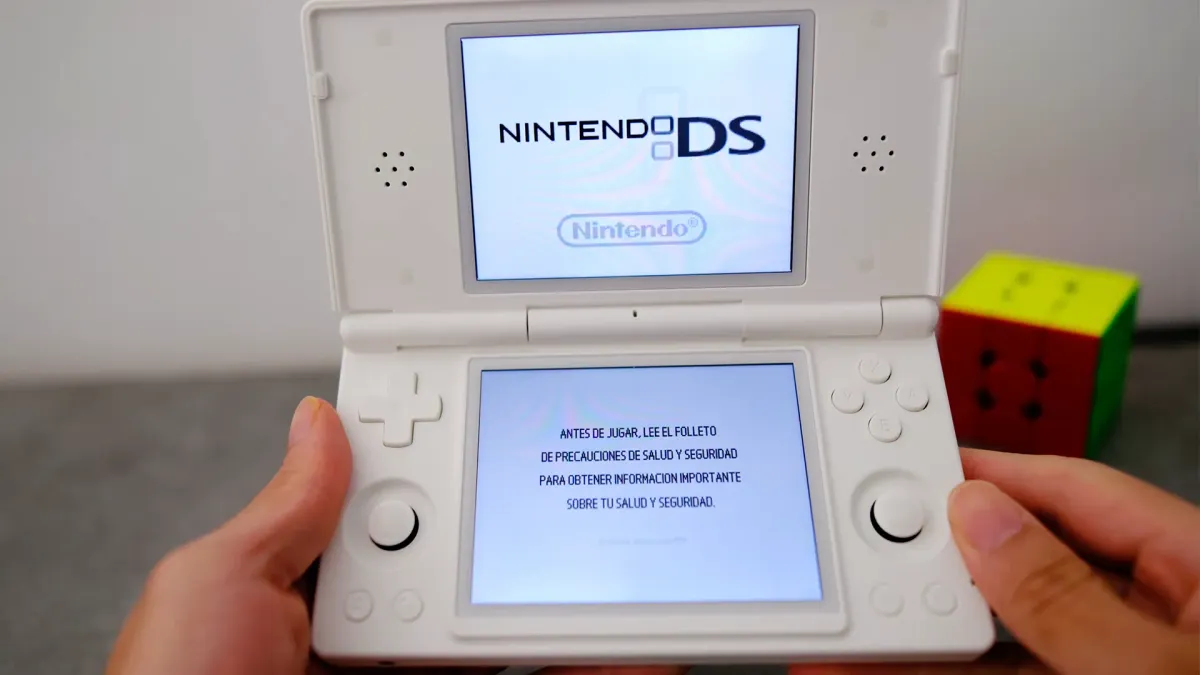
    NitroDeck is a previous Android launcher that turns your smartphone’s UI into that of a Nintendo DS, but a future update is coming in the next week or two that will allow you to use it with dual-screen Android handhelds such as the ANBERNIC RG DS, turning its UI into a more nostalgic Nintendo experience. The good news is that it’s available to downloadwait a little while before it gets updated

    I believe this is his first jab at creating a launcher designed for two screens at once, and he’s been testing it on the RG DS, as it’s the nearest Android device that looks like a Nintendo DS. Mr Rubik has taken a lot of inspiration from the DS’s user interface, so much so that it’s certainly infringing on a bunch of intellectual property, but that’s not stopped him in the past and Google seems to be looking the other way when allowing it to be available on the Play Store.

    But that said, he’s integrated your ROMs and emulators in the game cartridge section of the launcher, even going as far as adding in the Nintendo DS boot-up screen and sound when you open it up. In Mr Rubik’s words:

    “NitroDeck is a DS-style Android launcher for users who want a focused, visual, and controller-friendly home screen. Open installed apps from a fast catalog, search alphabetically, customize app icons with local images, use your own photos on the alternate home surface, and navigate comfortably with touch, keyboard, or gamepad. NitroDeck includes a classic dual-screen launcher layout, local game library tools for files from folders you choose, optional notification badges, sound and haptic settings, backup export, and controls designed for handheld Android devices”.

    Credit: Mr.Rubik

    Main Features

    • DS-style launcher interface
    • DSi-style launcher interface
    • Installed Android app catalog
    • Local DS, DSi, and GBA game library
    • Custom app icons from local images
    • Controller and gamepad-friendly navigation
    • Sound and haptic feedback toggles
    • Icon pack and notification badge support
    • Local backup/export tools
    • Offline by design — no accounts, no analytics, no tracking.

    The Android scene already has a wide range of frontends that resemble the Nintendo DS, but this is the first one that is happily flying too close to the sun and wants to mimic Nintendo’s UI as closely as possible, which undoubtedly makes your RG DS look and feel like a Nintendo DS. We just hope the update is refined enough to work well and launches soon, as we know Mr Rubik heavily uses AI to assist with development. All we can do is wait for the update to come!

    ❤️
    Like what you are reading? If you do and want to support us, you can do so by becoming a member,tipping us or taking a look at our gaming accessory company GAMENOOK (10% off just for you). This allows us to continue what we do without succumbing to algorithms, clickbait and over-intrusive ads, while paying human writers instead of AI.

    Android Getting launcher Nintendo NitroDeck
    Share. Facebook Twitter
    Previous ArticleHBO’s Lanterns Season 2 Renewal Update Sparks Online Debate
    Next Article Top Entertainment stories of the week
    James

    Related Posts

    Double Fine’s first post-Xbox title, first-person Soulslikes and other new indie games worth checking out

    October 17, 2026

    The Steam Deck Can Play PS5 Games, But Not The Way You Might Think

    October 17, 2026

    Pikmin 4 is $20 off ahead of its $10 Nintendo Switch 2 update

    October 17, 2026

    PlayStation 6 Price Tag Has Gamers Ready To Ditch Consoles Forever

    October 17, 2026
    Leave A Reply Cancel Reply

    Our Picks

    Sameera Reddy shares her mantra for self

    October 17, 2026

    Return Of The Living Dead in American Mythology December 2026 Solicits

    October 17, 2026

    Double Fine’s first post-Xbox title, first-person Soulslikes and other new indie games worth checking out

    October 17, 2026

    VisionQuest (TV Series) Guide

    October 17, 2026
    • Facebook
    • Twitter
    • Instagram
    • YouTube
    • TikTok
    • Telegram
    Don't Miss
    Gaming

    Wai Kiat Lee: From playing WSOP on Playstation to winning millions

    By JamesJuly 16, 20260

    Wai Kiat Lee is a high stakes poker pro from Malaysia and an ambassador for Natural8.

    Keke Palmer’s Lady Miss Jacqueline Returns With Royal Feuds, Dead Husbands and an AI Conspiracy

    July 16, 2026

    Kris Jenner’s mother Mary Jo ‘MJ’ Shannon dies at 91

    July 16, 2026

    Threezero Unveils New Mega Man MDLX Figure with the Ice Slasher Suit 

    July 16, 2026

    Subscribe to Updates

    Get the latest creative news from SmartMag about art & design.

    About Us
    About Us

    Comic Vibe is a pop-culture destination created for fans who live and breathe comics, movies, anime, TV shows, gaming, tech, cosplay, and collectibles.

    Our mission is to deliver engaging news, reviews, features, guides, and opinions that celebrate geek culture in all its forms. From the latest comic releases and blockbuster films to anime trends, gaming updates, cutting-edge tech, and collector culture, Comic Vibe brings everything together in one vibrant hub.

    Our Picks

    Sameera Reddy shares her mantra for self

    October 17, 2026

    Return Of The Living Dead in American Mythology December 2026 Solicits

    October 17, 2026

    Double Fine’s first post-Xbox title, first-person Soulslikes and other new indie games worth checking out

    October 17, 2026

    Subscribe to Updates

    Get the latest comics, anime, movies, TV, gaming, cosplay, and pop culture news delivered directly to your inbox. No spam—just the stories every fan should know.

    Facebook X (Twitter) Instagram YouTube TikTok
    • Home
    • Contact Us
    • Terms & Conditions
    • Advertise With Us
    • DMCA Policy
    • Privacy Policy
    • About Us
    © 2026 Comic Vibe. Designed by Comic Vibe.

    Type above and press Enter to search. Press Esc to cancel.