

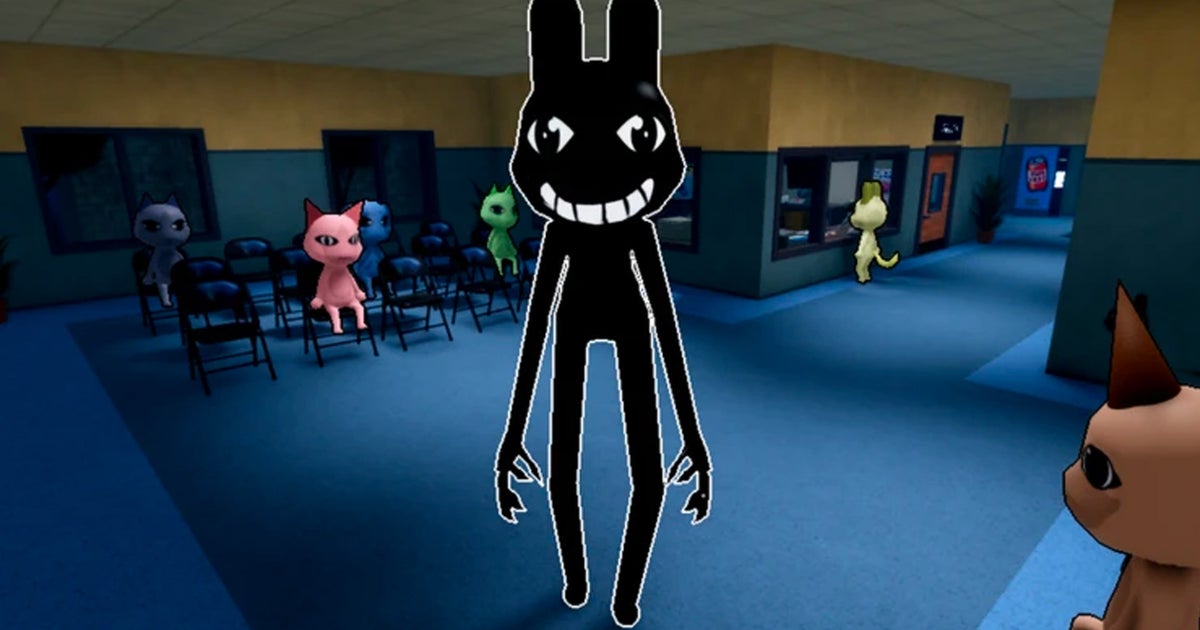
Anomalies are the main threat players need to look out for in Animal Hospital. The Roblox horror game puts you in charge of running a hospital, where you’ll do everything from checking in patients to treating them. While some patients are just after medical help, others are intent on causing harm to you and anyone else that crosses their path.
The game gives clues about which patients are up to no good, while other times it’s more tricky to figure out which animals are secretly a sinister Anomaly. That’s where our guide is here to help. We’ve put together this page which runs through all the Anomalies in Animal Hospital and how to get rid of them.
- Anomaly types
- All Anomalies
To see this content please enable targeting cookies.
Animal Hospital Anomaly types
There are dozens of Anomalies you can encounter in Animal Hospital, however the game doesn’t officially categorise them into different classes. Despite this, a lot of Anomalies do share things in common, including the ways you can spot them. To make things simple, we’ve grouped together all the different Anomalies into four categories, placing them alongside other Anomalies that share similar traits. These categories are Patients, CCTV, Photos and Hazards.
With Patients, you’ll typically be able to figure out something’s amiss with a character when they come to the reception desk to check-in. The CCTV Anomalies can be spotted when you’re using the security camera, while Photo Anomalies will appear when you take a patient’s photo during check-in. Hazards, meanwhile, are Anomalies you can encounter around the hospital that can spawn no matter how hard you try to turn away suspicious patients. Often, there’s not much you can do about these Anomalies apart from trying to avoid them, but sometimes there’s a specific course of action you need to take so they’re no longer a threat.
All Anomalies in Animal Hospital
Here are all the Anomalies you can encounter in Animal Hospital and what to do if you come face to face with one.
Patient Anomalies
Spotting Anomalies with patients is your first line of defence. Often, you’ll be able to sense something is amiss as soon as a patient comes up to the counter. Here are all the different patient Anomalies in Animal Hospital:
| Anomaly | Appearance | What to do |
|---|---|---|
| Twitching | At first, this patient looks fine but occasionally they will twitch in a violent and unnaturally quick manner | Close the shutters |
| Three eyes | A patient that has three glowing eyes | Close the shutters |
| Sharp teeth | When this patient comes to the counter one of the first things you’ll probably spot is their menacing smile that shows off their sharp teeth. They’ve also got lopsided, googly eyes | Close the shutters |
| Clenched teeth | Similar to the previous Anomaly, this patient will appear at the counter showing their teeth. Instead of sharp teeth, this Anomaly has clenched, human-like teeth and small eyes that are opened wide | Close the shutters |
| Sinister smile | Sticking with the smiling theme, the next patient you need to look out for has a sinister smile and large eyes that are wide open. Both their eyes and smile almost look like they’ve been hand drawn | Close the shutters |
| Hollow face | This patient has hollowed eyes and a blank expression on their face. Both their eyes and mouth are jet black | Close the shutters |
| Stalker check-in | The Stalker enemy, who you can sometimes find hiding around the hospital, can also try to check-in at reception | Take its picture |
CCTV Anomalies
You’ll unlock access to the security camera system after your first shift, and this proves an essential tool in spotting Anomalies, as sometimes there isn’t anything obviously suspicious about a patient. Here are all the different CCTV Anomalies you can come across in Animal Hospital:
| Anomaly | Appearance | What to do |
|---|---|---|
| Unnatural body | When the patient comes to the counter nothing seems amiss, however on the security camera you’ll see it has unnatural, stretched limbs | Close the shutters |
| Camera watcher | At the counter nothing seems wrong with the patient, however when you use the security camera they will stare straight at it | Close the shutters |
| Shadow | Nothing seems wrong with this patient at the counter, but when you use the security camera they’ll appear as a completely dark silhouette | Close the shutters |
| Redacted box | When you look at this patient on the security camera, a black, censored-style box will appear on top of the character. Inside the redacted box is a set of eyes | Close the shutters |
| Skinwalker | Skinwalkers are monsters in Animal Hospital with sharp teeth and wide, open mouths. At the counter this patient will look normal, but when you use the security cameras you’ll see they’re secretly a Skinwalker | Close the shutters |
Photo Anomalies
As part of the patient check-in process, you’ll have to take polaroid shots of each patient before their appointment. Sometimes these polaroids give clues away that a patient is secretly an Anomaly. Here are all the photo Anomalies you can find in Animal Hospital:
| Anomaly | Appearance | What to do |
|---|---|---|
| Static | As part of the check-in process, you’ll take a photo of the patient. If the image comes out covered in static then that’s an Anomaly | Close the shutters |
| Wrong eyes or ears | Anomalies can also be a bit more subtle. If you take a photo of a patient during check-in and the eyes or ears don’t match then you need to turn this character away | Close the shutters |
| Mismatching polaroid | If you take a picture of a patient during check-in and the polaroid shows a completely different character model then you’ve got an Anomaly. Watch out also for similar character models that have a grotesque expression | Close the shutters |
| Cursed photo | On a similar note, sometimes you’ll take a photo during check-in and you’ll get a Cursed photo. These usually appear blurred and feature a grotesque expression on the character’s face. Picking up this photo can cost you Sanity, but you can spot something’s wrong with the photo before you pick it up, while it’s on the desk after it’s been developed | Close the shutters |
Hazard Anomalies
No matter how careful you are screening patients, Anomalies can still get into your hospital. There’s not much you can do about these hazards appearing, but you need to know what’s the best way to protect yourself and your patients when they do spawn. Here’s all the different Anomaly hazards you can get:
| Anomaly | Appearance | What to do |
|---|---|---|
| Mass of eyes | A grotesque, blob of flesh and eyes that appear stuck to a room’s ceiling | You can offer the monster eye drops. Alternatively, avoid eye contact and it’ll disappear at the end of your shift |
| Hiders | Transparent characters that blend into an environment, and appear camouflaged apart from their eyes and smile. | Run back to the lobby and they’ll disappear. You can also hit it with a Taser or Gun |
| Skinwalker | You may have avoided letting a Skinwalker in at reception, but that’s not the end of it. Any Anomaly that you let into the hospital can turn into these vicious monsters with wide mouths | Use a Taser or Gun on it. You can also attack them with your bare hands if needed |
| Bed Monster | The Bed Monster hides underneath a patient’s bed. It’s easy to spot as its large hands stick out from the front of the bed | A large red area surrounds where the Bed Monster is hiding. Simply manoeuvre around it and don’t step in the highlighted area |
| Stalker | While the Stalker can appear during check-in, it most commonly spawns inside the hospital, appearing when you least expect it | You might spot the Stalker’s scrawny, long limbs from the corner of your screen as it tries to surprise. All you need to do is not look at it, as that will cost you Sanity |
| Camera Anomaly | The Camera Anomaly is a cat-like enemy that appears when you’re using broken security cameras | Press the ‘Exit’ button on the security camera screen quickly, otherwise you’ll lose Sanity points |
| Head Banger | A character with hollowed eyes and a void-like mouth that bangs their head against the reception’s windows | Approach it with a cup of coffee and ask it to leave |
| Tendril | Purple tentacles spawn from a patient recovering from surgery | Perform surgery successfully to save the patient |
| Slime | Green slime can sometimes appear on the floor around the hospital | Use a fire extinguisher to clear the slime |
| Fire | Empty rooms can sometimes catch on fire | Use a fire extinguisher to put out the blaze |
| Ghosts | Ghosts can haunt your hospital when you’re not able to save a patient | Use a Taser or the Gun |
| Fake patient | Skinwalkers can disguise themselves as fake patients who you need to do emergency surgery on | Use a Taser |
| Death rituals | Death rituals are sinister rituals that can suddenly spawn in a patient’s room. The patient starts levitating and is surrounded by candles | Use coffee to extinguish all the candles |
That wraps up our Animal Hospital Anomalies guide. If you need help with other Roblox games, then you’re in the right place. We have plenty of other pages you can turn to, including our guides on Iron Soul Dungeon codes, Haze Seas codes, Anime Expeditions codes, Gakuran codes, and Grow a Garden 2 codes.
