
Close Menu

    Subscribe to Updates

    Get the latest creative news from FooBar about art, design and business.

    What's Hot

    Netflix’s ‘Stranger Things’ Goes Back in Time With 1950s Prequel Series

    November 7, 2026

    Darth Vader Receives New Star Wars 50th Anniversary S.H.Figuarts

    November 7, 2026

    Clayface: Celebrity Dirt #5 Preview: Till Death Do Us Splat

    November 7, 2026
    Facebook X (Twitter) Instagram
    Facebook X (Twitter) Instagram YouTube TikTok
    Comic Vibe
    Saturday, November 7
    • Home
    • Comics
      • Comic Vibe News
    • Gaming
    • Movies
    • TV
    • Anime
    • Toys & Collectibles
    • Cosplay
    • Tech
    • Digital Culture
      • Creators & Fan Culture
      • Creator Economy & Fan-Driven Platforms
      • Digital Fandom & Online Communities
      • Metaverse & Virtual Worlds
      • NFTs & Digital Collectibles
      • Virtual Events & Online Conventions
      • Virtual Identity & Avatars
    • Shop
    Comic Vibe
    • Home
    • Contact Us
    • Terms & Conditions
    • Advertise With Us
    • DMCA Policy
    • Privacy Policy
    • About Us
    Home»Digital Culture»Metaverse & Virtual Worlds»+1 Stone Skipping Codes (October 2026) – +1 Stone Skipping Guide
    Metaverse & Virtual Worlds

    +1 Stone Skipping Codes (October 2026) – +1 Stone Skipping Guide

    JamesBy JamesOctober 18, 2026No Comments3 Mins Read
    Facebook Twitter
    +1 Stone Skipping Codes (October 2026) – +1 Stone Skipping Guide
    Share
    Facebook Twitter

    Last updated on October 16, 2026: We checked for new +1 Stone Skipping codes.

    +1 Stone Skipping codes will reward you with potions, wins, and Eggs, which you can use to level up faster in the incremental Roblox game by Meow Labs. There is a Discord server for +1 Stone Skipping, but we’ve saved you the trouble of hunting for codes yourself and rounded them up here.

    Working +1 Stone Skipping Codes

    We’ve rounded up all the currently active codes below and made it easy for you to copy them on whatever device you’re using. Just press the copy button, then follow the instructions below to redeem them.

    Note that the number of Wins and the amount of Skill you’ll get from these codes might depend on your Rebirth number. We’ve tested them a couple of times and got different numbers – that’s why we’ve put an X as the amount below.

    Code Reward
    1 Skill Potion, 1 Win Potion, 1 Luck Potion, 1 Common Egg
    1 Win Potion, X Wins
    1 Luck Potion, 1 Common Egg
    1 Skill Potion, 1 Win Potion, 1 Luck Potion, X Wins, X Skill, 1 Common Egg
    1 Win Potion, X Wins, X Skill
    1 Luck Potion, X Wins, X Skill, 1 Common Egg

    All the codes above have been tested as working at the time of submission. However, codes with unknown expiry dates may stop working at any time. Spotted a new code we haven’t included or tried one only to find it’s expired? Let us know by reporting them here.

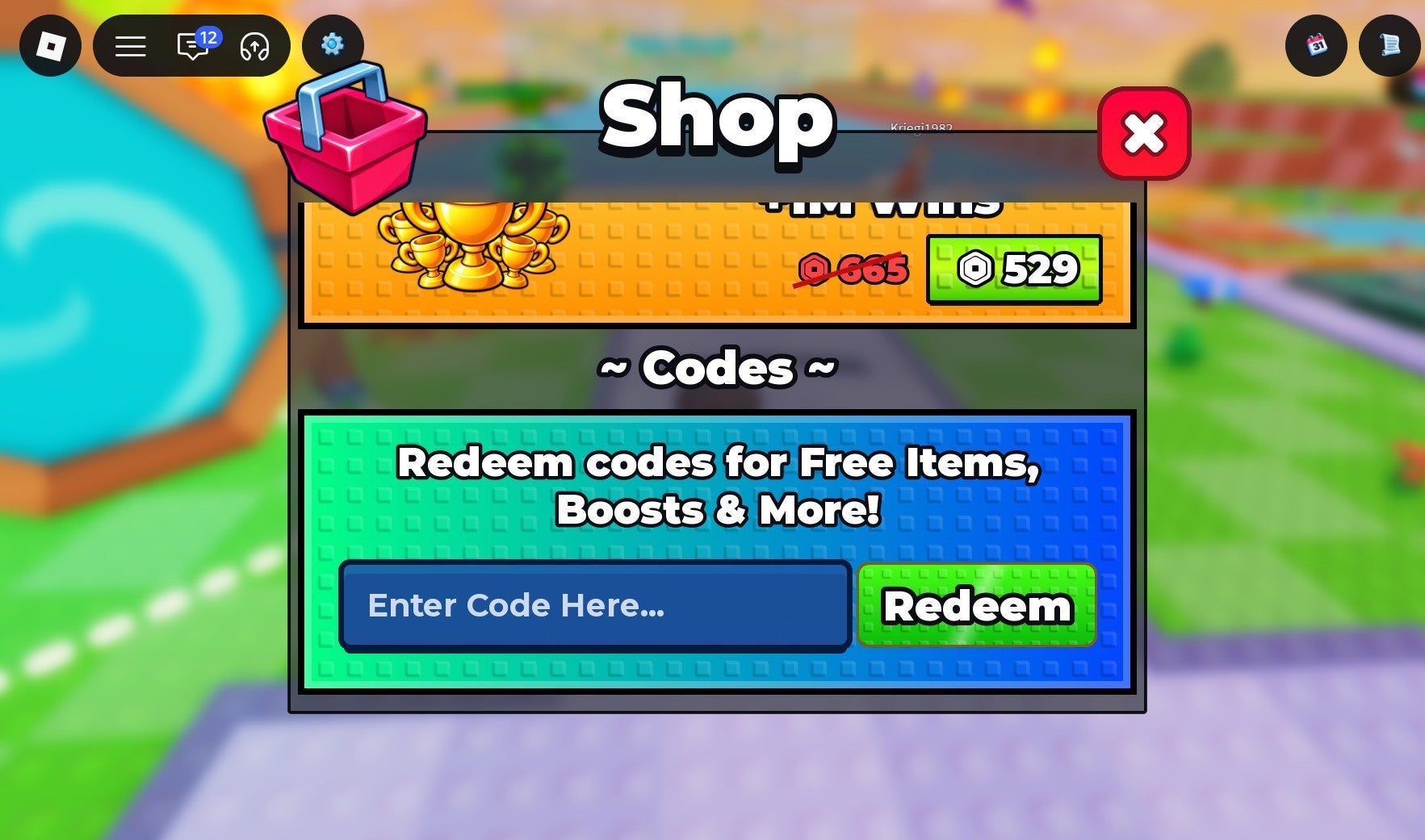
    How to Redeem +1 Stone Skipping Codes

    To redeem codes, follow these steps:

    1. Launch +1 Stone Skipping on the Roblox platform.
    2. Play through the tutorial.
    3. Click the Shopbutton on the left-hand side of the screen.
    4. Scroll to the bottom of the Shop.
    5. Copy the code using the button above.
    6. Paste it into the code redemption box.

    All Expired +1 Stone Skipping Codes

    The following codes can’t be redeemed anymore for their rewards:

    • SECRET2
    • 10MVISITS
    • 500KFAV
    • 2KSPECIAL
    • WORLD5
    • 10KLIKES
    • 50KCCU
    • 40KCCU
    • SECRET
    • 10KCCU
    • 5KCCU
    • WORLD4
    • THANKYOU
    • WORLD3
    • WELCOME

    Why is My +1 Stone Skipping Code Not Working?

    If the +1 Stone Skipping code that you’re trying to redeem is not working, it’s likely due to one of two reasons:

    • The code has expired.
    • There’s a typo in the code.

    The most common reason for a code not working is that it’s expired. While we check codes often, they can sometimes expire before our next check.

    It’s also a good idea to double-check the code you’re trying to redeem for any typos or hidden spaces before or after the code. We’ve included copy boxes above so that you can copy and paste the code directly into +1 Stone Skipping to avoid typos.

    How to Get More +1 Stone Skipping Codes

    The best way to obtain more codes is to bookmark this IGN +1 Stone Skipping codes page. We update it every time a new code is released, and test and verify every code ourselves, so you know you’ve always got the most up-to-date and active codes.

    Alternatively, new +1 Stone Skipping codes are posted in the game’s official Discord server, so make sure to join there if you’d prefer to get them directly from the source.

    Up Next: +1 Stone Skipping Guide

    Previous+1 Stone Skipping GuideNext+1 Stone Skipping Guide

    Was this guide helpful?

    In This Guide

    2026 codes October Skipping Stone
    Share. Facebook Twitter
    Previous ArticleMade in Abyss: Mezameru Shinpi release date, what to expect, and more
    Next Article Strategy RPG Stardust: Wish of Witch set to release for PlayStation 5 and Nintendo Switch 2 in 2027
    James

    Related Posts

    Can Jogging in Place Get a Teleport Player Moving? VR StrideS Thinks So, for $12.99

    November 7, 2026

    Fortnite Unleashes Chaos with Ultra-Rare Token Offering Free Shop Access: Players Are Selling Accounts for Up To $10,000 On eBay

    November 7, 2026

    Anime aficionados assemble for AniMaine 2026

    November 7, 2026

    Fortnite Treasure Hour (November 7, 2026): Event details and timings for all regions

    November 7, 2026
    Leave A Reply Cancel Reply

    Our Picks

    Netflix’s ‘Stranger Things’ Goes Back in Time With 1950s Prequel Series

    November 7, 2026

    Darth Vader Receives New Star Wars 50th Anniversary S.H.Figuarts

    November 7, 2026

    Clayface: Celebrity Dirt #5 Preview: Till Death Do Us Splat

    November 7, 2026

    PS5 Pro is Sold Out Everywhere as GTA VI Pre

    November 7, 2026
    • Facebook
    • Twitter
    • Instagram
    • YouTube
    • TikTok
    • Telegram
    Don't Miss
    Web3 Culture

    CryptoCasino.com Expands Platform With Broader Cryptocurrency Support and Multi

    By JamesJuly 20, 20260

    LEIGH-ON-SEA, United Kingdom, July 20, 2026 (GLOBE NEWSWIRE) — CryptoCasino.com today announced platform enhancements designed to improve accessibility and user experience through expanded cryptocurrency support, MetaMask wallet integration, and multilingual availability for users across global markets.

    Gloucester Rugby launches new esports school to help young people

    July 20, 2026

    CJP protest: Shabana Azmi`s health detoriates, continues climbing barricades with youth

    July 20, 2026

    Entertainment News (07/21/26)

    July 20, 2026

    Subscribe to Updates

    Get the latest creative news from SmartMag about art & design.

    About Us
    About Us

    Comic Vibe is a pop-culture destination created for fans who live and breathe comics, movies, anime, TV shows, gaming, tech, cosplay, and collectibles.

    Our mission is to deliver engaging news, reviews, features, guides, and opinions that celebrate geek culture in all its forms. From the latest comic releases and blockbuster films to anime trends, gaming updates, cutting-edge tech, and collector culture, Comic Vibe brings everything together in one vibrant hub.

    Our Picks

    Netflix’s ‘Stranger Things’ Goes Back in Time With 1950s Prequel Series

    November 7, 2026

    Darth Vader Receives New Star Wars 50th Anniversary S.H.Figuarts

    November 7, 2026

    Clayface: Celebrity Dirt #5 Preview: Till Death Do Us Splat

    November 7, 2026

    Subscribe to Updates

    Get the latest comics, anime, movies, TV, gaming, cosplay, and pop culture news delivered directly to your inbox. No spam—just the stories every fan should know.

    Facebook X (Twitter) Instagram YouTube TikTok
    • Home
    • Contact Us
    • Terms & Conditions
    • Advertise With Us
    • DMCA Policy
    • Privacy Policy
    • About Us
    © 2026 Comic Vibe. Designed by Comic Vibe.

    Type above and press Enter to search. Press Esc to cancel.