
Close Menu

    Subscribe to Updates

    Get the latest creative news from FooBar about art, design and business.

    What's Hot

    Midnight Fantastic Four release schedule (updated September 2026)

    September 9, 2026

    What To Watch Tuesday: Snowfall Spin-Off Debuts, Jeopardy! Masters Winner Revealed, And More

    September 9, 2026

    SportsHero (ASX:SHO): Inside the Razer and Carry1st Deals Powering This Gaming Ecosystem Play

    September 9, 2026
    Facebook X (Twitter) Instagram
    Facebook X (Twitter) Instagram YouTube TikTok
    Comic Vibe
    Wednesday, September 9
    • Home
    • Comics
      • Comic Vibe News
    • Gaming
    • Movies
    • TV
    • Anime
    • Toys & Collectibles
    • Cosplay
    • Tech
    • Digital Culture
      • Creators & Fan Culture
      • Creator Economy & Fan-Driven Platforms
      • Digital Fandom & Online Communities
      • Metaverse & Virtual Worlds
      • NFTs & Digital Collectibles
      • Virtual Events & Online Conventions
      • Virtual Identity & Avatars
    • Shop
    Comic Vibe
    • Home
    • Contact Us
    • Terms & Conditions
    • Advertise With Us
    • DMCA Policy
    • Privacy Policy
    • About Us
    Home»Gaming»You Can Now Organise Your Nintendo 3DS Apps With “Drag & Drop” on PC
    Gaming

    You Can Now Organise Your Nintendo 3DS Apps With “Drag & Drop” on PC

    JamesBy JamesAugust 19, 2026No Comments4 Mins Read
    Facebook Twitter
    You Can Now Organise Your Nintendo 3DS Apps With “Drag & Drop” on PC
    Share
    Facebook Twitter

    🤝
    Don’t want to see ads? Become a premium member for $3 a month and support an independent publication today!

    The Nintendo 3DS is getting a lot of love this year, which is great for those of us that hanged onto this beloved clamshell, not so much for those wanting one… have you seen the resale prices on these things!? Many 3DS enthusiasts have hacked their 3DS over the years, offering an array of enhancements that may make your handheld a little… overwhelming.

    Your home screen is likely riddled with applications, many of which you have no idea what they do because you haven’t opened them in ages, and because the 3DS wasn’t technically designed for this, the UI (and your stylus) feels the pressure and the user experience becomes a cluttered mess.

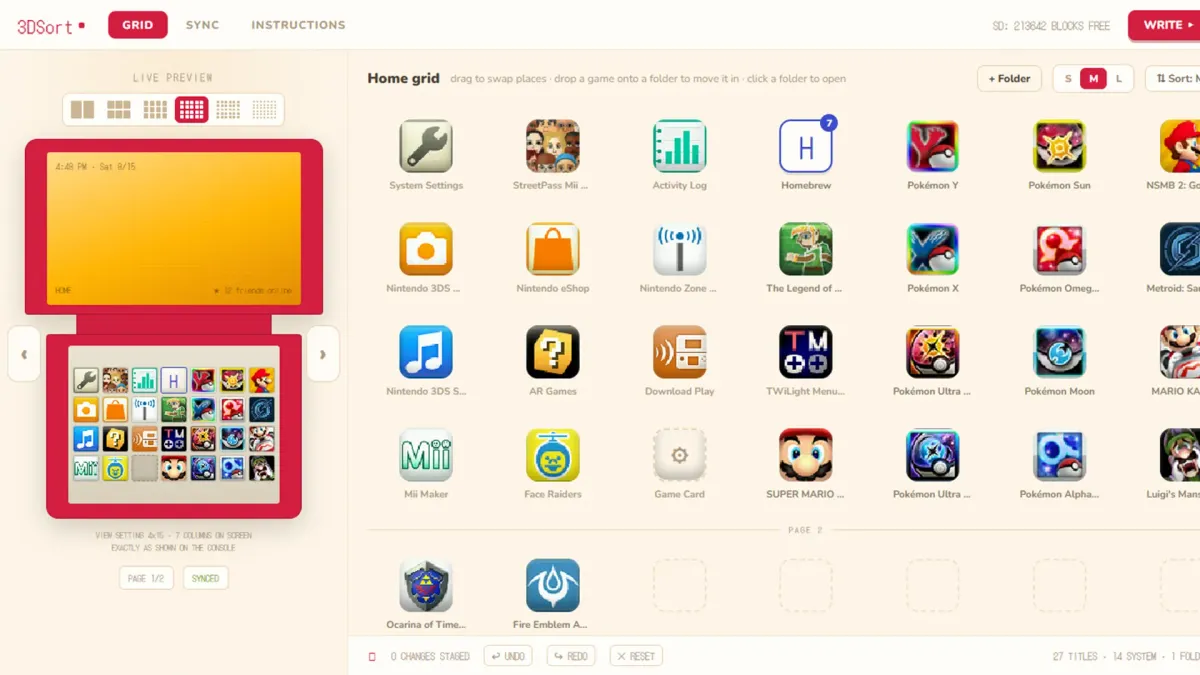
    Well, that clutter can now become an organised library of games and apps thanks to 3DSort, a new piece of software for PC users that syncs your 3DS and allows you to literally drag and drop your apps around the device, alongside the ability to edit, rename, delete, and empty folders quickly.
    Credit: SalustLab

    What does it do?

    • Swap any two tiles by dropping one onto the other: games, system apps, folder tiles, even the Game Card slot
    • Move games and system apps in and out of folders
    • Create, rename, empty and delete folders
    • Sort presets (A to Z, Z to A, release date oldest or newest first)
    • Live preview that reproduces the console screen exactly, for every view setting from 1×60 to 6×10
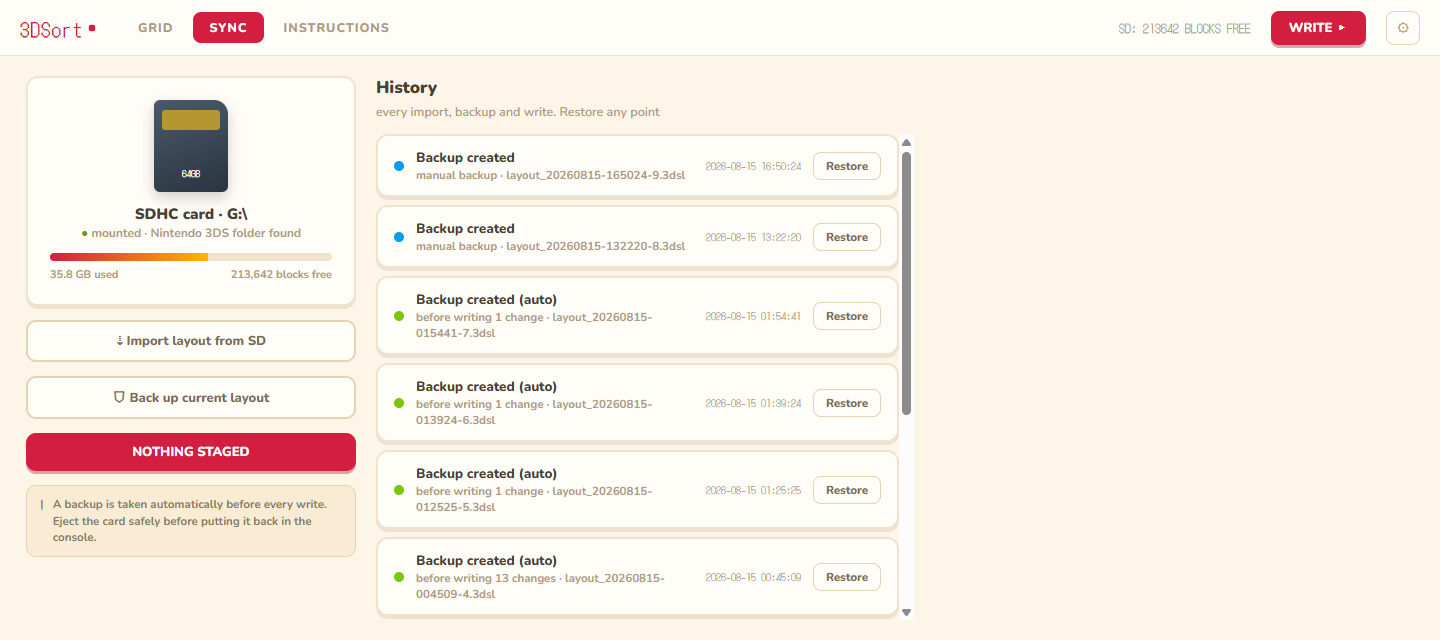
    • Every change is staged in memory first, with undo, redo and reset. Nothing touches the card until you hit WRITE and confirm
    • A backup of the current layout is taken automatically before every write, and any backup can be restored later
    • Every write also unwraps gift-boxed icons in bulk (same mechanism as Cthulhu’s “Unwrap all”) and preserves the HOME menu theme you picked on the console, even when restoring an old backup

    ⚠️
    Disclaimer: The user has openly mentioned that this project was heavily assisted by AI. We respect the openness and the fact that they have left it open-aders would rather not use AI-assisted and “vibe coded” software

    This was made by SalustLab, and in their words: 3DSort edits the layout directly on the SD card instead. Put the card in your computer, sort your games automatically by alphabetical order or release year, or manually drag things around and manage folders in a desktop app, check the live preview, then write the result back and boot the console.
    Credit: SalustLab

    How It Works

    The HOME menu layout lives in an encrypted extdata archive on the SD card. 3DSort uses save3ds to extract and reimport that archive with your console’s keys, then parses save data itself. Anything in the file it does not understand is preserved byte for byte. Icons and names come from the console’s own icon cache, so the grid shows exactly what the console shows.

    Folder definitions and system app positions live in Launcher.dat, inside a system save on the NAND. 3DSort edits that file too, through the same save3ds engine, but it can only reach the NAND with your help: a GodMode9 script dumps the save container to the card, the app edits it, and another script injects it back, hash-checked end to end. If the check fails the script aborts and the original container stays on the card for recovery, states SalustLab.

    What you need to make this work

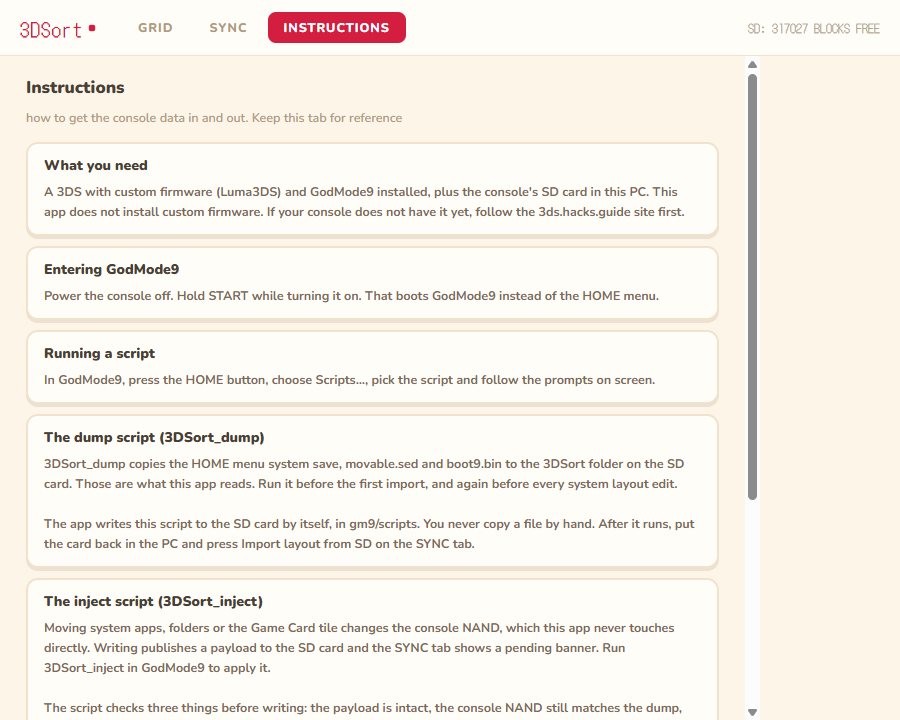
    • A 3DS with custom firmware (Luma3DS) and GodMode9
    • A PC with an SD card reader. On Windows, also the WebView2 runtime, which ships with Windows 10 and 11 by default
    • The console’s boot9.bin and movable.sed. You do not copy these by hand: the app writes a 3DSort_dump script to the card, and that script dumps them for you, along with the HOME menu save.

    If this interests you and you want to give it ago this openion on how best to execute this piece of software on PC. Please be wary when downloading things from GitHub; do your due diligence because there has been a moment in the past where retro gamers have downloaded Malware from GitHub, even more so during this “vibe coding” trend we are living through

    ❤️
    Like what you are reading? If you do and want to support us, you can do so by becoming a member,tipping us or taking a look at our gaming accessory company GAMENOOK (10% off just for you). This allows us to continue what we do without succumbing to algorithms, clickbait and over-intrusive ads, while paying human writers instead of AI.

    Apps Drag Nintendo Organise your
    Share. Facebook Twitter
    Previous ArticleNFL Fans in the Smallest Markets Are Buying the Most Merchandise
    Next Article Kim Zolciak Reacts to Kroy Biermann Dating Her Boyfriend’s Ex
    James

    Related Posts

    ‘Gen-AI Controversy Aside’ Is A Wild Thing To Write In A Video Game Preview

    September 9, 2026

    Ex-PlayStation boss confirms he never met with Xbox CEO Asha Sharma to discuss games business

    September 9, 2026

    GOG brings back “big box” PC games, one printable template at a time

    September 9, 2026

    Nintendo teases with the logo for The Legend of Zelda ahead of today’s Nintendo Direct

    September 9, 2026
    Leave A Reply Cancel Reply

    Our Picks

    Midnight Fantastic Four release schedule (updated September 2026)

    September 9, 2026

    What To Watch Tuesday: Snowfall Spin-Off Debuts, Jeopardy! Masters Winner Revealed, And More

    September 9, 2026

    SportsHero (ASX:SHO): Inside the Razer and Carry1st Deals Powering This Gaming Ecosystem Play

    September 9, 2026

    Is Jimmy Kimmel’s Show Ending? ABC Shuts Down Report Claiming a 2027 End Date

    September 9, 2026
    • Facebook
    • Twitter
    • Instagram
    • YouTube
    • TikTok
    • Telegram
    Don't Miss
    Tech

    ASUS Launches Triple-Mode ROG Strix XG27UCMG Gaming Monitor With Up To 488Hz

    By JamesJuly 10, 20260

    ASUS is now the third display manufacturer to debut a triple-mode gaming monitor after MSI, and GIGABYTE

    FIFA selling small pieces of World Cup final pitch for $450

    July 10, 2026

    1990s cop shows: The dramas, detectives and reality TV that defined an era

    July 10, 2026

    Rocketship Inks Deal with Moulin Rouge

    July 10, 2026

    Subscribe to Updates

    Get the latest creative news from SmartMag about art & design.

    About Us
    About Us

    Comic Vibe is a pop-culture destination created for fans who live and breathe comics, movies, anime, TV shows, gaming, tech, cosplay, and collectibles.

    Our mission is to deliver engaging news, reviews, features, guides, and opinions that celebrate geek culture in all its forms. From the latest comic releases and blockbuster films to anime trends, gaming updates, cutting-edge tech, and collector culture, Comic Vibe brings everything together in one vibrant hub.

    Our Picks

    Midnight Fantastic Four release schedule (updated September 2026)

    September 9, 2026

    What To Watch Tuesday: Snowfall Spin-Off Debuts, Jeopardy! Masters Winner Revealed, And More

    September 9, 2026

    SportsHero (ASX:SHO): Inside the Razer and Carry1st Deals Powering This Gaming Ecosystem Play

    September 9, 2026

    Subscribe to Updates

    Get the latest comics, anime, movies, TV, gaming, cosplay, and pop culture news delivered directly to your inbox. No spam—just the stories every fan should know.

    Facebook X (Twitter) Instagram YouTube TikTok
    • Home
    • Contact Us
    • Terms & Conditions
    • Advertise With Us
    • DMCA Policy
    • Privacy Policy
    • About Us
    © 2026 Comic Vibe. Designed by Comic Vibe.

    Type above and press Enter to search. Press Esc to cancel.