

The 4th-gen Apple TV 4K comes with a new remote. Here’s what you need to know about it.
Earlier this October, Apple unveiled its latest Apple TV 4K streaming box. Like most product launches in recent months, the release centered around a “supercharged” AI offering, which Apple believes will transform “how users search for, discover, and enjoy their favorite movies and TV shows through a full-screen Siri AI experience.” In its announcement, Apple touted the AI-enabled fourth generation of its popular streaming hub as the “most immersive home theater experience yet.”
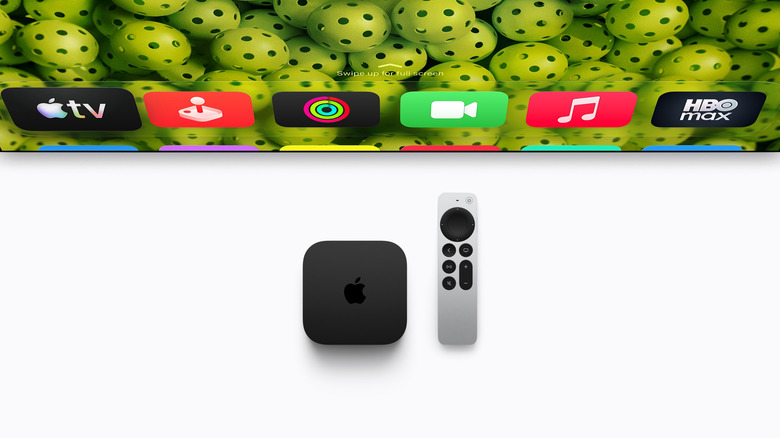
One of the most underrated aspects of the new Apple TV 4K is the introduction of its new remote. At first glance, the Siri Remote doesn’t appear much different. Sporting the same sleek silver and black design fashioned with 100 percent recycled aluminum, it retains the touch-enabled clickpad and voice recognition from its previous version. Like its third-generation predecessor, the new Siri Remote uses a USB-C port for quick recharging and better cross-compatibility.
However, the new Siri Remote builds on top of this beloved design by adding a more precise Find My feature. With Precision Finding, you can use your phone’s Find My app to find exactly where your fourth-gen Siri Remote is hiding. The remote also adds the ability to play a sound when trying to locate it, much to the joy of those affected by the couch-swallowing gremlins plaguing America’s living rooms.
The new Apple TV 4K is now on available for purchase, and the new Siri Remote comes in the box. However, you will also be able purchase the fourth-generation Siri Remote separately
The compatibility conundrum
Retailing for $59, the remote is compatible with all four generations of the Apple TV 4K, as well as the Apple TV HD. Those holding onto Apple TV models from before 2015 will need to continue digging through their couch cushions.
This expanded compatibility is notable given Apple’s plans for Siri AI. As it stands, the fine print of Apple’s press release notes that the new AI suite isn’t exclusive to the new streaming box. Instead, the company is also pushing its Siri AI features to both Apple TV 4K’s second- and third-generation boxes. So while you might be tempted to upgrade your streaming box in order to benefit from the faster speeds, an Ethernet port and a built-in microphones, you may also find that upgrading your Apple TV 4K simply isn’t worth the $299 price tag. As such, you may want to consider simply upgrade your remote separately and save $240.
There is a catch, however. In addition to a compatible streaming device, your fourth-gen Siri Remote will need to be paired with a relatively new iPhone to unlock its Precision Finding feature. As it stands, the feature is available to Apple viewers with an iPhone Duo, iPhone Air, or iPhone 17 or later, except the iPhone 17e. You will also need to run Apple’s latest iOS software, iOS 27.
Similar to users with a second- or third-generation Siri Remote, those with an older iPhone will be able to use Apple’s Find My feature without Precision Finding. This may be a surprise, as Apple’s iPhone 15 and 16 models support Precision Finding for products like the AirTag 2. However, some speculate that this is because Apple’s Find My tech has transitioned from using its Ultra Wideband chip to Bluetooth 6 technology in this instance.
What else is coming to your Apple TV 4K?
Apple promises that its Siri AI will make your Apple TV 4K more helpful and intuitive by adding a “profoundly more capable and conversational assistant with personal context understanding, broad world knowledge, and the ability to take even more systemwide app actions.”
Siri AI allows you to ask your television questions like, “Siri, who won Best Comedy at this year’s Emmy Awards?” You can also ask Siri questions about the film or show you are watching, such as filming locations, why recognize a particular actor or whether a movie is appropriate for your children. Responses are overlaid at the corner of your screen in order to not disrupt your viewing experience.
In service of this mission, the box has three far-field microphones, extending your hands-free viewing experience across the room. Moreover, advanced echo cancellation allows your Apple TV 4K to isolate your voice and block out the noise, ensuring you don’t spend half the show unsuccessfully screaming at Siri. This also means you don’t have to speak all of your queries into the Siri Remote; the box itself can hear you.
The new Apple TV 4K also promises significant speed gains. By adding a new A19 chip, Apple claims that its latest streaming box will achieve 50 percent faster CPU performance and up to twice the GPU speeds when compared to its third-gen predecessor. Its AV1 decoder will enable more bandwidth-efficient streams, increasing visual quality without overloading your network.
Connected to a four compatible HomePods, you can achieve Apple’s best surround sound experience. Moreover, you can manage smart home hub notifications with AI-generated camera activity descriptions, doorbell notifications and enhanced control of select accessories.
