
Close Menu

    Subscribe to Updates

    Get the latest creative news from FooBar about art, design and business.

    What's Hot

    5 Things You Need To Do Before You Install Grand Theft Auto 6

    November 8, 2026

    Ramayana and Avengers: Doomsday raise a pertinent question – Why films are becoming increasingly dependent on franchise?

    November 8, 2026

    Survive Your Ideas codes November 2026

    November 8, 2026
    Facebook X (Twitter) Instagram
    Facebook X (Twitter) Instagram YouTube TikTok
    Comic Vibe
    Sunday, November 8
    • Home
    • Comics
      • Comic Vibe News
    • Gaming
    • Movies
    • TV
    • Anime
    • Toys & Collectibles
    • Cosplay
    • Tech
    • Digital Culture
      • Creators & Fan Culture
      • Creator Economy & Fan-Driven Platforms
      • Digital Fandom & Online Communities
      • Metaverse & Virtual Worlds
      • NFTs & Digital Collectibles
      • Virtual Events & Online Conventions
      • Virtual Identity & Avatars
    • Shop
    Comic Vibe
    • Home
    • Contact Us
    • Terms & Conditions
    • Advertise With Us
    • DMCA Policy
    • Privacy Policy
    • About Us
    Home»Gaming»What the orange light on your PlayStation 5 is actually telling you
    Gaming

    What the orange light on your PlayStation 5 is actually telling you

    JamesBy JamesOctober 19, 2026No Comments4 Mins Read
    Facebook Twitter
    What the orange light on your PlayStation 5 is actually telling you
    Share
    Facebook Twitter

    Unlike many orange icons and lights, this one isn’t a warning sign.

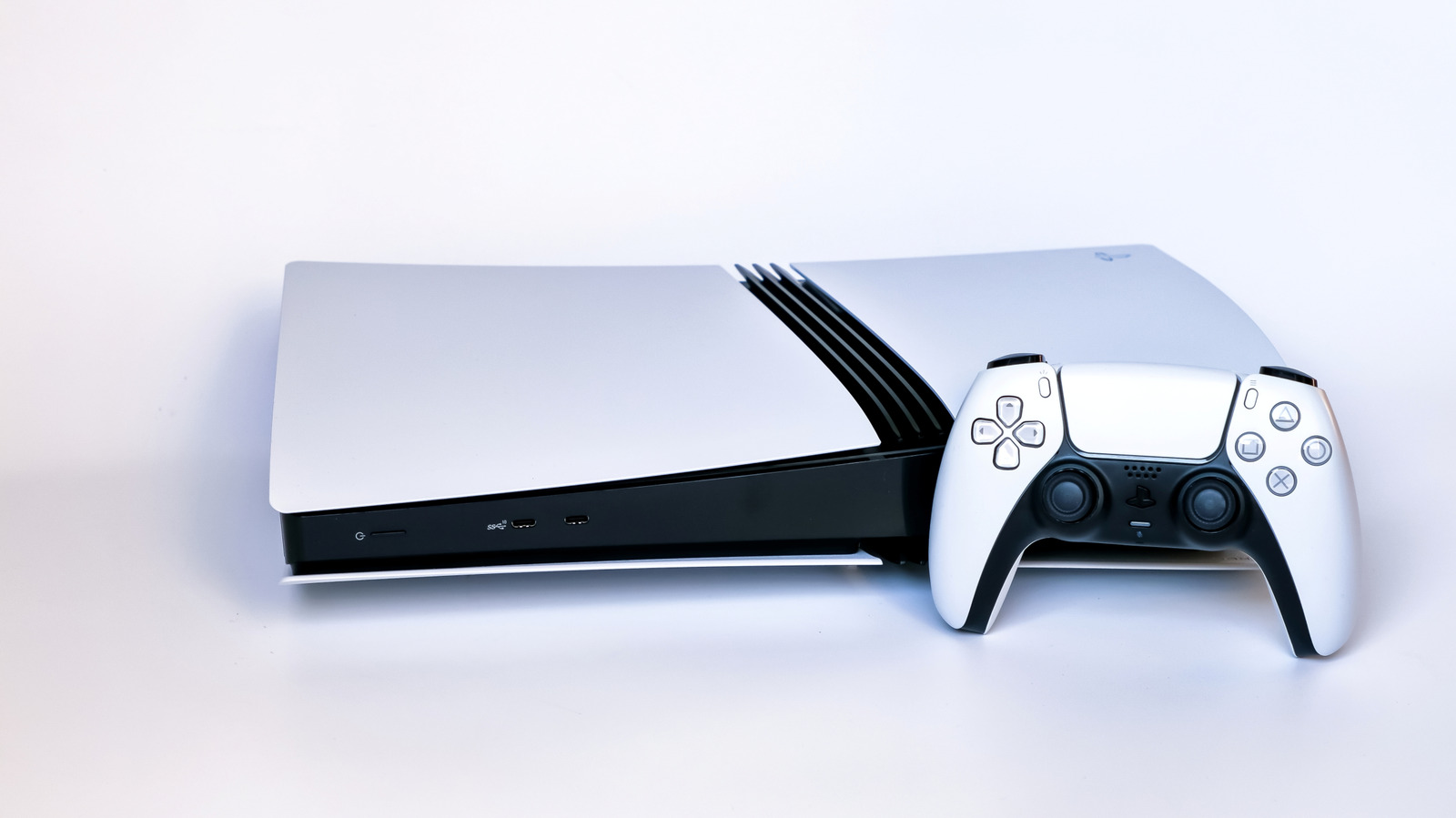
    Orange isn’t the most reassuring color to see displayed on a device. It’s something that can trigger a visceral reaction of panic, given its use for elements like check engine lights in a car and faulty power supplies for past consoles. Thankfully, on a PlayStation 5 it’s nothing to worry about; it just means the console has entered Rest Mode. An unrelated orange light on your PS5 controller below the PS button indicates that your mic is muted — press that button to unmute.

    Rest Mode is an incredibly handy feature that saves power while still allowing your console to perform basic tasks. Depending on your PS5’s settings, it can work to charge your controllers and download games while consuming only a few watts. Entering Rest Mode after a set period of inactivity is part of the console’s factory settings, but you can easily adjust this or disable it entirely.

    To enter Rest Mode when you’re done playing, simply press the power button on the front of the console for a moment. Alternatively, hit the PS button on your controller to open the control center, then go to Power > Enter Rest Mode. Never unplug your PS5 when you see the orange light, as it’s not fully powered off in that state. Select Turn Off PS5 from the Power menu and wait for the system lights to go out before unplugging it.

    How to change your PlayStation 5’s Rest Mode settings

    If your PS5 is entering Rest Mode from inactivity faster than you want, you can change the timer for this in its settings:

    1. From the home screen, select Settings at the top-right.

    2. Select System, then Power Saving.

    3. Select Set Time Until PS5 Enters Rest Mode.

    From here, you can set how long the console will remain inactive before entering Rest Mode, with separate settings for media playback and while playing games. If you’d like, you can also choose to have your PS5 never enter Rest Mode, even after prolonged inactivity. 

    Also in the Power Saving section of system settings, select Features Available in Rest Mode to determine how much your PS5 will do while resting. This is where you can choose to power the USB ports, update games, upload saves to the cloud or play games remotely using a PlayStation Portal or other device

    PlayStation 5 hardware warning signs

    A man sitting on a couch holding a PlayStation controller and looking frustrated.

    While an orange light on your PS5 is nothing to worry about, there are other signs when your console is having trouble and might need repair. The console has been around for nearly six years, and there’s no clear timeline for how long a PS5 should be expected to last. Sony’s track record of continuing to support the PS4 with updates bodes well for the firmware side as the PS5 gets on in years, but it’s smart to keep an eye on your hardware. Considering how the PS5 has gone up in price since release, the earlier you can address and fix problems (and in turn avoid having to purchase a new console), the better.

    One of the most common PS5 issues is overheating, which can either be a product of the environment it’s in (like blocked or dusty exhaust vents) or the cooling system naturally degrading over time. Possible signs of overheating include the console shutting down unexpectedly, extremely hot or loud air flow coming from its vents or even an on-screen warning about the console’s temperature. If it continues to be a problem even after you’ve cleaned out dust and placed it in a well-ventilated area, it might be worth bringing it to a professional to have the thermal paste replaced. Repeated overheating can damage internal components and lead to more problems later on.

    Another one of the most frequent PS5 problems is GPU failure, which presents as visual glitches like screen flickering, static or multicolored lines. These can also be caused by HDMI issues, however, so it’s worth trying another high-quality HDMI cable and HDMI port on your TV before assuming your GPU is failing. Plugging your PS5 into another monitor or TV is also a good step to rule out the display as the root cause. 

    If problems persist, it’s likely that your GPU is failing. Unfortunately, because of the specific parts a PS5 uses, the solution for this is to either send the console to Sony for repair or take it to a specialized repair shop.

    Light Orange PlayStation What your
    Share. Facebook Twitter
    Previous ArticleAll Fortnite Chapter 7 Season 4 Sprites
    Next Article This Victor Wembanyama Collectible Quietly Smashed a $5 Million Record
    James

    Related Posts

    5 Things You Need To Do Before You Install Grand Theft Auto 6

    November 8, 2026

    Survive Your Ideas codes November 2026

    November 8, 2026

    Louisville Game Harvest Showcases Local Video Games

    November 8, 2026

    PlayStation Issues New Official Update on Exclusives

    November 8, 2026
    Leave A Reply Cancel Reply

    Our Picks

    5 Things You Need To Do Before You Install Grand Theft Auto 6

    November 8, 2026

    Ramayana and Avengers: Doomsday raise a pertinent question – Why films are becoming increasingly dependent on franchise?

    November 8, 2026

    Survive Your Ideas codes November 2026

    November 8, 2026

    Marvel’s Most Complicated Mutant Is Finally Getting His X

    November 8, 2026
    • Facebook
    • Twitter
    • Instagram
    • YouTube
    • TikTok
    • Telegram
    Don't Miss
    Gaming

    Call of Duty: Modern Warfare 4 announces open beta for Nintendo Switch 2

    By JamesJuly 20, 20260

    Rhythm Heaven Groove review for Nintendo SwitchThe Nintendo Switch 2 Pro Controller is worth buying – here’s why you should get it[Let’s Talk] Do you prefer Mario Kart World or Mario Kart 8 Deluxe?A look at Mario Kart Tour’s lasting impact on the Mario Kart seriesDisgaea Mayhem review for Nintendo Switch 2 and SwitchDenshattack review…

    CJP protest: Swara Bhasker reacts after husband Fahad Ahmad arrested in Mumbai

    July 20, 2026

    NSFW Exclusive Preview: Roberta Gregory’s BITCHY! cuts to the chase

    July 20, 2026

    Christian Ward Signs Deal with Oni Press for Three New Creator

    July 20, 2026

    Subscribe to Updates

    Get the latest creative news from SmartMag about art & design.

    About Us
    About Us

    Comic Vibe is a pop-culture destination created for fans who live and breathe comics, movies, anime, TV shows, gaming, tech, cosplay, and collectibles.

    Our mission is to deliver engaging news, reviews, features, guides, and opinions that celebrate geek culture in all its forms. From the latest comic releases and blockbuster films to anime trends, gaming updates, cutting-edge tech, and collector culture, Comic Vibe brings everything together in one vibrant hub.

    Our Picks

    5 Things You Need To Do Before You Install Grand Theft Auto 6

    November 8, 2026

    Ramayana and Avengers: Doomsday raise a pertinent question – Why films are becoming increasingly dependent on franchise?

    November 8, 2026

    Survive Your Ideas codes November 2026

    November 8, 2026

    Subscribe to Updates

    Get the latest comics, anime, movies, TV, gaming, cosplay, and pop culture news delivered directly to your inbox. No spam—just the stories every fan should know.

    Facebook X (Twitter) Instagram YouTube TikTok
    • Home
    • Contact Us
    • Terms & Conditions
    • Advertise With Us
    • DMCA Policy
    • Privacy Policy
    • About Us
    © 2026 Comic Vibe. Designed by Comic Vibe.

    Type above and press Enter to search. Press Esc to cancel.