

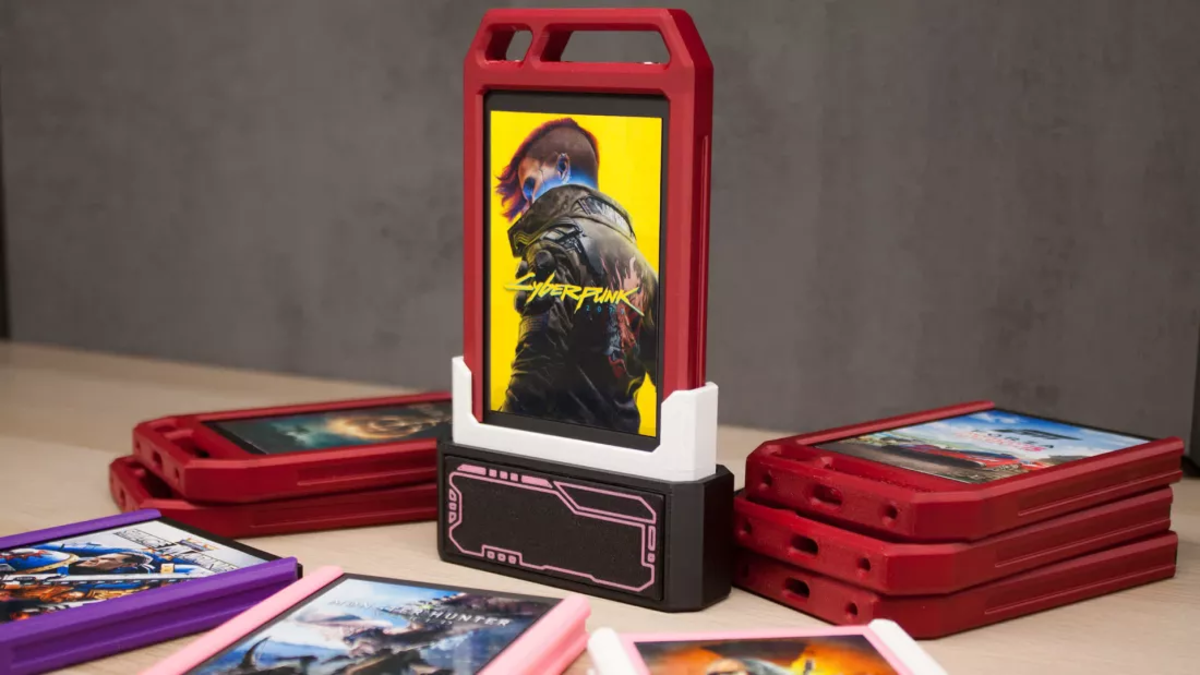
TL;DR: A Reddit user converted inexpensive 128GB 2.5-inch SSDs into custom Steam “cartridges” with printed covers and 3D-printed cases; a Linux udev/systemd setup auto-navigates or can auto-launch Steam, but games remain tied to a Steam account and SSD NAND can lose data over time.
Voice: Hassam NasirSpeed
0:00 / 2:47
Use left and right arrow keys to seek audio.
With PlayStation announcing the end of <a href="https://comicvibe.com/gamestop-ceo-says-physical-games-are-totally-irrelevant/” title=”GameStop CEO Says Physical Games Are 'Totally Irrelevant'”>physical disc production for new games in January 2028, game ownership and physical media have become hot topics. However, one PC gamer on Reddit isn’t ready to let go of physical media just yet, turning old 2.5-inch SSDs into custom Steam game cartridges complete with printed cover art and 3D-printed cases.
Reddit user Jibril-sama shared the setup online, where it has since picked up over 17,000 upvotes. The games are installed onto individual 128GB SATA SSDs, each dressed up to look like a game cartridge. When one is plugged into a SATA dock, a script automatically navigates Steam to the game’s page and offers the option to launch it automatically as well. The SSDs were picked up for around $7 to $8 each, making this an affordable flex as much as a practical one.
The system runs on Linux, using a udev rule to detect when an SSD is connected and triggering a systemd daemon that finds and executes the launch script. Jibril-sama notes that it should be replicable on Windows as well, though without the seamless auto-navigate and auto-launch functionality that Linux enables.
That said, one caveat is that the games are still tied to a Steam account, meaning you still need Valve’s authentication to actually play them. So this is not true physical ownership in the way a disc or a DRM-free GOG installer is. As Jibril-sama puts it, “you still don’t really own the games on Steam, but it’s at least something fun and useful to me personally.” The NAND flash in older SSDs can also lose data over extended periods without power, making long-term preservation less reliable than traditional media.
2
VIEW GALLERY – 2 IMAGES
Question #1
How does the SATA dock+udev+systemd setup detect which SSD cartridge was inserted and trigger the correct Steam launch script?
The setup runs on Linux where a udev rule detects when an SSD is plugged into the SATA dock and triggers a systemd daemon. That systemd daemon then finds and executes the appropriate Steam launch script for the inserted SSD.
Answered
Question #2
What Linux components and scripts did the builder use to auto-navigate Steam to a game’s page and optionally auto-launch it?
The builder used Linux with a udev rule to detect when an SSD is connected, which triggers a systemd daemon that locates and executes a launch script. That launch script is what automatically navigates Steam to the game page and can optionally auto-launch the game.
Answered
Question #3
Can this SSD cartridge system be replicated on Windows, and what Linux features would be missing on that platform?
Yes. The article says Jibril-sama thinks the setup should be replicable on Windows, but Windows would lack the Linux mechanisms that enable seamless auto-navigation and auto-launch. Specifically, the Linux udev rule and systemd daemon that detect a connected SSD and trigger the launch script are the features enabling that automation, and those exact facilities would not be available on Windows.
Answered
Question #4
What size and type of SSDs were used for each cartridge, and why were 128GB SATA drives chosen?
Each cartridge uses an old 2.5-inch 128GB SATA SSD. They were chosen because the drives were inexpensive (about $7 to $8 each), making them an affordable and practical option for the project.
Answered
Have a question not listed here? Ask below and TweakBot will answer it.
It’s hard to deny how creatively the project blends modern technology with nostalgia. At a time when the industry is racing toward an all-digital future, there’s something satisfying about picking up a cartridge, slotting it in, and watching a game load.
