
Close Menu

    Subscribe to Updates

    Get the latest creative news from FooBar about art, design and business.

    What's Hot

    UK entertainment industry faces ‘reckoning’ over sex scandals

    November 13, 2026

    Collectibles insurance limits tested as Darth Vader lightsaber hits $4.9M

    November 13, 2026

    The AI and VR training gap

    November 13, 2026
    Facebook X (Twitter) Instagram
    Facebook X (Twitter) Instagram YouTube TikTok
    Comic Vibe
    Friday, November 13
    • Home
    • Comics
      • Comic Vibe News
    • Gaming
    • Movies
    • TV
    • Anime
    • Toys & Collectibles
    • Cosplay
    • Tech
    • Digital Culture
      • Creators & Fan Culture
      • Creator Economy & Fan-Driven Platforms
      • Digital Fandom & Online Communities
      • Metaverse & Virtual Worlds
      • NFTs & Digital Collectibles
      • Virtual Events & Online Conventions
      • Virtual Identity & Avatars
    • Shop
    Comic Vibe
    • Home
    • Contact Us
    • Terms & Conditions
    • Advertise With Us
    • DMCA Policy
    • Privacy Policy
    • About Us
    Home»Gaming»There’s a chance your PlayStation 5 is plugged into the wrong HDMI port
    Gaming

    There’s a chance your PlayStation 5 is plugged into the wrong HDMI port

    JamesBy JamesOctober 24, 2026No Comments4 Mins Read
    Facebook Twitter
    There’s a chance your PlayStation 5 is plugged into the wrong HDMI port
    Share
    Facebook Twitter

    The picture may look great, but that doesn’t mean you’re getting the full experience.

    A <a href="https://comicvibe.com/playstation-classics-every-retro-game-available-with-ps-plus-premium/” title=”PlayStation Classics: Every retro game available with PS Plus Premium”>PlayStation 5 can display a good picture even while connected to an HDMI port that’s limiting its capabilities, which is a simple mistake to make. Most TVs and monitors come with multiple HDMI ports, each with tiny labels that are hard to read — assuming they’re even present and situated where you can see them. If there is no label, you’ll have to look up the specs for your brand and model. The PS5 console supports HDMI 2.1 for 4K output at 120Hz, among other gaming features, but accessing that requires both a compatible screen and the right output.

    It’s worse if you like to bring your PS5 around the house and set it up on different TVs, because each brand and model features different HDMI arrangements. Never assume that the same set of port numbers means the same specs, even if every TV in the house is from the same brand. For max benefit, check the specs for your exact model and look for an HDMI 2.1 input that supports 4K at 120Hz. On most TVs (not all), HDMI 2.1 ports are the third or fourth option.

    Your choice of cable is also important. Sony recommends using the HDMI cable that comes with the PS5, or another high-quality Ultra High Speed (HDMI 2.1) cable. It’s best to plug the cable directly into the screen or TV without a soundbar or similar between them. For the most part, that’s all it takes. A PS5 console and TV can’t provide peak signal support if the port, cable or intermediary equipment is getting in the way.

    What the correct HDMI cable will unlock

    The benefit of the correct HDMI port is access to the full breadth of output features the PS5 console supports. A 120Hz display can refresh its image 120 times per second, so compatible PS5 games offer smoother motion than a 60Hz setup can provide. However, the game has to support 120 fps output as well. This isn’t always enabled by default, so check the game’s video settings for an option like “120Hz output”, “High Frame Rate” or similar.

    Keep in mind that 120Hz gaming at a lower resolution (1080p or 1440p) can work through HDMI 2.0 on a compatible display. However, HDMI 2.1 is the relevant option for the PS5’s 4K 120Hz output. Also be aware that few PS5 games run at 4K/120; most high frame rate modes lower the resolution to compensate.

    If you’re using a monitor with a high refresh rate, check which resolutions and refresh rates it supports with HDMI, as this might differ from any DisplayPort inputs. Alone, a high refresh rate is not an indication that any given HDMI port supports the PS5 mode you want.

    Other important HDMI 2.1 features include Variable Refresh Rate (VRR), which syncs your screen’s refresh rate with your system’s output to prevent screen tearing. There’s also Auto Low Latency Mode, which tells your TV to switch into its “Game Mode” — disabling picture processing features to minimize input lag.

    Should I use HDMI 1 or 2 for gaming?
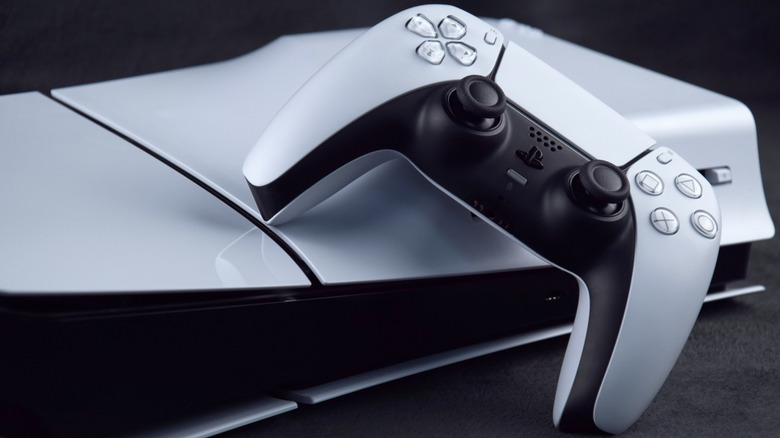
    A PlayStation 5 console laying flat, with a DualSense Wireless Controller leaning on it.

    Neither input number on your TV is inherently better or worse than the other. “HDMI 1” and “HDMI 2” are simply designators, not necessarily version numbers like HDMI 1.x or HDMI 2.x. Plus, you could have a port that’s clearly labeled HDMI 2.1, plug your HDMI cable into it, and still not get 4K 120Hz. Once the console is connected, check the TV/monitor’s input settings, since HDMI 2.1 is not always the default option. Various manufacturers use different menu names and terms, like “Enhanced Features” or similar.

    You also have to make sure to enable the feature on your PS5. On the main menu, open Settings > Screen and Video > Video Output. Set the resolution to Automatic for best results, leave Video Transfer Rate on Automatic and set Enable 120Hz Output to Automatic as well. Select Information for the Connected HDMI Device to see details about the screen’s resolution, Variable Refresh Rate and HDR support. Current Video Output Signal also gives you information for troubleshooting.

    If the console still fails to deliver the signal you expect, recheck the input, cable and display settings before assuming your PS5 needs to be shipped off for repair.

    Chance PlayStation plugged Theres your
    Share. Facebook Twitter
    Previous ArticlePrime Video’s 2027 Fallout Series Officially Confirms $1 Million Twist and Release Date
    Next Article 15 Best Political TV Shows Of All Time, Ranked
    James

    Related Posts

    The Best PS5 and Xbox Controller Deals to Shop Before GTA 6 Releases

    November 13, 2026

    Nintendo Reveals Its First Official Switch 2 Discount for Its Black Friday 2026 Sale, Wiping Out September’s Price Hike Alongside Major Deals on Games and More

    November 13, 2026

    Death Metal Guitarist Goes Viral for Playing Video Games While Band Performs Just Feet Away

    November 13, 2026

    GTA 6 Day One Patch Is Already Rolling Out on PS5

    November 13, 2026
    Leave A Reply Cancel Reply

    Our Picks

    UK entertainment industry faces ‘reckoning’ over sex scandals

    November 13, 2026

    Collectibles insurance limits tested as Darth Vader lightsaber hits $4.9M

    November 13, 2026

    The AI and VR training gap

    November 13, 2026

    Pete Davidson Shares Update On ‘Brutal’ Tattoo Removal

    November 13, 2026
    • Facebook
    • Twitter
    • Instagram
    • YouTube
    • TikTok
    • Telegram
    Don't Miss
    Gaming

    Score Nintendo Switch 2 consoles as low as $399 today ahead of upcoming price hike

    By JamesJuly 21, 20260

    As part of its Birthday celebration, Woot is now offering some discounts on Nintendo Switch 2. Using code GIFT26 will knock $22 off, while new Woot customers can knock the price down to $399 using the same code, and we also have a refurbished deal to scope out.

    Is AMC Entertainment’s (AMC) Record Revenue Proof That the Theater Recovery Is Finally Real?

    July 21, 2026

    What To Watch Tuesday: Kitchen Nightmares Returns, Real Housewives Of London Debuts, And More

    July 21, 2026

    GODSMACK Teams Up With SUMERIAN COMICS For New Graphic Novel ‘Awake’

    July 21, 2026

    Subscribe to Updates

    Get the latest creative news from SmartMag about art & design.

    About Us
    About Us

    Comic Vibe is a pop-culture destination created for fans who live and breathe comics, movies, anime, TV shows, gaming, tech, cosplay, and collectibles.

    Our mission is to deliver engaging news, reviews, features, guides, and opinions that celebrate geek culture in all its forms. From the latest comic releases and blockbuster films to anime trends, gaming updates, cutting-edge tech, and collector culture, Comic Vibe brings everything together in one vibrant hub.

    Our Picks

    UK entertainment industry faces ‘reckoning’ over sex scandals

    November 13, 2026

    Collectibles insurance limits tested as Darth Vader lightsaber hits $4.9M

    November 13, 2026

    The AI and VR training gap

    November 13, 2026

    Subscribe to Updates

    Get the latest comics, anime, movies, TV, gaming, cosplay, and pop culture news delivered directly to your inbox. No spam—just the stories every fan should know.

    Facebook X (Twitter) Instagram YouTube TikTok
    • Home
    • Contact Us
    • Terms & Conditions
    • Advertise With Us
    • DMCA Policy
    • Privacy Policy
    • About Us
    © 2026 Comic Vibe. Designed by Comic Vibe.

    Type above and press Enter to search. Press Esc to cancel.