
Close Menu

    Subscribe to Updates

    Get the latest creative news from FooBar about art, design and business.

    What's Hot

    How to watch NASCAR live at Charlotte in 2026 Chase, schedule

    October 11, 2026

    47 New Hot Wheels Collectibles to Start Hunting for Soon

    October 11, 2026

    It’s a Boy! Olivia Culpo and Christian McCaffrey Share Son’s Name in Sweet Birth Announcement

    October 11, 2026
    Facebook X (Twitter) Instagram
    Facebook X (Twitter) Instagram YouTube TikTok
    Comic Vibe
    Sunday, October 11
    • Home
    • Comics
      • Comic Vibe News
    • Gaming
    • Movies
    • TV
    • Anime
    • Toys & Collectibles
    • Cosplay
    • Tech
    • Digital Culture
      • Creators & Fan Culture
      • Creator Economy & Fan-Driven Platforms
      • Digital Fandom & Online Communities
      • Metaverse & Virtual Worlds
      • NFTs & Digital Collectibles
      • Virtual Events & Online Conventions
      • Virtual Identity & Avatars
    • Shop
    Comic Vibe
    • Home
    • Contact Us
    • Terms & Conditions
    • Advertise With Us
    • DMCA Policy
    • Privacy Policy
    • About Us
    Home»Gaming»The meaning behind the padlock symbol in your PlayStation 5 game library
    Gaming

    The meaning behind the padlock symbol in your PlayStation 5 game library

    JamesBy JamesOctober 11, 2026No Comments4 Mins Read
    Facebook Twitter
    The meaning behind the padlock symbol in your PlayStation 5 game library
    Share
    Facebook Twitter

    Being locked out of your own games isn’t fun, but there are solutions to get back in.

    Sony’s plans to stop making disc-based games beginning in January 2028 mean digital games need to work flawlessly. Unfortunately, that’s not always the case. On your PS5, you may have found some titles inaccessible, as evidenced by a padlock icon over their thumbnails. From your perspective, this can be baffling. You’ve paid for a game and installed it, so it should always be ready to play, right? 

    The reality is that when you buy a game from an online store, you typically don’t get permanent ownership rights — just a license to download and play. Sony has final control over how you access games associated with your account. If the company withdraws a license for whatever reason, or something goes wrong with the authentication process, you’re blocked from accessing the title. This is what the padlock indicates.

    As if that weren’t enough, the way PlayStation Store and Plus subscriptions work can create headaches. Thankfully, there are some methods to fix those padlocks.

    Fixing the PlayStation padlock icon
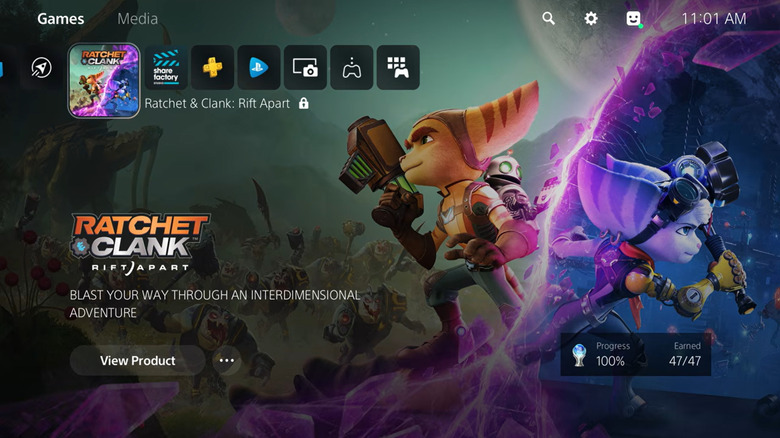
    A "locked" copy of Ratchet & Clank: Rift Apart on the PlayStation 5 home screen.

    First, check that you’re signed into the right PlayStation account, since that’s what ties all your purchases and subscriptions together. You can sign out of an account by going to Settings > Users and Accounts > Other > Sign Out, or sign back in lets you create new accounts if needed, too. Next, confirm that PlayStation Network is online using the PlayStation Status page. If PSN is down, you may get locked out of games

    You’ll also want to verify that PSN recognizes your purchases, or in the case of PlayStation Plus, that you both have an active subscription and the game you want to play is included with it. Titles are added and removed on a regular basis, so you’ll see a padlock on games you previously downloaded that aren’t in the library anymore (as well as if your subscription has lapsed).

    Scan your transaction history at Settings > Users and Accounts > Account > Payment and Subscriptions > Transaction History. As for Plus, your status is under Settings > Users and Accounts > Account > Payment and Subscriptions > Subscriptions, and you can browse the PlayStation Plus website for the current library.

    When multiple people share a console, it’s possible to play another person’s games under your own account. This is known as “gamesharing,” and works as long the owner has Console Sharing and Offline Play enabled under Settings > Users and Accounts > Other. That option can only be enabled on one PS5 at a time per account, so if the owner has multiple consoles, they may need to re-designate the one you’re on.

    If you know you should have direct or shared access to a game, you may need to force PSN to restore licenses. Go to the game in your library, press the Options button on your controller, then select Restore License. You can also go to Settings > Users and Accounts > Other > Restore Licenses to fix multiple games simultaneously.

    What if your PS5 games are still locked up?
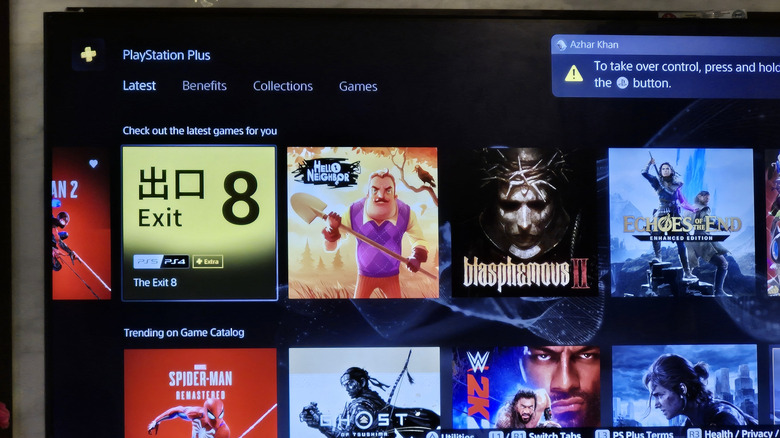
    A storefront showing games included with PlayStation Plus, like Blasphemous II and Exit 8.

    Before moving forward, restart your PS5 (press the PS Button on your controller, then go to the Power menu and choose Restart PS5). You should also install any available updates at Settings > System > System Software > System Software Update and Settings. Bugs fixed by the latest patches don’t typically affect licensing issues, but it’s good to rule everything out.

    Finally, if you see the padlock icon on a disc-based game, that means the disc isn’t acting as a “key” to authenticate the title. Confirm sure the correct disc is inserted into your console. Eject it and make sure it’s clean and inserted the right way (label facing up if the console is horizontal, or to the left if it’s vertical). 

    Beyond these, in an extreme scenario, there could be a glitch with your PS5’s database. You can attempt to solve this by booting your console into Safe Mode. Follow these steps:

    1. Turn off the system by holding the Power button on its front until you hear a second beep, which takes a few seconds. 
    2. Once the console shuts down, press and keep holding the Power button again. Release it only after you hear two beeps, the second of which should trigger in seven seconds.
    3. Connect your controller via a USB cable, then press the PS Button on the controller.
    4. Once Safe Mode is running, select Clear Cache and Rebuild Database.

    Should that not accomplish anything, it’s time to talk to PlayStation Support.

    Behind Meaning Padlock symbol your
    Share. Facebook Twitter
    Previous ArticleNYCC: Jonah Hex And The Shadow Of Michael Walsh
    Next Article Sonic the Hedgehog is hitting mid-life at full speed with a Dragon Ball
    James

    Related Posts

    Promising Video Game Stocks To Watch Today

    October 11, 2026

    Nintendo says they have “no plans” to abandon physical media

    October 11, 2026

    We’re in the middle of a PS5 Pro shortage and GTA 6 will only make it worse

    October 11, 2026

    What is ray tracing in gaming and does it really make a difference?

    October 11, 2026
    Leave A Reply Cancel Reply

    Our Picks

    How to watch NASCAR live at Charlotte in 2026 Chase, schedule

    October 11, 2026

    47 New Hot Wheels Collectibles to Start Hunting for Soon

    October 11, 2026

    It’s a Boy! Olivia Culpo and Christian McCaffrey Share Son’s Name in Sweet Birth Announcement

    October 11, 2026

    Promising Video Game Stocks To Watch Today

    October 11, 2026
    • Facebook
    • Twitter
    • Instagram
    • YouTube
    • TikTok
    • Telegram
    Don't Miss
    Anime

    INCUBASE Studio Powers 12 Anime IP Experiences Across Asia This July

    By JamesJuly 16, 20260

    July 16, 2026 /PRNewswire/ — From large-scale immersive exhibitions to pop-up retail experiences, July marks one of INCUBASE Studio’s busiest months yet, with twelve IP projects taking place across Asia, reflecting the growing momentum of location-based entertainment and the increasing demand for experiential fan engagement

    Silenced Beats: The Detention of Mehdi Black Wind

    July 16, 2026

    10 Best TV Shows Like Little House On The Prairie

    July 16, 2026

    When Daredevil was at Netflix, Charlie Cox felt it was Marvel Studios’ “unwanted stepchild”

    July 16, 2026

    Subscribe to Updates

    Get the latest creative news from SmartMag about art & design.

    About Us
    About Us

    Comic Vibe is a pop-culture destination created for fans who live and breathe comics, movies, anime, TV shows, gaming, tech, cosplay, and collectibles.

    Our mission is to deliver engaging news, reviews, features, guides, and opinions that celebrate geek culture in all its forms. From the latest comic releases and blockbuster films to anime trends, gaming updates, cutting-edge tech, and collector culture, Comic Vibe brings everything together in one vibrant hub.

    Our Picks

    How to watch NASCAR live at Charlotte in 2026 Chase, schedule

    October 11, 2026

    47 New Hot Wheels Collectibles to Start Hunting for Soon

    October 11, 2026

    It’s a Boy! Olivia Culpo and Christian McCaffrey Share Son’s Name in Sweet Birth Announcement

    October 11, 2026

    Subscribe to Updates

    Get the latest comics, anime, movies, TV, gaming, cosplay, and pop culture news delivered directly to your inbox. No spam—just the stories every fan should know.

    Facebook X (Twitter) Instagram YouTube TikTok
    • Home
    • Contact Us
    • Terms & Conditions
    • Advertise With Us
    • DMCA Policy
    • Privacy Policy
    • About Us
    © 2026 Comic Vibe. Designed by Comic Vibe.

    Type above and press Enter to search. Press Esc to cancel.