

We may receive a commission on purchases made from links.
For many years, building your own PC was the best option if you wanted to customize your setup and save money, but buying one can be a more reasonable alternative today. With demand running high, buying parts separately doesn’t always work out in favor of the DIY (do-it-yourself) route, especially when prebuilt PC deals offer a better price and a warranty.
Of course, building your own PC still lets you choose where every dollar goes. But that freedom also comes with research into component compatibility and performance, along with assembly time and a few headaches if the setup doesn’t boot on the first try. If you’d rather spend that time playing games, having the computer arrive ready to go can make more sense.
If you’re interested in buying a gaming PC, though, pay close attention to the specs. It’s easy to get excited about the graphics card and overlook where the manufacturer cut costs to reach the sticker price, while the power supply and cooling deserve attention, too, if you’re thinking about upgrades. To help you avoid those pitfalls, we have selected some gaming PCs that are worth the investment.
ABS Cyclone Aqua
For $1,399.99, you can buy the ABS Cyclone Aqua. It combines a Core i5-14400F with an 8-gigabyte (GB) RTX 5060, making it a good option for stable gaming at 1080p. It also comes with 32 GB of RAM, so you’re not stuck with just one program open at a time. Rounding out the specs is a one-terabyte (TB) solid-state drive (SSD), which can get tight if you have a lot of games. Windows 11 Home comes installed.
If you bought the parts separately, a comparable build would cost around $1,485 with Windows, before shipping and taxes. Prices tend to fluctuate quite a bit, though, especially with memory and GPU shortages. Under those conditions, the prebuilt version still works out as a good deal.
The RTX 5060 performs well in games, with Cyberpunk 2077 and Hogwarts Legacy, for example, exceeding 100 frames per second (fps) in tests of the graphics card, while others like Clair Obscur: Expedition 33 can have performance issues and need some adjustments. The card’s eight GB of graphics memory also limits texture settings at higher resolutions.
Asus ROG NUC 2025
If you don’t have much room for a gaming PC with a large case, the Asus ROG NUC 2025 might appeal to you. It’s a mini PC built for gaming, so you can use it in tighter spaces or keep it near the TV if you want a more traditional gaming experience. The model also comes in different configurations and at different prices, so it’s worth checking those before choosing.
One midrange option has a Core Ultra 9 275HX, an RTX 5070 Laptop GPU, 32 GB of RAM, and a one TB SSD for around $2,149.00 on Asus’s official website. That’s enough to play well at 1080p or even 1440p at certain settings, although you may need to make some graphical adjustments to play at the higher resolution.
But this mini PC has a few catches of its own. It uses a laptop GPU, and although performance is good, it’s still a little lower than what you’d get from a conventional desktop version. The smaller format also means that while you can replace the memory or storage, you don’t have the same freedom with the CPU and GPU.
CyberPowerPC Gamer Xtreme MA-01
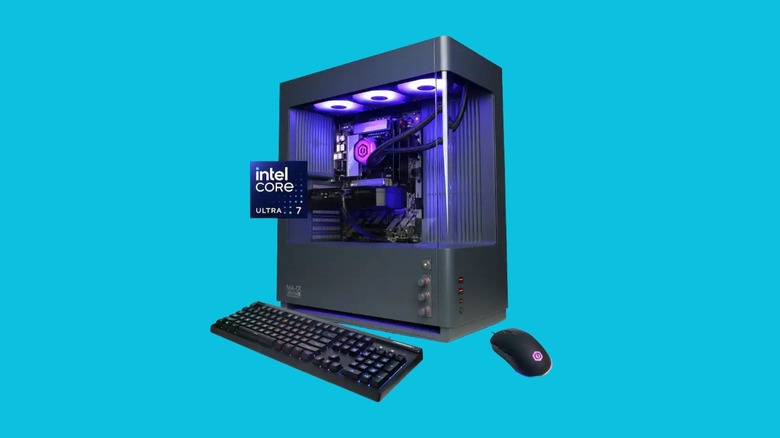
The CyberPowerPC Gamer Xtreme MA-01 is an attractive PC that stands out for its curved-panel case and physical buttons, which let you change the lighting without opening another app. You can find the GXi3800BSTV2 configuration for $2,229.99 with a 360-millimeter All-in-one (AIO) liquid cooler already installed, so you don’t need to make that modification later.
For that price, the hardware includes a Core Ultra 7 270K Plus, a 12 GB RTX 5070, 32 GB of DDR5 RAM, and a two TB SSD. Judging by the specs, it’s a good option for playing at 1440p with good graphics quality, though you’ll want to turn to Deep Learning Super Sampling (DLSS) in some more demanding titles to get more frames on your screen. The solid memory capacity also allows you to keep other programs open while you play.
The weaker points are the finish of the lighting controls and connectivity, which stops at Wi-Fi 6 and doesn’t include USB4 or Thunderbolt. If you plan to use accessories that need those faster connections, you might end up disappointed, but the overall package makes sense if you just want to play.
Thermaltake LCGS Quartz i1460
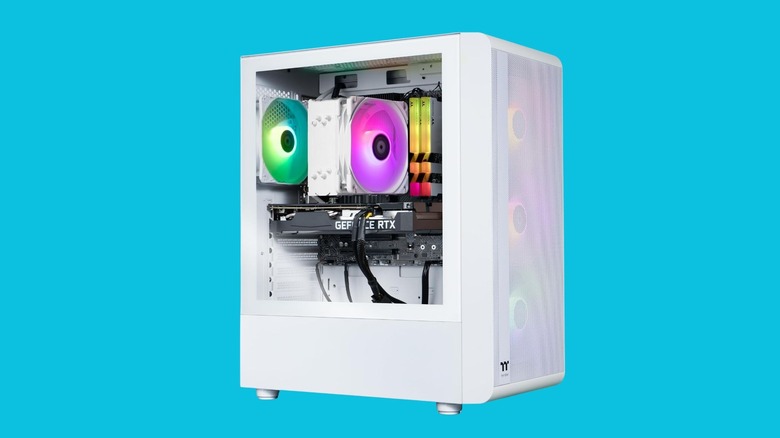
If you want to spend less without giving up an Nvidia RTX 50-series GPU, one option is the Thermaltake LCGS Quartz i1460, which you can find on Amazon for around $1,200. One configuration combines a Core i5-14400F, an eight GB RTX 5060, 16 GB of DDR4 RAM, and a one TB SSD, with Windows 11 Home installed. The package also includes a tower cooler and a 600-watt Thermaltake power supply with 80 Plus Gold certification, making it a solid setup for the money.
You’ll still need to keep your expectations in check, since the focus is gaming at 1080p, and certain less optimized games will need graphics adjustments or DLSS to run smoothly. In some games, for example, you won’t be able to use ray tracing to get more out of the lighting, while 16 GB of RAM gives you less flexibility to keep several programs open at once. If you want to save a little and don’t mind those compromises, it’s a good buy.
Corsair Vengeance a7500
If you want to play at higher resolutions, like 1440p or even 4K, one of the best prebuilt PC options is the Corsair Vengeance a7500. You can find it in Corsair’s own store for $2,999.99, and it comes with some serious hardware, including a Ryzen 7 9800X3D, an RTX 5070 Ti, and 32 GB of DDR5 RAM, and 240-millimeter liquid cooling, along with a two-year warranty.
That’s a bigger investment than the other models on this list (by a lot in some cases), but given the components inside, you can expect good graphics quality at 1440p and even 4K, though the latter will need some adjustments and DLSS. The graphics card also has 16 GB of VRAM, so you can use more demanding textures with less worry.
The one TB SSD is a less exciting part of the package, since that’s a modest capacity if you want to keep several games installed at once. In that case, you might need to expand your storage a little sooner than expected.
How we chose these prebuilt gaming PCs

When putting this list together, we wanted to cover different budget levels, but not at the cost of a solid baseline gaming experience. To that end, the computers here all have at least enough hardware to run games with stable performance at 1080p or even in higher presets, like 1440p and 4K, although those higher resolutions may need some adjustments and DLSS. We also compared prices and specifications across different stores and read reviews to understand each model’s strengths and limitations. We made sure to include one compact option, too, for people with limited space or those who prefer to keep their computer beside their TV.
Our final choices considered the whole package, because a powerful GPU doesn’t always make a PC the best buy. We paid attention to memory, storage, cooling, and warranty coverage, along with the possibility of future upgrades. When referencing component tests to discuss performance, we kept in mind that results can vary depending on the computer’s specs and game settings.
