

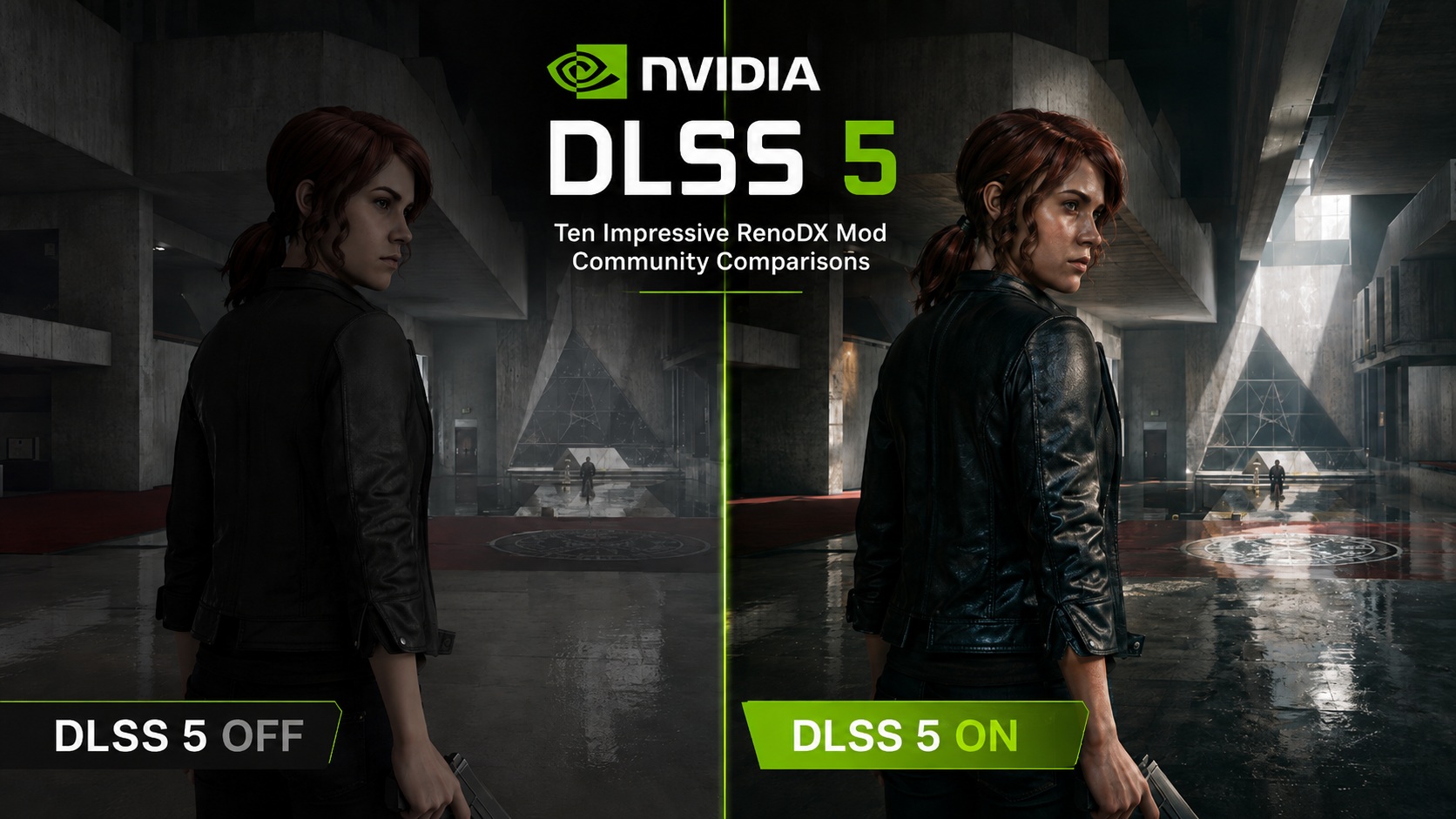
NVIDIA’s DLSS 5 marks a major shift for the company’s AI-powered graphics technologies, using Neural Rendering to enhance lighting, materials, skin, hair, and other visual elements in real time. NVIDIA is positioning it as a “significant step” toward more photorealistic game graphics, while still giving developers and artists control over how the effect is applied.
Although DLSS 5 isn’t officially available in games yet, PC gaming enthusiasts have already managed to get an early and unofficial version working. An experimental runtime library shipped with the early access PC build of NBA 2K27, and members of the RenoDX Discord server quickly figured out how to inject its Neural Rendering functionality into games such as Control using RenoDX and ReShade.
Since then, the mod has been tested on numerous modern PC games, giving us our first opportunity to see what DLSS 5 can potentially do outside NVIDIA’s official demonstrations.
What Exactly Is NVIDIA DLSS 5?
DLSS 5 is NVIDIA’s latest Neural Rendering technology, which is designed to enhance a game’s existing image with more photorealistic lighting and material rendering in real time. Rather than simply improving image reconstruction or performance, it uses an AI model to reinterpret elements such as skin, hair, fabrics, and their interaction with light, while remaining anchored to the game’s original 3D content and artistic direction
NVIDIA says DLSS 5 takes the game’s existing color information and motion vectors for each frame and feeds them into a real-time neural rendering model. The network then analyzes the scene and enhances lighting and material appearance while keeping the output anchored to the game’s original 3D content and temporally consistent from frame to frame. NVIDIA says the model can operate in real time at resolutions of up to 4K.
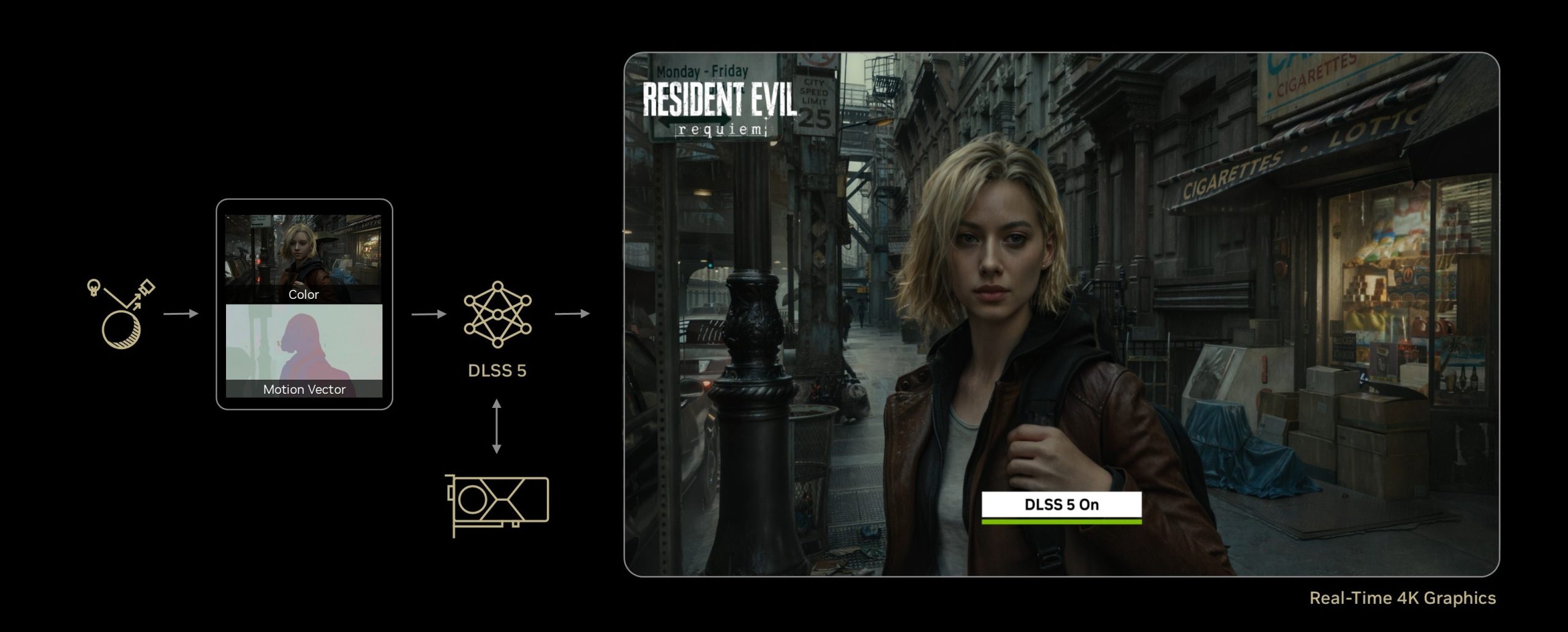
The DLSS 5 model is trained to understand elements such as characters, skin, hair, fabrics, translucent materials, and different lighting conditions, allowing it to enhance effects like subsurface scattering, material sheen, and light interaction. Crucially, NVIDIA also gives developers control over effect intensity, color grading, and masking, letting artists decide where and how aggressively Neural Rendering is applied. This will be essential to preserving each game’s intended look, as an overly aggressive or poorly tuned implementation can substantially alter characters, lighting, materials, and the overall mood of a scene.
How The Unofficial DLSS 5 RenoDX Mod Came Together
The unofficial DLSS 5 experiments began after modders discovered the “nvngx_dlssnr.dll” Neural Rendering runtime inside the early access PC build of NBA 2K27. Members of the RenoDX community quickly got it working in Control through ReShade, before adapting the experimental implementation to several other DirectX 12 games.
The leaked runtime initially worked only on RTX 50 Series GPUs, as its CUDA binaries targeted Blackwell GPUs. However, modder Uncle Burrito managed to replace them with Ada Lovelace-compatible binaries, enabling the experimental implementation on RTX 40 Series GPUs as well. Nonetheless, this remains an unofficial community modification rather than confirmation of official RTX 40 Series support.
How To Try The Unofficial DLSS 5 Mod
The precise installation procedure can differ slightly between games and as RenoDX’s experimental implementation continues evolving, but the basic process currently looks like this:
- Use a compatible DirectX 12 game with DLSS support. Back up any files you intend to replace before continuing. We also strongly recommend keeping experimental injection mods away from multiplayer titles or games using anti-cheat software.
- Install ReShade with Full Add-On Support against the game’s DX12 executable. The Control implementation, for example, explicitly requires the Full Add-On Support version of ReShade.
- Install the appropriate RenoDX/DLSS 5 add-on for your game, generally by placing its “.addon64” file next to the game’s executable. The latest experimental files and game-specific implementations are being shared through the RenoDX Discord server (make sure to check the pinned messages at the top right). Control users can also find SpeedLemur‘s implementation on Nexus Mods.
- Supply the required NVIDIA Streamline DLLs. The experimental implementation requires “nvngx_dlssnr.dll” for Neural Rendering, while some game-specific RenoDX implementations may additionally use recent “nvngx_dlss.dll”(for Super Resolution) and “nvngx_dlssd.dll”(for Ray Reconstruction) files. You can also obtain the required Streamline DLLs from the RenoDX Discord server (again, check the pinned messages in the top right).
- For an RTX 50 Series GPU, use the original Blackwell-compatible Neural Rendering runtime together with a sufficiently recent NVIDIA driver. SpeedLemur‘s current Control implementation, for example, lists driver 616.56 or newer as a requirement for Neural Uplift.
- For an RTX 40 Series GPU, use the Ada-compatible community patch produced from the CUDA binary swap described above (which can also be obtained from the RenoDX Discord server, via its pinned messages).
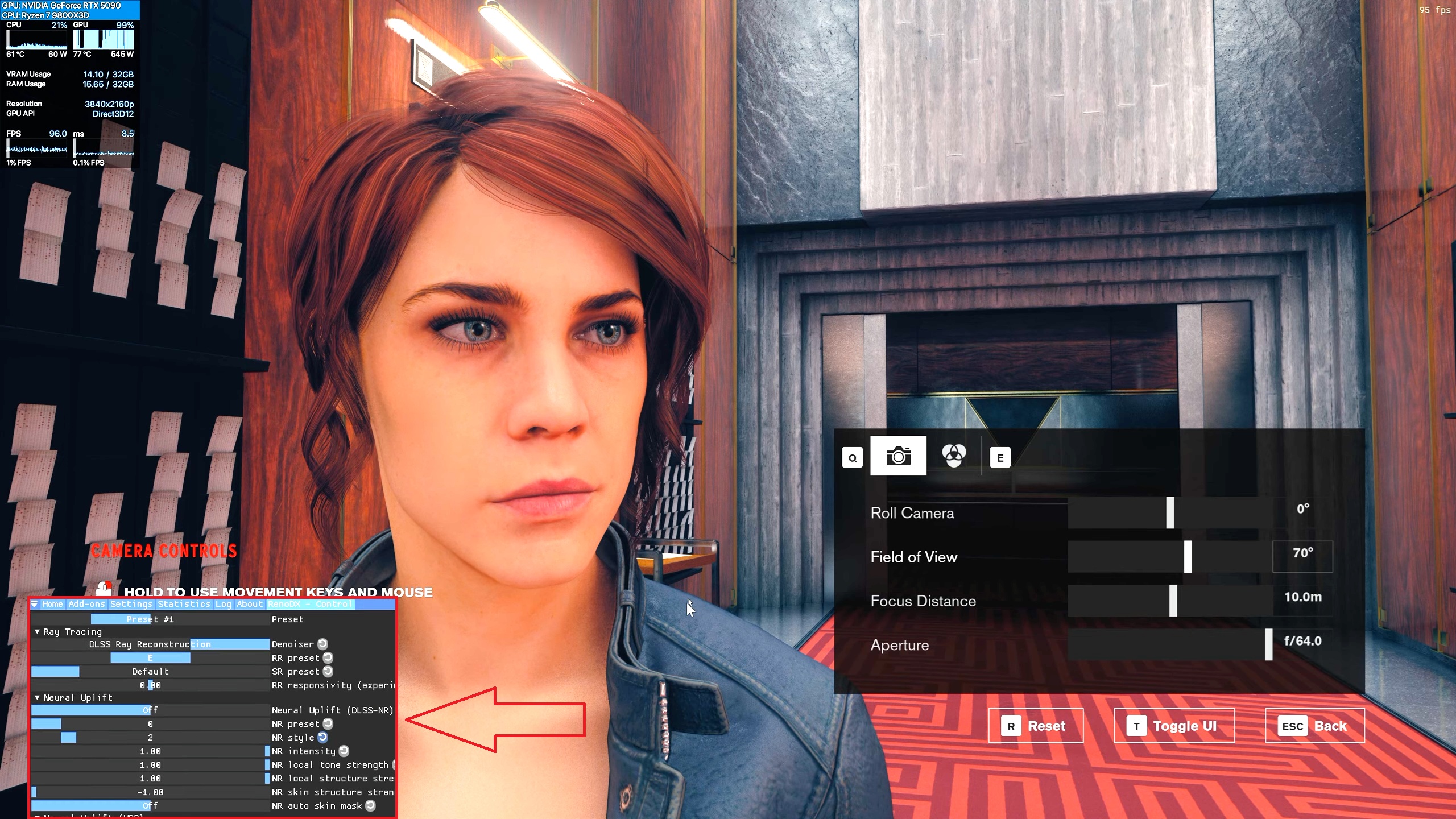
- Launch the game and open the ReShade interface, usually with the Home key. Navigate to the Add-ons section, enable the RenoDX DLSS 5/Neural Uplift functionality, and start adjusting its Neural Rendering parameters. We strongly recommend beginning with relatively conservative values rather than maxing every slider.
Again, this whole process is extremely experimental. Expect compatibility issues, strange visual behavior, large performance costs, VRAM-related bugs, and potentially broken HDR depending on the game and current RenoDX version. This is, after all, an unofficial community mod, and not an official release from NVIDIA.
DLSS 5 ON Vs OFF – 10 Of The Best Community Comparisons We’ve Seen So Far
Before looking at the comparisons, one important disclaimer is necessary: none of these examples represent a proper developer implementation of DLSS 5. What the RenoDX community has achieved is extremely impressive, but these are still unofficial mods built around a leaked runtime, without access to the original developers’ tools, artistic direction, or professional tuning. NVIDIA itself stresses that DLSS 5 gives developers control over parameters such as intensity, color grading, and masking specifically to preserve a game’s intended look. This is important to keep in mind because DLSS 5 is highly tweakable, and aggressive settings can easily make faces, lighting, colors, and materials look worse than intended. With that in mind, we’ve selected ten of the best community comparisons we’ve seen so far: five from YouTube and five from Reddit.
YouTube Comparisons
Control – DLSS 5 ON Vs OFF
This comparison comes from YouTube channel Testing Games.
Control was effectively ground zero for this entire experiment, making it an obvious place to start.
The Neural Rendering pass can have a surprisingly dramatic impact on Jesse, the main character, adding significantly more apparent detail to skin, hair, and clothing. Facial lighting in particular can look far more complex, and there are moments where characters take on an almost prerendered quality. Still, not all people will like this altered appearance, which further stresses the importance of proper DLSS 5 tuning from game developers.
The performance impact, though, is quite substantial, as Testing Games’s RTX 5090 loses a bit more than half (!) of its performance after enabling DLSS 5.
S.T.A.L.K.E.R. 2: Heart of Chornobyl – DLSS 5 ON Vs OFF
This comparison comes from YouTube channel MxBenchmarkPC.
S.T.A.L.K.E.R. 2: Heart of Chornobyl is arguably an even more interesting test case because its environments already feature extremely dense geometry, materials, and sophisticated lighting, courtesy of Unreal Engine 5.
Here, DLSS 5 can alter much more than character presentation. Material response becomes more pronounced, facial detail receives the now-familiar Neural Rendering treatment, and some surfaces appear more naturally integrated into their surrounding lighting.
There are also examples where the additional processing can feel excessive, however, particularly when local contrast or facial structure becomes too aggressive. Once again, this looks more like an illustration of what the model can do than an indication of what GSC Game World would actually choose to do with it.
This comparison also reinforces another recurring theme throughout these early tests: the current Neural Rendering pass carries a considerable performance penalty, as MxBenchmarkPC’s RTX 5080 loses more than half of its performance after enabling DLSS 5!
Cyberpunk 2077 – DLSS 5 ON Vs OFF
This comparison is also courtesy of YouTube channel MxBenchmarkPC.
Cyberpunk 2077 is particularly fascinating because CD Projekt RED‘s game is already one of the industry’s best showcases for real-time path tracing.
DLSS 5 doesn’t replace that rendering. Instead, it sits on top of the existing image and reinterprets elements such as material response, skin, hair, and lighting.
There are scenes where the results look remarkably photographic, particularly on faces and certain highly detailed materials. There are others where the additional local contrast and altered illumination arguably work against the carefully authored atmosphere of Night City.
That’s precisely the sort of distinction professional artist-controlled masks could potentially solve. A developer could selectively exploit Neural Rendering where it genuinely improves materials or character shading while restricting or reducing it where the original lighting already delivers the intended result.
As with the other current tests, performance drops considerably — again, by more than 50% on the tested RTX 5080 — once the experimental DLSS 5 model is enabled.
The Witcher 3: Wild Hunt – DLSS 5 ON Vs OFF
This comparison comes from YouTube channel hodilton.
The Witcher 3: Wild Hunt (with the next-gen update) is one of our favorite comparisons so far because it demonstrates how Neural Rendering can make an older title look surprisingly different without changing its underlying geometry.
Character faces receive additional surface detail, materials react differently to illumination, and several scenes take on a much more photographic appearance. In the right circumstances, it can almost feel like another layer has been added on top of CD Projekt RED‘s current-gen visual upgrade.
But this comparison also demonstrates the potential danger of globally applying a model whose primary goal is photorealism to an existing game. In fact, The Witcher 3 has an intentionally stylized visual identity. Making skin, hair, clothing, or environmental lighting more physically plausible does not automatically mean the resulting image is better. Ideally, an official implementation would use DLSS 5 selectively enough to enhance the game’s rendering while retaining the atmosphere and visual language that makes The Witcher 3: Wild Hunt immediately recognizable.
Unfortunately, hodiltondid not provide any performance data in their video, but we can easily assume that the performance impact will still be highly considerable.
Grand Theft Auto V Enhanced – DLSS 5 ON Vs OFF
This comparison comes from YouTube channel Lootward.
Perhaps no comparison better illustrates the sheer transformative potential of DLSS 5 than Grand Theft Auto V Enhanced, or GTA V Enhanced.
RockstarGames’ game is now more than a decade old, and although GTA V Enhanced has received substantial visual upgrades, its original character assets and lighting foundation inevitably reveal their age next to modern titles, and Neural Rendering can dramatically change that presentation.
Skin and facial shading become significantly more detailed, material response changes, and certain outdoor scenes acquire an almost photorealistic look. When everything lines up correctly, the results can be legitimately impressive.
The problem is that DLSS 5 can also dramatically reinterpret faces and lighting when pushed too far. Some characters start looking less like enhanced versions of Rockstar’s original models and more like AI-generated reinterpretations of them. DLSS 5 can also introduce a noticeable haloing effect around player characters, creating a distracting bright outline along their silhouettes.
Sadly, no performance data was shared by YouTuber Lootward, though given that GTA V Enhancedis much easier to run than modern games, the performance impact could be somewhat manageable, even on lower-end RTX 40/50 Series GPUs.
Reddit Comparisons
This comparison is courtesy of Reddit user Qeeyana.
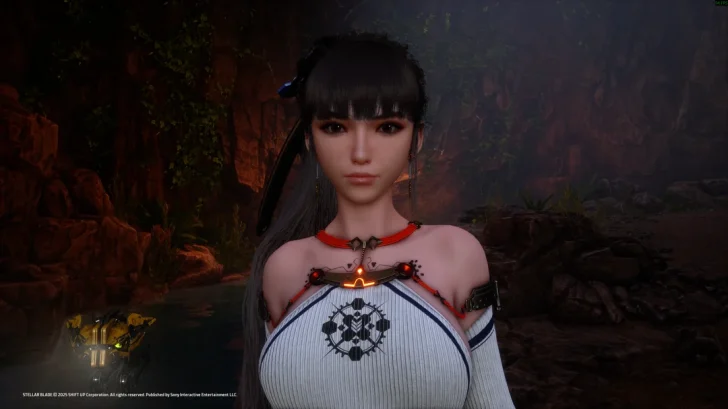
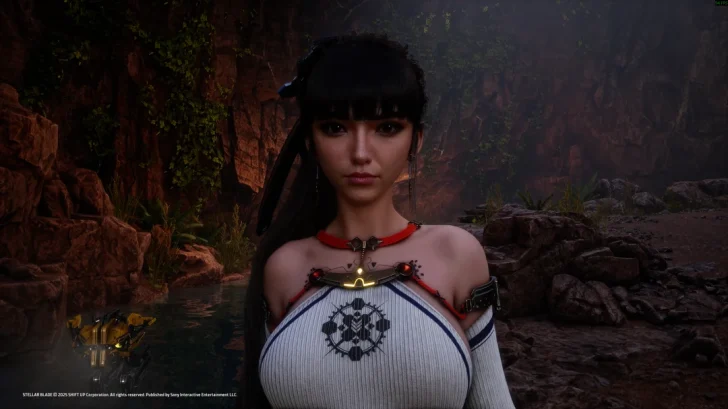
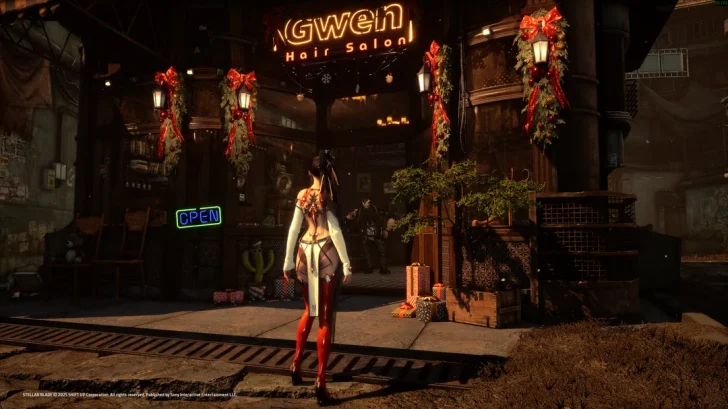
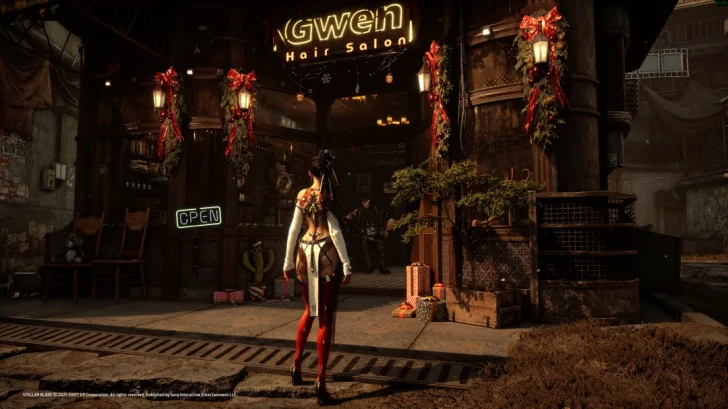
Unfortunately, the Stellar Blade comparison screenshots are a bit too compressed and low-resolution, but they do provide some important insights on how the experimental mod worked on this title.
The poster tested the mod on an RTX 5090 with a Ryzen 7 9800X3D at maximum settings using DLAA, presumably at a resolution of 4K. DLSS 5 adds clearly visible detail to faces, hair, skin, clothing, and local lighting, and some of the comparisons can look convincing. However, not everyone will like this untuned look, as many aspects of the game’s presentation don’t necessarily jibe well with the added DLSS 5 detail, especially the stylized character faces.
It also illustrates the current performance problem particularly well. Depending on the tested area, the poster reports framerates falling from roughly 155-250 FPS without DLSS 5 to approximately 118-125 FPS with it enabled, while one indoor scene drops from around 270 FPS to 132 FPS. The author also reports what appears to be a memory leak when repeatedly toggling the implementation.
Again, none of this should be taken as representative of the eventual optimized DLSS 5 runtime.
This comparison comes from Reddit user zhubaohi.
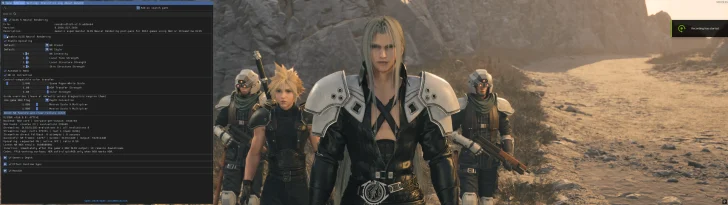
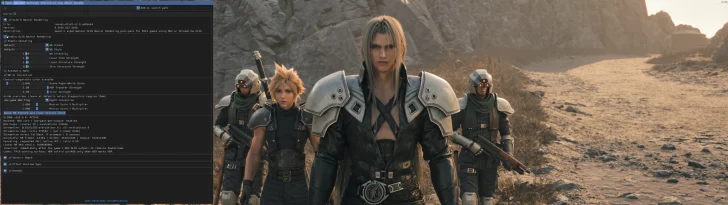
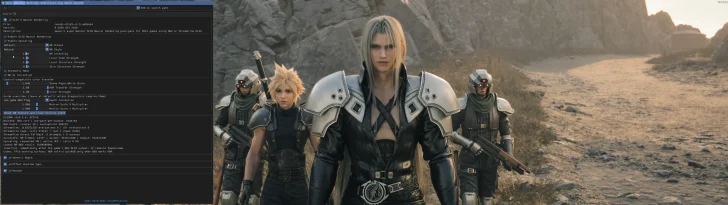
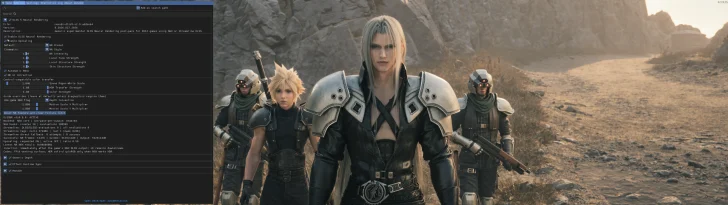
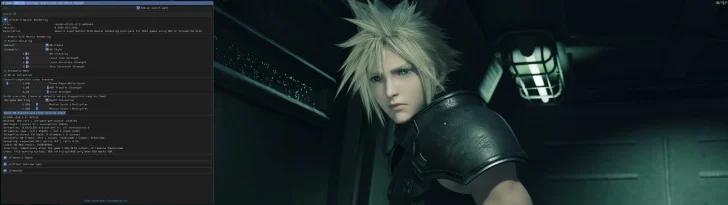
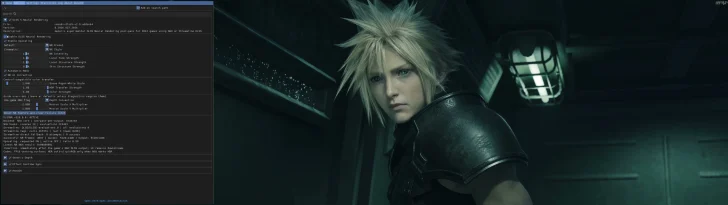
Final Fantasy VII Rebirth certainly provides an interesting test case that shows the importance of proper tuning for this experimental Neural Rendering mod.
The Reddit thread compares several looks, and the differences between them are substantial. The “default” and “cinematic” settings can produce an overly sharpened, almost haloed presentation, whereas the less aggressive “natural” configuration retains far more of the original game’s presentation while still introducing additional material and lighting detail.
Even commenters who like the technology generally gravitate toward the restrained implementation rather than the most dramatic one.
That is arguably one of the most useful lessons one can take away from this entire experiment. The “best” DLSS 5 implementation may not create the starkest differences in ON/OFF comparisons, but rather the one where artists use the model selectively enough that the improvements look like they belonged there all along.
This comparison comes from Reddit user Worried_Matter4443.
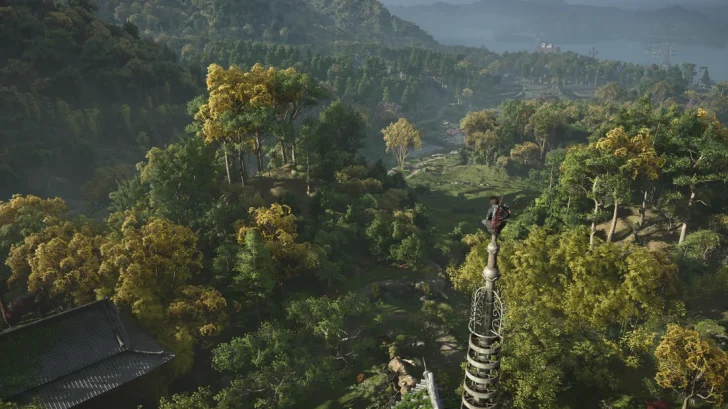


Assassin’s Creed Shadows makes for an especially relevant comparison since it was one of NVIDIA’s original official DLSS 5 showcase titles.
This community comparison revisits approximately the same type of scene seen in NVIDIA’s presentation, and the effect on Naoe (one of the game’s two player-characters) and the surrounding lighting is immediately obvious.
Skin structure becomes more defined, shadows are softened and redistributed, and material definition changes noticeably. Some users prefer the added realism, while others point out that the Neural Rendering version can look flatter or more washed out and that the character’s facial presentation changes more than they would like.
That split reaction neatly demonstrates the problem with evaluating DLSS 5 without developer tuning. Even technically “better” skin shading or more detailed materials can become undesirable if they don’t align with the way Ubisoft‘s artists intend a character or scene to look.
These screenshots were provided by Reddit user mightyjam7.


Oblivion Remastered is another particularly interesting example because Bethesda has already confirmed the title as one of the games intended to receive official DLSS 5 support.
Unfortunately, the user did not provide DLSS 5 ON vs OFF comparisons here, instead only opting to include the DLSS 5 screenshots, with no vanilla versions to compare them to. As such, we can only analyze the screenshots in a vacuum.
The current RenoDX implementation can seemingly produce impressive detail and rich-looking material response, but it also demonstrates one of the most obvious consequences of running an untuned neural renderer: lighting balance.
The Reddit poster specifically notes that nighttime scenes become somewhat too bright. This highlights the importance of proper developer tuning of DLSS 5 parameters in all possible scenes and scenarios that a game offers, so as to provide consistent visuals, rather than inconsistent messes.
This is the second comparison in our article that’s been made by Reddit user Worried_Matter4443.


Finally, we have The Last of Us Part II Remastered, which is arguably the hardest possible test for Neural Rendering.
In fact, Naughty Dog already places enormous emphasis on facial detail, character materials, cinematic lighting, and highly controlled presentation. Consequently, the bar for any AI-driven modification is extremely high.
The community comparison shows that Neural Rendering can add striking extra structure to skin and lighting, but it can also make an already meticulously authored face look considerably different when applied aggressively.
Some of the reactions in the thread also point to precisely the issue we’ve repeatedly discussed throughout this article: the current RenoDX settings allow the effect to be pushed far beyond what a professional artist would necessarily choose.
The Last of Us Part II Remastered is therefore an excellent example of why the ability to make something more detailed should never be confused with automatically making it better.
Final Words
These unofficial experiments show that DLSS 5 has great potential, but also how dependent it will be on proper developer and artist tuning. Applied too aggressively, Neural Rendering can noticeably alter faces, materials, lighting, and the overall mood of a scene. It can also push characters into the uncanny valley, particularly when highly realistic skin and facial detail clash with stiff animations, unnatural movement, or limited facial expressions. NVIDIA itself emphasizes artist control through intensity, color-grading, and masking options.
Performance may be the bigger concern. The leaked implementation is extremely demanding, with even enthusiast-grade GPUs such as the RTX 5090 often losing half of their performance when enabling this experimental DLSS 5 mod.
That raises questions about how Neural Rendering will coexist with real-timeray tracing and path tracing. DLSS 5 can enhance lighting and materials, but it cannot entirely replace the physically grounded lighting provided by RT/PT. Combining all of these techniques could therefore become extremely expensive: one community Cyberpunk 2077 testsaw performance fall from 71 FPS with Path Tracing to 45 FPS after adding the unofficial DLSS 5 implementation.
Naturally, these numbers come from an unreleased, unofficial implementation and should not be treated as representative of the finished technology. Still, they suggest that realizing DLSS 5’s full potential alongside increasingly sophisticated RT and PT workloads may ultimately require future GPUs that are considerably more powerful than today’s flagships.
For now, these comparisons should be viewed as an impressive technical preview rather than a verdict on DLSS 5 itself.
About the author: Sebastian Castellanos is a data scientist by education and training. He’s also deeply passionate about PC gaming hardware and software. He has recently started writing technical articles and guides on Wccftech about PC hardware, games and mods.
Follow Wccftech on Google to get more of our news coverage in your feeds.
