
Close Menu

    Subscribe to Updates

    Get the latest creative news from FooBar about art, design and business.

    What's Hot

    Lutris 0.5.23 Gaming Manager Adds GOG Cloud Saves and DLC Support

    November 29, 2026

    Dunesday Merch Is Being Made By Movie Theater Chains, And It’s Going to Be Rare

    November 29, 2026

    The Super Mario Galaxy Movie almost had very little Gusty Garden

    November 29, 2026
    Facebook X (Twitter) Instagram
    Facebook X (Twitter) Instagram YouTube TikTok
    Comic Vibe
    Sunday, November 29
    • Home
    • Comics
      • Comic Vibe News
    • Gaming
    • Movies
    • TV
    • Anime
    • Toys & Collectibles
    • Cosplay
    • Tech
    • Digital Culture
      • Creators & Fan Culture
      • Creator Economy & Fan-Driven Platforms
      • Digital Fandom & Online Communities
      • Metaverse & Virtual Worlds
      • NFTs & Digital Collectibles
      • Virtual Events & Online Conventions
      • Virtual Identity & Avatars
    • Shop
    Comic Vibe
    • Home
    • Contact Us
    • Terms & Conditions
    • Advertise With Us
    • DMCA Policy
    • Privacy Policy
    • About Us
    Home»Gaming»How To Update Your Nintendo Switch Joy-Con Controllers
    Gaming

    How To Update Your Nintendo Switch Joy-Con Controllers

    JamesBy JamesNovember 9, 20264 Comments4 Mins Read
    Facebook Twitter
    Share
    Facebook Twitter

    The Nintendo Switch 2 from 2025 has quickly become many users’ pick as one of the best handheld consoles you can get, but that doesn’t mean the original Nintendo Switch is no longer worth buying. Despite it debuting in 2017, Nintendo continues to release updates for the Switch nearly a decade after the console came out. These updates — and those for the Nintendo Switch 2 — are downloaded automatically; you aren’t prompted to download system updates on a Nintendo Switch. However, many Switch owners who rely on these automatic updates eventually run into issues with their Joy-Con and Switch Pro controllers. Unlike the console itself, Nintendo Switch controllers don’t inform you when an update is available — you need to manually check the system Settings menu to know when it’s time to install controller updates.

    It’s easy enough to update your Joy-Con and Switch Pro controller firmware through the Settings menu. With the home page open, go to System Settings in the system icons row, open the Controllers & Accessories menu on the Switch 2 (or the Controllers and Sensors menu on the original Switch), then scroll down and select Update Controllers.

    You can do this with the controllers attached to the console or with them connected wirelessly; just ensure you don’t press any buttons on the Joy-Con or touch the Nintendo Switch until the update completes. This generally only takes a minute, and, while it isn’t required, restarting the Switch afterward can help ensure the update has fully initialized. Do this by holding down the power button on the console itself until the “Power Options” menu pops up on the screen, then selecting Restart. 

    What to do if your Switch controllers aren’t updating
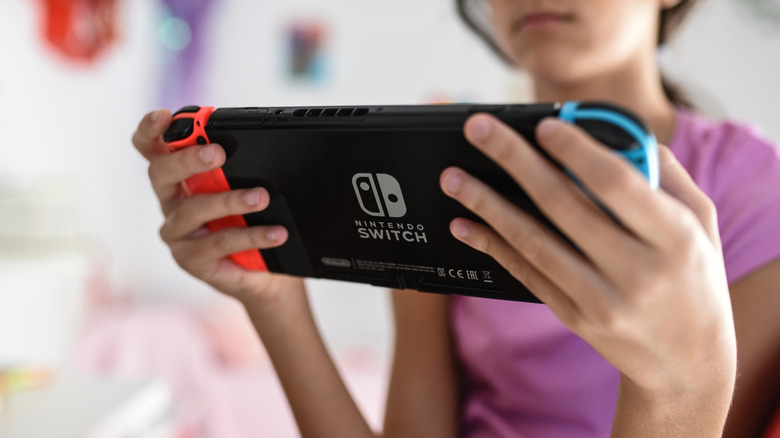
    A child in a pink shirt using the Nintendo Switch

    Switch controller updates are relatively small in size. As such, a failed update or an error prompt showing “Unable to update the controllers. Do you want to try again?” is rarely caused by large corrupted update files. Oftentimes, just restarting the update fixes the issue, but there are certain things you can do if it doesn’t.

    First and foremost, ensure that your Nintendo Switch itself is up to date, as version mismatches can cause update syncing issues. You can update your Switch’s firmware or ensure it’s running the latest update by going to System Settings from the system icons row, scrolling all the way down to System in the left sidebar, and then selecting System Update. With the update completed (or once you have ensured the system is up to date), Nintendo also recommends restarting or power cycling your console before you try updating the controllers again.

    If this doesn’t work, you can try resetting your Switch controllers by pressing the SYNC button. On the Joy-Con, disconnect each one from the console and press the tiny black button on the slider rail side. Afterward, press any button on the controller to reconnect it to the Switch, or slide the controller back onto the console. The process is similar on a Nintendo Switch Pro Controller, but the SYNC button is located on the top edge, near the USB-C port.

    What does updating Nintendo Switch controllers do?
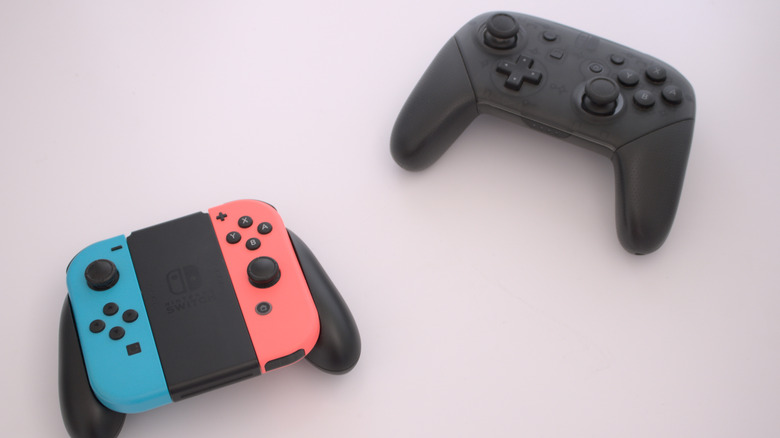
    Nintendo Switch Joy-Con controllers beside a Nintendo Switch Pro Controller

    Keeping your system software up to date is important for any piece of tech in order to maintain stability and reliability, and this is especially true for the Nintendo Switch and Nintendo Switch 2. As mentioned above, the Switch itself downloads updates automatically when connected to the internet, but the controllers require manual downloads. Controllers running years-old firmware connected to an up-to-date console can result in sync issues that can manifest in a variety of ways.

    If you find that your Joy-Con controllers are randomly disconnecting, have delayed inputs, struggle with stick drift, or just aren’t working as they should, there’s a chance that might be at least partly due to them running older firmware. Updating them from the Switch’s Settings menu in that case would be the easiest way of fixing the issue. If you continue to receive errors during the update process or the issue persists even after updating and power cycling the console, Nintendo recommends sending the console and the affected controllers to be serviced. Alternatively, you can get a cheaper Joy-Con alternative for your Switch.

    JoyCon Nintendo Switch Update your
    Share. Facebook Twitter
    Previous ArticleStudy Reveals ‘Sex and the City’ as TV’s Most Fashion-Obsessed Show with Manolo Blahnik Leading Mentions
    Next Article Wade Wilson: Deadpool #10 Preview: Swamp Thing Gets Competition
    James

    Related Posts

    The Super Mario Galaxy Movie almost had very little Gusty Garden

    November 29, 2026

    Unofficial ‘GTA 6’ PC port makes rapid progress

    November 29, 2026

    How to use headphones for GTA VI on PS5 or Xbox – instead of a gaming headset

    November 29, 2026

    Monk Claims He Hid Secret NASA UFO Footage Inside PS1 Game

    November 29, 2026

    4 Comments

    1. Pingback: From scandalous game to mass entertainment: is GTA going soft? - Comic Vibe

    2. Pingback: 5 Cheaper Ways To Play Games Than Building A New PC In 2026 - Comic Vibe

    3. Pingback: Melania Trump's docu - Comic Vibe

    4. Pingback: Abhishek Sharma's Diwali dance on 'Bolo Ta Ra Ra' with family is too cute to miss  - Comic Vibe

    Leave A Reply Cancel Reply

    Our Picks

    Lutris 0.5.23 Gaming Manager Adds GOG Cloud Saves and DLC Support

    November 29, 2026

    Dunesday Merch Is Being Made By Movie Theater Chains, And It’s Going to Be Rare

    November 29, 2026

    The Super Mario Galaxy Movie almost had very little Gusty Garden

    November 29, 2026

    Jim Caviezel’s ‘Ghost Soldier’ loses out on 1,300 screens after two weeks at the box office

    November 29, 2026
    • Facebook
    • Twitter
    • Instagram
    • YouTube
    • TikTok
    • Telegram
    Don't Miss
    Metaverse & Virtual Worlds

    Fortnite Season 4 leak reveals potential Sonic and Kingdom Hearts crossover

    By JamesJuly 23, 20260

    Sonic and Kingdom Hearts tipped for Fortnite crossover. (Image: Square Enix | SEGA)

    The Gaussian splatting tool “VRCGS” for VRChat has been updated to support rendering up to 100 million splatters.

    July 23, 2026

    Amazon brings Luna game streaming to the Prime Video app

    July 23, 2026

    Shemaroo Entertainment consolidated loss narrows to

    July 23, 2026

    Subscribe to Updates

    Get the latest creative news from SmartMag about art & design.

    About Us
    About Us

    Comic Vibe is a pop-culture destination created for fans who live and breathe comics, movies, anime, TV shows, gaming, tech, cosplay, and collectibles.

    Our mission is to deliver engaging news, reviews, features, guides, and opinions that celebrate geek culture in all its forms. From the latest comic releases and blockbuster films to anime trends, gaming updates, cutting-edge tech, and collector culture, Comic Vibe brings everything together in one vibrant hub.

    Our Picks

    Lutris 0.5.23 Gaming Manager Adds GOG Cloud Saves and DLC Support

    November 29, 2026

    Dunesday Merch Is Being Made By Movie Theater Chains, And It’s Going to Be Rare

    November 29, 2026

    The Super Mario Galaxy Movie almost had very little Gusty Garden

    November 29, 2026

    Subscribe to Updates

    Get the latest comics, anime, movies, TV, gaming, cosplay, and pop culture news delivered directly to your inbox. No spam—just the stories every fan should know.

    Facebook X (Twitter) Instagram YouTube TikTok
    • Home
    • Contact Us
    • Terms & Conditions
    • Advertise With Us
    • DMCA Policy
    • Privacy Policy
    • About Us
    © 2026 Comic Vibe. Designed by Comic Vibe.

    Type above and press Enter to search. Press Esc to cancel.