
Close Menu

    Subscribe to Updates

    Get the latest creative news from FooBar about art, design and business.

    What's Hot

    How to Watch Purdue vs. No. 15 Gonzaga With TV, Radio, Stats & Preview

    November 2, 2026

    Detroit Lions Issue New Statement Regarding Star Jack Campbell After Terrifying On

    November 2, 2026

    5 Best Video Games Like Lies Of P

    November 2, 2026
    Facebook X (Twitter) Instagram
    Facebook X (Twitter) Instagram YouTube TikTok
    Comic Vibe
    Monday, November 2
    • Home
    • Comics
      • Comic Vibe News
    • Gaming
    • Movies
    • TV
    • Anime
    • Toys & Collectibles
    • Cosplay
    • Tech
    • Digital Culture
      • Creators & Fan Culture
      • Creator Economy & Fan-Driven Platforms
      • Digital Fandom & Online Communities
      • Metaverse & Virtual Worlds
      • NFTs & Digital Collectibles
      • Virtual Events & Online Conventions
      • Virtual Identity & Avatars
    • Shop
    Comic Vibe
    • Home
    • Contact Us
    • Terms & Conditions
    • Advertise With Us
    • DMCA Policy
    • Privacy Policy
    • About Us
    Home»Tech»You Can Build A Retro Gaming Setup Using Hardware You Already Own
    Tech

    You Can Build A Retro Gaming Setup Using Hardware You Already Own

    JamesBy JamesNovember 2, 2026No Comments4 Mins Read
    Facebook Twitter
    Share
    Facebook Twitter

    Making your own “retro console” out of an old PC or laptop is surprisingly easy, and even doable on some Android tablets, if they support video out. Whereas we’d always suggest a more dedicated piece of hardware, like the SuperStation One, sometimes going the recycling route is the better — free — option. If you’re more of a tinkerer, don’t forget that an old Raspberry Pi gathering dust could be put to use to play some classic games.

    On pretty much all devices, we can run RetroArch by simply installing it. It’s supported on pretty much every operating system, and all types of hardware, including Fire Sticks. RetroArch is a collection of “cores,” which are based on emulation software. For instance, RetroArch has its own “core” of Dolphin, the widely used GameCube and Wii emulator. We have a dedicated setup article for Android tablets, but on PC systems, just follow the installation instructions provided in the setup wizard. This can be configured to boot at launch, but alternatively, for that true “console” feel — aside from having to add games and BIOS for the emulators — on Windows, you can use Retrobat, which will boot into its frontend when you turn the PC on.

    There’s also ample chance to modify old consoles too, with the Xbox One and Series consoles in particular ripe for turning into a retro jukebox. That’ll require you to dig into Developer Mode, but it’s a fairly straight forward process.

    There’s so many options for a retro machine
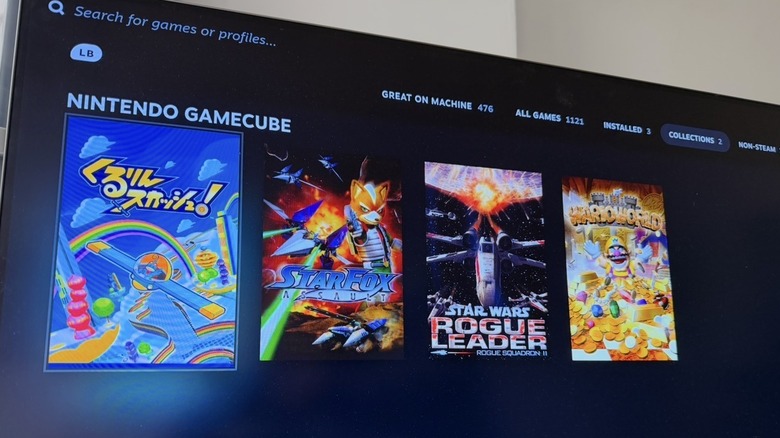
    Steam Big Picture Mode showing GameCube games integrated into the wider library

    With Linux or old Mac devices, there are frontends like EmulationStation DE that can be launched at boot to simulate a console-like experience. If you opt to install something like Bazzite, this can be configured to launch straight into Steam’s Big Picture Mode, or “Game Mode.” This requires you to download a specific version of Bazzite. You can then flash it to a USB with Rufus or BalenaEtcher. Combined with software like EmuDeck and Steam ROM Manager, you can import and configure emulators and retro games straight into your Steam library. This also works with Windows.

    On older machines, it’s probably best to opt for a Linux distribution, cutting overhead that modern Windows 11 carries with it — that or modern Windows simply isn’t supported. In some cases, your retro setup might be based around old DOS and Windows 95 or 98 era games, up to XP. If you go this route, make sure to leave it off the internet for security purposes. No one is likely interested in your retro box, but you can never be too careful.

    You’ll also need secure installation media, so unless you have the original discs yourself, Microsoft doesn’t provide downloads for these anymore, so you’ll have to

    Dedicated Linux distros for emulation & Android frontend setup

    RetroPie logo

    On Linux in particular, there are specific distributions like RetroPie or Batocera.linux, which boot from something as small as a microSD card on devices like the Raspberry Pi, which will provide nearly everything out of the box. Of course, you’ll still need to find games and BIOS files.

    Depending on your device, performance will vary. Modern Raspberry Pis are just capable enough at playing up to GameCube games, but an old laptop from, say, 2016, will be more than capable of running up to PS2 — again, depending on the specs.

    For old Android devices, the same thing with frontends applies here. Users recommend Daijisho, which can be set to launch on boot and act as your home screen. Don’t fret about your other non-emulator-based apps; there’s a section within the launcher for them. To set your new frontend, you’ll need to go to your Android settings and go to Apps > Default Apps > Home Screen > Daijisho (or your chosen frontend).

    Build Gaming Retro setup using
    Share. Facebook Twitter
    Previous ArticleStar Wars Actor Hayden Christensen Says a Man Who Burgled His House Recognized Him Then Gave His Stuff Back Mid
    Next Article Marvel’s VisionQuest episode 7 is coming out sooner than announced
    James

    Related Posts

    Waving Night: reading entertainment tech 2027 early, in Seoul on Nov. 4

    November 2, 2026

    Hallyu’s next stage, explored through AI and entertainment tech at CES and in LA from Jan. 5

    November 2, 2026

    CES 2027 entertainment tech: from AI adoption to AI revenue, Las Vegas from Jan. 5

    November 2, 2026

    Virtual Reality Stocks To Watch Today

    November 1, 2026
    Leave A Reply Cancel Reply

    Our Picks

    How to Watch Purdue vs. No. 15 Gonzaga With TV, Radio, Stats & Preview

    November 2, 2026

    Detroit Lions Issue New Statement Regarding Star Jack Campbell After Terrifying On

    November 2, 2026

    5 Best Video Games Like Lies Of P

    November 2, 2026

    elDLIVE: Anime About a Teen Recruited Into an Alien Space Police Force, Is Now Available to Stream

    November 2, 2026
    • Facebook
    • Twitter
    • Instagram
    • YouTube
    • TikTok
    • Telegram
    Don't Miss
    Digital Culture

    EXCLUSIVE: Inside the Massive Global Economy Behind FIFA x BTS

    By JamesJuly 19, 20260

    Global icons BTS are all set to headline the historic 2026 FIFA World Cup Final Halftime Show.

    Xbox Game Pass Could Drop Day One First

    July 19, 2026

    TV actor Abhinav Shukla claims porn contributes to global warming

    July 19, 2026

    Captain Marvel: Dark Past #4 Preview: Carol’s Mind Games

    July 19, 2026

    Subscribe to Updates

    Get the latest creative news from SmartMag about art & design.

    About Us
    About Us

    Comic Vibe is a pop-culture destination created for fans who live and breathe comics, movies, anime, TV shows, gaming, tech, cosplay, and collectibles.

    Our mission is to deliver engaging news, reviews, features, guides, and opinions that celebrate geek culture in all its forms. From the latest comic releases and blockbuster films to anime trends, gaming updates, cutting-edge tech, and collector culture, Comic Vibe brings everything together in one vibrant hub.

    Our Picks

    How to Watch Purdue vs. No. 15 Gonzaga With TV, Radio, Stats & Preview

    November 2, 2026

    Detroit Lions Issue New Statement Regarding Star Jack Campbell After Terrifying On

    November 2, 2026

    5 Best Video Games Like Lies Of P

    November 2, 2026

    Subscribe to Updates

    Get the latest comics, anime, movies, TV, gaming, cosplay, and pop culture news delivered directly to your inbox. No spam—just the stories every fan should know.

    Facebook X (Twitter) Instagram YouTube TikTok
    • Home
    • Contact Us
    • Terms & Conditions
    • Advertise With Us
    • DMCA Policy
    • Privacy Policy
    • About Us
    © 2026 Comic Vibe. Designed by Comic Vibe.

    Type above and press Enter to search. Press Esc to cancel.