
Close Menu

    Subscribe to Updates

    Get the latest creative news from FooBar about art, design and business.

    What's Hot

    The Fate of A Once-Intriguing Star Wars’ Spinoff Movie Is Sealed With Disappointing Update

    October 18, 2026

    Marvel TV Chief Sidesteps “Young Avengers” Talk

    October 18, 2026

    5 Collectibles People May Be Undervaluing, per ChatGPT

    October 18, 2026
    Facebook X (Twitter) Instagram
    Facebook X (Twitter) Instagram YouTube TikTok
    Comic Vibe
    Sunday, October 18
    • Home
    • Comics
      • Comic Vibe News
    • Gaming
    • Movies
    • TV
    • Anime
    • Toys & Collectibles
    • Cosplay
    • Tech
    • Digital Culture
      • Creators & Fan Culture
      • Creator Economy & Fan-Driven Platforms
      • Digital Fandom & Online Communities
      • Metaverse & Virtual Worlds
      • NFTs & Digital Collectibles
      • Virtual Events & Online Conventions
      • Virtual Identity & Avatars
    • Shop
    Comic Vibe
    • Home
    • Contact Us
    • Terms & Conditions
    • Advertise With Us
    • DMCA Policy
    • Privacy Policy
    • About Us
    Home»Digital Culture»Creator Economy & Fan-Driven Platforms»Here’s Why Everybody Should Get This Accessory Live Streamers Swear By
    Creator Economy & Fan-Driven Platforms

    Here’s Why Everybody Should Get This Accessory Live Streamers Swear By

    JamesBy JamesAugust 19, 2026No Comments3 Mins Read
    Facebook Twitter
    Here’s Why Everybody Should Get This Accessory Live Streamers Swear By
    Share
    Facebook Twitter

    We may receive a commission on purchases made from links.

    I’ve been streaming online in one form or another for many years. I can still remember Twitch when it was called Justin.tv, broadcasting on Mixer, and even streaming VR games on Facebook Gaming. And while I’m always experimenting with the more oddball alternative platforms to stream on, I’ve been in the game a long time.

    One of the best tools in my streaming arsenal is the Elgato Stream Deck. Elgato, known for their video capture cards, sent me a Stream Deck when it launched back in 2017. I still daily drive that same original model all these years later. And any piece of technology that you’re still using ten years after it first released probably works pretty darn well. But what‘s interesting about the Stream Deck is that, in all the years I’ve owned it, I use it for gaming the least.

    The Stream Deck has become an essential piece of my daily work and home life. The device might have been built for gamers and creators, but its uses go far beyond that. So much so that I often recommend a Stream Deck or a similar device to just about anyone who uses a computer.

    A versatile tool for streamers

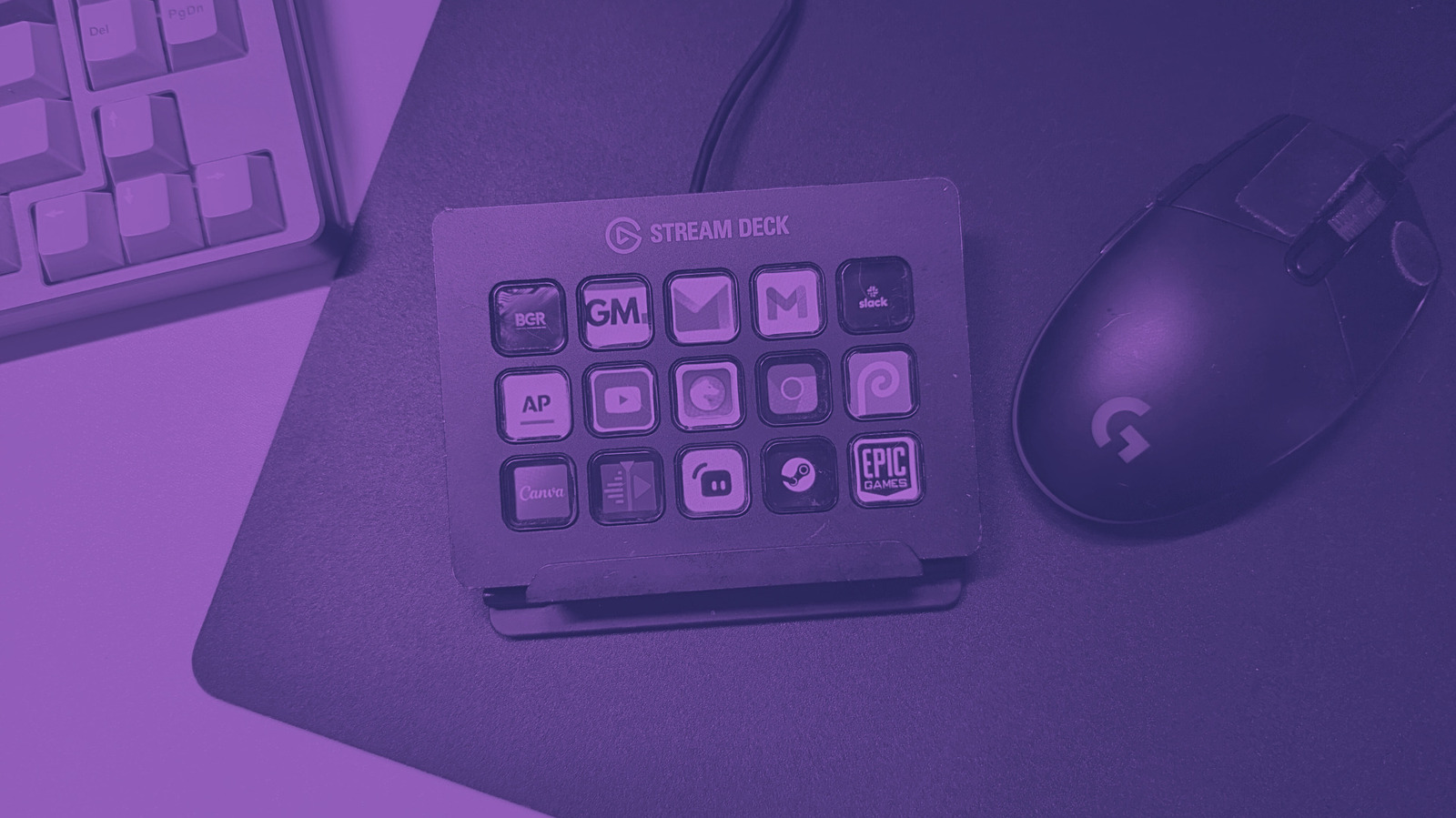
    The standard Stream Deck is a pretty simple device. It’s a small black frame with a series of 15 square buttons arranged in three rows on its face. These buttons each feature an LCD, allowing you to customize them in almost any way you see fit through the Elgato software. For game streaming, you can assign commands to each button, with a visual representation of your desired action.

    In my setup, I have a button with a microphone icon and another with a crossed-out microphone icon. Tapping the crossed-out button mutes my microphone during streaming, while the other turns it back on. Other buttons include settings for my OBS streaming software, such as tossing up a Be Right Back screen, volume controls, camera angle changes, and several audio triggers for various on-stream events/goals.

    The Stream Deck essentially lets me be my own live producer when streaming, giving me the kind of dedicated control that would have cost thousands in the medium’s early days. But this little device can do so much more beyond gaming or streaming.

    Optimize your workflow

    Today, I use my Stream Deck more for work than for gaming. Because each button serves as a hotkey, you can program each for a nearly endless array of tasks. If you work in photo or video editing, you can assign buttons to your most-used tools, helping optimize your workflow in Microsoft Office or one of its many free alternatives. I run my video editing software almost exclusively with only a mouse and my Stream Deck.

    You can also assign programs to opener turns on, my Stream Deck loads my desktop preferences, each button representing a program I use. I can tap the Email icon to open my mail, the Firefox logo for my browser, and even Slack to load up work

    I also have a different set of commands when I launch my browser. Each button changes to represent my most-visited websites, so all I need to do is tap the BGR button to read the latest news. If there’s a command that you want, chances are that you can assign it to a button, making it a pretty invaluable tool for many who love optimizing their workflows.

    Accessory everybody Heres Should this
    Share. Facebook Twitter
    Previous ArticleIt’s Been 4 Years Since Marvel Studios Released It’s Most Divisive TV Series & They Still Haven’t Addressed The Character’s MCU Absence
    Next Article Have you heard? Parvathy Thiruvothu to star with Kartik Aaryan in Captain India
    James

    Related Posts

    This $60 USB Gadget Lets You Play Your Super Nintendo Cartridges On A Computer

    October 18, 2026

    ‘Watch Out!’ — Here’s Our First Ever Look at Dark Link in The Legend of Zelda: Ocarina of Time Remake

    October 18, 2026

    This Is ’90s DC’s Most Influential Story (And Everyone Learned the Wrong Lesson From It)

    October 18, 2026

    This subtle VisionQuest Easter Egg ties the MCU series into the WandaVision Trilogy

    October 18, 2026

    Comments are closed.

    Our Picks

    The Fate of A Once-Intriguing Star Wars’ Spinoff Movie Is Sealed With Disappointing Update

    October 18, 2026

    Marvel TV Chief Sidesteps “Young Avengers” Talk

    October 18, 2026

    5 Collectibles People May Be Undervaluing, per ChatGPT

    October 18, 2026

    An Xbox Series X can now run PlayStation 5 games, but there’s a catch

    October 18, 2026
    • Facebook
    • Twitter
    • Instagram
    • YouTube
    • TikTok
    • Telegram
    Don't Miss
    Anime

    Shout! Studios / Radial Entertainment Set SDCC 2026 Booth Exclusives

    By JamesJuly 17, 20260

    The leading entertainment content distributor will be setup in booth #4118 at San Diego Comic-Con 2026, and plans numerous giveaways, physical media releases, collector offers and a photobooth featuring backgrounds from its film and TV catalog.

    The Newest Complete Carl Barks Library volume has Donald Duck lost beneath the sea

    July 17, 2026

    Graphic Novel Review: BITCHY! THE EXASPERATING EXISTENCE OF MIDGE MCCRACKEN refuses to flinch

    July 17, 2026

    300 dancers, aged from 3 to 70, to enthrall Charukala tomorrow

    July 17, 2026

    Subscribe to Updates

    Get the latest creative news from SmartMag about art & design.

    About Us
    About Us

    Comic Vibe is a pop-culture destination created for fans who live and breathe comics, movies, anime, TV shows, gaming, tech, cosplay, and collectibles.

    Our mission is to deliver engaging news, reviews, features, guides, and opinions that celebrate geek culture in all its forms. From the latest comic releases and blockbuster films to anime trends, gaming updates, cutting-edge tech, and collector culture, Comic Vibe brings everything together in one vibrant hub.

    Our Picks

    The Fate of A Once-Intriguing Star Wars’ Spinoff Movie Is Sealed With Disappointing Update

    October 18, 2026

    Marvel TV Chief Sidesteps “Young Avengers” Talk

    October 18, 2026

    5 Collectibles People May Be Undervaluing, per ChatGPT

    October 18, 2026

    Subscribe to Updates

    Get the latest comics, anime, movies, TV, gaming, cosplay, and pop culture news delivered directly to your inbox. No spam—just the stories every fan should know.

    Facebook X (Twitter) Instagram YouTube TikTok
    • Home
    • Contact Us
    • Terms & Conditions
    • Advertise With Us
    • DMCA Policy
    • Privacy Policy
    • About Us
    © 2026 Comic Vibe. Designed by Comic Vibe.

    Type above and press Enter to search. Press Esc to cancel.