

We’ve seen a number of wild things regarding AI and the push that companies are making with it over the past few years. Previously we saw YouTube editing people’s videos with AI despite them not asking for it. This isn’t an issue that’s been locked to just YouTube, either.
X (Elon Musks’s revamped Twitter) has also been turning to user data to train its AI, and Musk has even come out in the past to tell SpaceX employees that it’ll use the company’s data to train its latest Grok AI models. And while some of these companies have been shady about how they’ve initiated their AI training systems, others have taken a far worse approach; like Twitch.
The latest controversy surrounding AI and a company is Twitch’s decision to start training Amazon’s AI models on content taken from Twitch streamers themselves. However, instead of being open about the feature, telling streamers and giving them a chance to opt-in to the training program, the company decided to make it opt-out, and started quietly training on streamers’ content. And the reason Twitch did this the way that it did? Well, according to a statement made by the company’s chief product officer, Mike Minton, the reason is quite simple: “If it was opt-in, nobody would opt-in.” (via Kotaku)
Nobody wants AI
Concerns over AI and its overall impact on the economy have been growing in recent months, despite America’s push to make data centers more appealing with legislation. Tie that to some of the other news about how content is being used to train AI — like Anthropic’s recent debacle around buying up rare books and then destroying them to train Claude — and you have a recipe for people to hate anything that has to do with AI. And Twitch’s move to train Amazon AI models off users’ content without asking is just more fuel on that fire.
The company further addressed the concerns in a livestream talking about the patch notes that introduced the toggle, which is where Minton made the above statement. Of course, this reaction, while bluntly honest, has also sparked online rhetoric, with users noting that Twitch knows nobody wants the AI to train on their content, but the company doesn’t care, while others have noted that Twitch’s handling of the announcement feels illegal, because the company chose not to even send out an email to the affected users, citing the fact that not everyone reads their emails as one of the main reasons.
The concerns don’t stop there. When asked how it would handle content that was streamed and contained users who had chosen to opt-out of the functionality, Minton was unable to answer. Instead he said that was “a good question,” and followed it up by saying there were no plans to allow others to see who had opted in or out of using their content for training.
You can opt-out, but it’s kind of hidden
Of course, companies training on your data is not a new thing, and even before AI as we know it today became big, companies were always looking for ways to use your data to train their algorithms and systems in some way or another. However, with AI this has become an even bigger issue, especially as generative AI tools are not being used to improve the systems you’re already using. A lot of times, your content is being used to improve the model itself so it can generate content on its own.
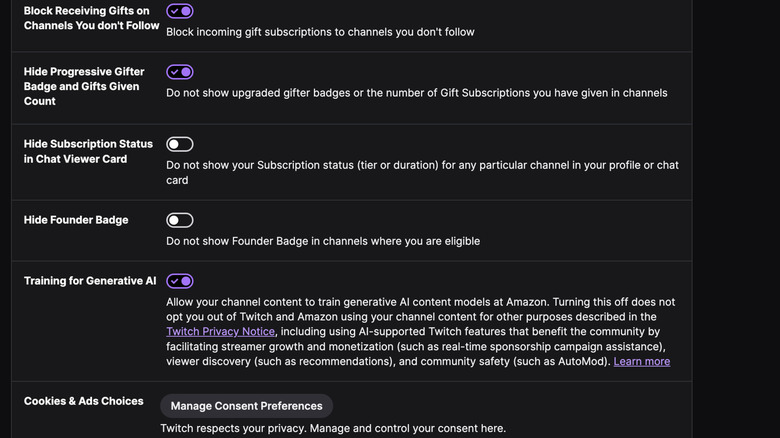
In Twitch’s case, the company’s FAQ page says that it’ll use channel content such as streams, VODs, chats from streams, and even pictures and text on your channel to train future Amazon models, including ones that are designed to generate text, images, audio, and video. That means your content could directly be used to train Amazon’s next generative video model, which might not sit well with some folks.
If you’re one of those people that doesn’t want your content to be used to train AI, then you can always opt-out by following these steps. First, click on your account icon in the top-right corner of the page, and then select Settings from the list. From there, navigate to Security and Privacy, and then scroll all the way down the page until you spot the Training for Generative AI option at the bottom. Untoggle it to turn it off, and you should be good. Twitch notes that turning this off does not opt you out of AI-powered features, and that your content might still be used to improve those features.
