
Close Menu

    Subscribe to Updates

    Get the latest creative news from FooBar about art, design and business.

    What's Hot

    ‘GTA 6’ breaks entertainment box office records with $3.79B in 1st

    November 20, 2026

    Do Not Stop Codes (November 2026) – Do Not Stop [Roblox] Guide

    November 20, 2026

    Cardiff Entrepreneur Launches New Community to Help South Wales Founders Succeed

    November 20, 2026
    Facebook X (Twitter) Instagram
    Facebook X (Twitter) Instagram YouTube TikTok
    Comic Vibe
    Friday, November 20
    • Home
    • Comics
      • Comic Vibe News
    • Gaming
    • Movies
    • TV
    • Anime
    • Toys & Collectibles
    • Cosplay
    • Tech
    • Digital Culture
      • Creators & Fan Culture
      • Creator Economy & Fan-Driven Platforms
      • Digital Fandom & Online Communities
      • Metaverse & Virtual Worlds
      • NFTs & Digital Collectibles
      • Virtual Events & Online Conventions
      • Virtual Identity & Avatars
    • Shop
    Comic Vibe
    • Home
    • Contact Us
    • Terms & Conditions
    • Advertise With Us
    • DMCA Policy
    • Privacy Policy
    • About Us
    Home»Gaming»Change these Xbox Series X/S settings before playing GTA 6
    Gaming

    Change these Xbox Series X/S settings before playing GTA 6

    JamesBy JamesNovember 20, 20261 Comment4 Mins Read
    Facebook Twitter
    Share
    Facebook Twitter

    From calibrating HDR to increasing refresh rate, here’s how to get the best GTA VI experience on your Xbox Series X/S.

    Grand Theft Auto VI is coming out on November 19 on the PlayStation 5 and the Xbox Series X/S. We have already covered all the settings you need to change on the PlayStation 5 before the game comes out, and now it’s the Xbox’s turn. The Xbox store page also carries the “Optimized for Xbox Series X|S” badge, meaning the game is built to lean on the console’s advanced features.

    That means that some of the settings on Microsoft’s console matter more than usual, if you want the best possible experience out of the game. Some of them are actual setting toggles inside the console, and some are just about where you install the game. Here is what is worth checking on your Xbox Series X/S before launch night.

    Let the console check your TV first
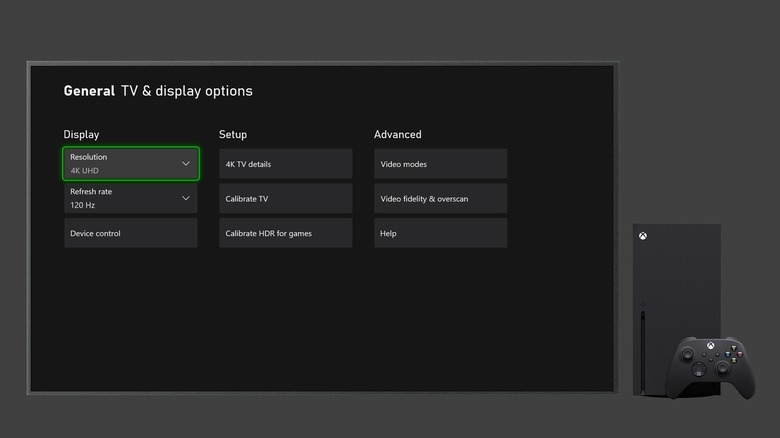
    TV & display options page on the Xbox Series X console

    Before changing anything, go to Settings > General > TV and Display Options > 4K TV Details. You should see a group of green checkmarks on the screen. According to Microsoft, these checkmarks indicate that everything is working, and it’s the quickest way to learn whether your TV and HDMI port can handle the console’s best features. Microsoft mentions that the Xbox’s most advanced features need an HDMI 2.1 connection. Keep in mind that on some TVs, only certain HDMI ports support 2.1. So make sure you reserve the best port for your Xbox.

    Next, open Video Modes in the same menu, and check “Allow variable refresh rate” and “Allow auto low latency mode.” Variable refresh rate, or VRR, lets the TV match its refresh rate to the frames the Xbox is producing, which reduces stutter and screen tearing for a much smoother experience. “Allow auto low latency mode,” or ALLM, switches the TV into its game mode automatically, which reduces the amount of post-processing your TV does and shortens the delay between what is happening in the game and what you see on screen.

    Set up HDR, and check for Dolby Vision
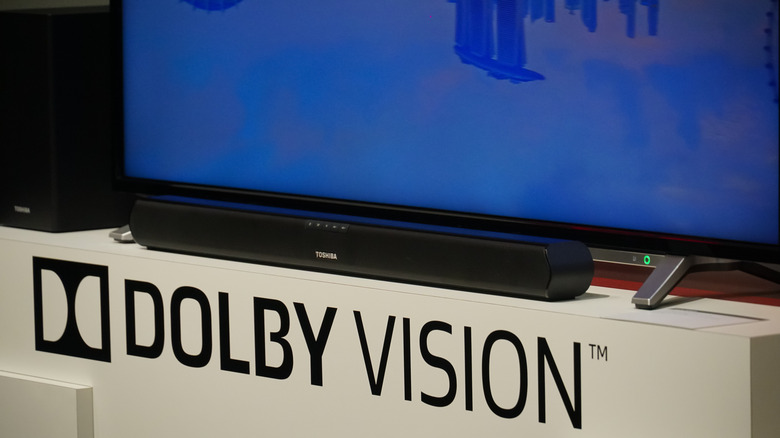
    Advertisement of Dolby Vision, brand name for a high dynamic range (HDR) 4K video format.

    In Video Modes, make sure “Allow HDR10” is checked, then run the Calibrate HDR for Games tool, which fine-tunes HDR to your specific screen. The goal is for bright and dark areas to keep their detail on your particular TV.

    Xbox also supports Dolby Vision for gaming, which is available on both the Xbox Series X and S. It requires a Dolby Vision-supported TV and works best with VRR and ALLM switched on. Over a hundred games are currently optimized for Dolby Vision HDR and Dolby Atmos, and GTA VI will be joining them at launch with calibrated Dolby support. Check whether your TV supports these Dolby formats by going through your TV’s display and audio settings, and get the best possible experience.  

    Free up space on the right drive

    This one is very important. Games that are optimized for the Series X and S can only be played from the internal SSD or an official storage expansion card. An external USB drive (even an SSD) can hold the game files, but the game will not run unless the entire game is on the internal SSD or expansion card. Considering the fact that GTA 6’s download file is reported to be a whopping 212GB, and that the Series S is equipped with an internal SSD with capacity as low as 512GB, you are going to need as much of that storage free as possible. You can go to Settings > Storage and start deleting the games and files you can live without, or perhaps move them to a USB storage.

    Preloading on Xbox began on November 10, and if you have already pre-ordered the game, it might be a good idea to preload it on your console so you don’t have to start downloading over 200GB and moving files on the day the game comes out. Change all of these settings, and you will give the game its best chance of looking as good as possible once Grand Theft Auto VI finally arrives.

    change Series settings These Xbox
    Share. Facebook Twitter
    Previous ArticleFlorence Pugh responds to ‘disturbing’ plastic surgery rumors
    Next Article What To Watch Friday: MobLand Finale, Yellowjackets And Percy Jackson And The Olympians Return, And More
    James

    Related Posts

    El Hijo del Vikingo Set For Netflix Reality Series Secreto Millonario | 411MANIA

    November 20, 2026

    The Thermaltake LGCS GeForce RTX 5070 Gaming PC Drops to $1,500 Shipped for Black Friday, Excellent Prebuilt Rig for 1080p and 1440p Gaming (With Some 4K Gaming Chops)

    November 20, 2026

    Ampere Analysis: Over 2m UK and US Xbox players accessed GTA 6 before official launch by switching location to New Zealand

    November 20, 2026

    Get $10 Off GTA 6 Preorders Using This Trick (It Won’t Last Long)

    November 20, 2026

    1 Comment

    1. Pingback: Ananya Panday feels Gen Z has more options in love, but won’t ‘settle for just anything’: ''Our standards of love are also very high' - Comic Vibe

    Leave A Reply Cancel Reply

    Our Picks

    ‘GTA 6’ breaks entertainment box office records with $3.79B in 1st

    November 20, 2026

    Do Not Stop Codes (November 2026) – Do Not Stop [Roblox] Guide

    November 20, 2026

    Cardiff Entrepreneur Launches New Community to Help South Wales Founders Succeed

    November 20, 2026

    The GTA 6 effect: Why blockbuster gaming is becoming a billion-dollar marketing ecosystem

    November 20, 2026
    • Facebook
    • Twitter
    • Instagram
    • YouTube
    • TikTok
    • Telegram
    Don't Miss
    TV

    This Titanium Apple Watch Series 11 cell model just hit one of its best prices ever at $169 off

    By JamesJuly 22, 20260

    Joining the $100 price drops on the most popular Apple Watch Series 11 modelsstarting from $299, we just spotted a notable and likely fleeting chance to land the Apple Watch Series 11 GPS + Cell with the Natural Titanium Case at $169 off the list price. 

    One Piece Chapter 1189 Spoilers & Manga Plot Leaks

    July 22, 2026

    Comic-Con goes to the dogs at pet cosplay competition

    July 22, 2026

    Zombie Island codes July 2026

    July 22, 2026

    Subscribe to Updates

    Get the latest creative news from SmartMag about art & design.

    About Us
    About Us

    Comic Vibe is a pop-culture destination created for fans who live and breathe comics, movies, anime, TV shows, gaming, tech, cosplay, and collectibles.

    Our mission is to deliver engaging news, reviews, features, guides, and opinions that celebrate geek culture in all its forms. From the latest comic releases and blockbuster films to anime trends, gaming updates, cutting-edge tech, and collector culture, Comic Vibe brings everything together in one vibrant hub.

    Our Picks

    ‘GTA 6’ breaks entertainment box office records with $3.79B in 1st

    November 20, 2026

    Do Not Stop Codes (November 2026) – Do Not Stop [Roblox] Guide

    November 20, 2026

    Cardiff Entrepreneur Launches New Community to Help South Wales Founders Succeed

    November 20, 2026

    Subscribe to Updates

    Get the latest comics, anime, movies, TV, gaming, cosplay, and pop culture news delivered directly to your inbox. No spam—just the stories every fan should know.

    Facebook X (Twitter) Instagram YouTube TikTok
    • Home
    • Contact Us
    • Terms & Conditions
    • Advertise With Us
    • DMCA Policy
    • Privacy Policy
    • About Us
    © 2026 Comic Vibe. Designed by Comic Vibe.

    Type above and press Enter to search. Press Esc to cancel.