
Close Menu

    Subscribe to Updates

    Get the latest creative news from FooBar about art, design and business.

    What's Hot

    One cable mistake could be killing your desktop PC’s gaming performance

    November 14, 2026

    Catwoman #93 Preview: Selina’s Deadly Carnival Game Begins

    November 14, 2026

    10 Twilight Zone Episodes That Were Way Ahead Of Their Time

    November 14, 2026
    Facebook X (Twitter) Instagram
    Facebook X (Twitter) Instagram YouTube TikTok
    Comic Vibe
    Saturday, November 14
    • Home
    • Comics
      • Comic Vibe News
    • Gaming
    • Movies
    • TV
    • Anime
    • Toys & Collectibles
    • Cosplay
    • Tech
    • Digital Culture
      • Creators & Fan Culture
      • Creator Economy & Fan-Driven Platforms
      • Digital Fandom & Online Communities
      • Metaverse & Virtual Worlds
      • NFTs & Digital Collectibles
      • Virtual Events & Online Conventions
      • Virtual Identity & Avatars
    • Shop
    Comic Vibe
    • Home
    • Contact Us
    • Terms & Conditions
    • Advertise With Us
    • DMCA Policy
    • Privacy Policy
    • About Us
    Home»Gaming»One cable mistake could be killing your desktop PC’s gaming performance
    Gaming

    One cable mistake could be killing your desktop PC’s gaming performance

    JamesBy JamesNovember 14, 2026No Comments3 Mins Read
    Facebook Twitter
    Share
    Facebook Twitter

    Your monitor might be connected to the motherboard instead of your graphics card, and the fix takes only a cable swap.

    You may have a great graphics card in your gaming desktop and still be disappointed with its performance because of where the monitor is plugged in. Many PCs have HDMI, DisplayPort and USB-C monitor connections in two places: on the motherboard and on the dedicated graphics card. The same cable can fit either set of ports, which isn’t particularly helpful.

    If your desktop has a dedicated graphics card, the monitor should normally connect to that card’s outputs. You may end up with less capable integrated graphics or a blank screen if you use a motherboard port. Instead of assuming that the problem is your hardware, start by inspecting the back of the case. The motherboard’s video outputs typically use the graphics integrated into the CPU (if it has any), instead of the dedicated graphics card in a PCIe slot.

    Why plugging into the motherboard can hurt gaming performance
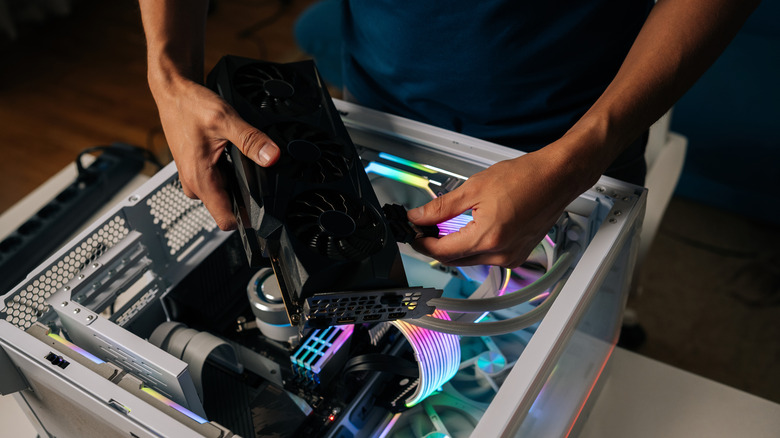
    A person holding a black graphics card above an open white desktop PC case.

    Integrated graphics are suitable for basic tasks and less demanding games, but typically cannot compete with your dedicated graphics card — even if you know how to boost GPU performance without buying new hardware. If Windows runs your game on integrated graphics instead, you’re missing out on the performance of your dedicated GPU.

    Plugging into the motherboard doesn’t always leave the dedicated GPU idle. In some Windows configurations, that card can still render games and pass the frames through integrated graphics, potentially adding overhead. Microsoft doesn’t state a percentage of performance loss for this configuration, and the impact will depend on the hardware. That’s why some gamers don’t notice the mistake immediately.

    For others, it’s a black screen. Motherboard video outputs won’t work with Intel desktop processors carrying an F or KF suffix, since those chips lack integrated graphics. Some PCs also disable the integrated GPU when a dedicated card is installed, so a blank screen doesn’t necessarily mean your graphics card has failed.

    How to make sure you’re using the right port
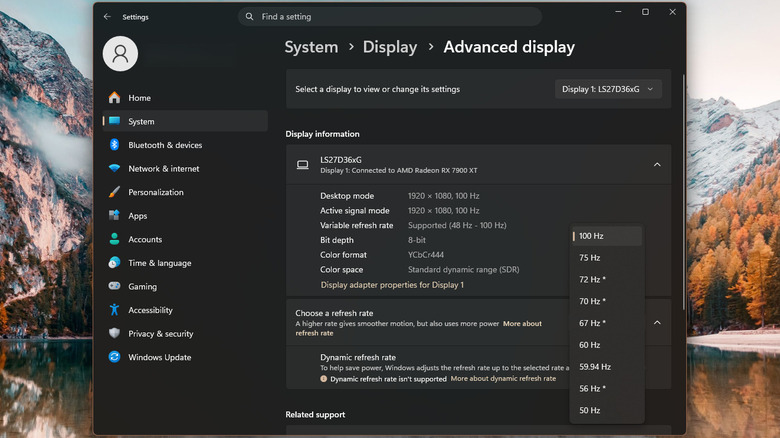
    Windows 11 Advanced display settings showing a monitor connected to an AMD Radeon RX 7900 XT with a refresh rate of 100Hz.

    Luckily, the correct ports are typically easy to find. The motherboard’s video outputs are grouped with its USB, Ethernet and audio ports. The graphics card has its own outputs on a separate expansion bracket, typically lower down on the back of a conventional tower. They’re often horizontal rather than vertical, but orientation isn’t universal, so check which ports belong to the graphics card.

    Turn off the PC, move the monitor cable to the graphics card and select the corresponding input on the monitor. Both HDMI and DisplayPort support high-refresh-rate gaming, provided your graphics card, monitor and cable support the resolution and refresh rate you want. DisplayPort comes standard on most modern gaming monitors, but if you are already using HDMI and it is working at the resolution and refresh rate you need, then you don’t need to purchase a new cable. For Windows 11, go to Settings > System > Display > Advanced display and check the refresh rate. 

    Do remember, though, that a 100Hz monitor that’s set to 60Hz will only show 60 updates per second, no matter what the graphics card renders. If your screen goes black after switching to the graphics card, try a different GPU port or cable. Before checking the power connectors or seating on the card, shut down and unplug the PC. Finally, if integrated graphics aren’t disabled, you can even connect a second monitor to the motherboard’s output, depending on your system’s compatibility.

    Cable Could Killing mistake your
    Share. Facebook Twitter
    Previous ArticleCatwoman #93 Preview: Selina’s Deadly Carnival Game Begins
    James

    Related Posts

    Xbox’s Matt Booty Faces Backlash From Developers Over Anniversary Post: “Didn’t You Just Lay Off Most of Halo Studios?”

    November 14, 2026

    PlayStation Game is Being Delisted and Permanently Shutting Down

    November 14, 2026

    Xbox Store lists new $2000 GTA 6 pre-order edition, with price causing sticker shock

    November 14, 2026

    5 Disadvantages Of Buying Digital-Only Gaming Consoles

    November 14, 2026
    Leave A Reply Cancel Reply

    Our Picks

    One cable mistake could be killing your desktop PC’s gaming performance

    November 14, 2026

    Catwoman #93 Preview: Selina’s Deadly Carnival Game Begins

    November 14, 2026

    10 Twilight Zone Episodes That Were Way Ahead Of Their Time

    November 14, 2026

    Tavern Town codes for a free crate (November 2026)

    November 14, 2026
    • Facebook
    • Twitter
    • Instagram
    • YouTube
    • TikTok
    • Telegram
    Don't Miss
    TV

    Bruins Young Forward Is Big Player To Watch Next Season

    By JamesJuly 21, 20260

    At the 2026 NHL trade deadline, the Boston Bruins acquired Lukas Reichel from the Vancouver Canucks in exchange for a 2026 sixth-round pick. With this move, the Bruins brought in a former first-round pick who was in need of a change of scenery in a big way. 

    Kingdom release schedule (updated July 2026): When the next chapter of the sweeping historical epic is coming out

    July 21, 2026

    Ryan Reynolds Says Another ‘Deadpool’ Movie Is Coming: “There’s Stuff Upcoming”

    July 21, 2026

    No Comic-Con badge? Here are some standout off

    July 21, 2026

    Subscribe to Updates

    Get the latest creative news from SmartMag about art & design.

    About Us
    About Us

    Comic Vibe is a pop-culture destination created for fans who live and breathe comics, movies, anime, TV shows, gaming, tech, cosplay, and collectibles.

    Our mission is to deliver engaging news, reviews, features, guides, and opinions that celebrate geek culture in all its forms. From the latest comic releases and blockbuster films to anime trends, gaming updates, cutting-edge tech, and collector culture, Comic Vibe brings everything together in one vibrant hub.

    Our Picks

    One cable mistake could be killing your desktop PC’s gaming performance

    November 14, 2026

    Catwoman #93 Preview: Selina’s Deadly Carnival Game Begins

    November 14, 2026

    10 Twilight Zone Episodes That Were Way Ahead Of Their Time

    November 14, 2026

    Subscribe to Updates

    Get the latest comics, anime, movies, TV, gaming, cosplay, and pop culture news delivered directly to your inbox. No spam—just the stories every fan should know.

    Facebook X (Twitter) Instagram YouTube TikTok
    • Home
    • Contact Us
    • Terms & Conditions
    • Advertise With Us
    • DMCA Policy
    • Privacy Policy
    • About Us
    © 2026 Comic Vibe. Designed by Comic Vibe.

    Type above and press Enter to search. Press Esc to cancel.