
Close Menu

    Subscribe to Updates

    Get the latest creative news from FooBar about art, design and business.

    What's Hot

    Legendary Sci-Fi Writer Harlan Ellison Wrote An Underrated Daredevil Story For Marvel

    November 2, 2026

    Watch the Milwaukee Brewers make a surprise cameo on Saturday Night Live

    November 2, 2026

    CES 2027 entertainment tech: from AI adoption to AI revenue, Las Vegas from Jan. 5

    November 2, 2026
    Facebook X (Twitter) Instagram
    Facebook X (Twitter) Instagram YouTube TikTok
    Comic Vibe
    Monday, November 2
    • Home
    • Comics
      • Comic Vibe News
    • Gaming
    • Movies
    • TV
    • Anime
    • Toys & Collectibles
    • Cosplay
    • Tech
    • Digital Culture
      • Creators & Fan Culture
      • Creator Economy & Fan-Driven Platforms
      • Digital Fandom & Online Communities
      • Metaverse & Virtual Worlds
      • NFTs & Digital Collectibles
      • Virtual Events & Online Conventions
      • Virtual Identity & Avatars
    • Shop
    Comic Vibe
    • Home
    • Contact Us
    • Terms & Conditions
    • Advertise With Us
    • DMCA Policy
    • Privacy Policy
    • About Us
    Home»Gaming»How To Use Your Xbox Series X Controller On A Steam Deck
    Gaming

    How To Use Your Xbox Series X Controller On A Steam Deck

    JamesBy JamesNovember 2, 20263 Comments3 Mins Read
    Facebook Twitter
    Share
    Facebook Twitter

    One of the Steam Deck’s biggest selling points is that you can play it anywhere. However, at nearly two inches thick and around 640 grams in weight, you may notice your hands cramping or feeling sore after longer gaming sessions. Thankfully, the Steam Deck supports a wide range of modern controllers, including the PS5’s DualSense, Joy-Cons, and Xbox Series X controllers. This lets users choose the most ergonomic controller for them and keep playing with the Steam Deck docked, as though it were a Nintendo Switch.

    Better still, the whole process takes only a few moments. There are two ways to connect an Xbox Series X controller to a Steam Deck. If you don’t mind trailing cables, you can link the two with a USB-C to USB-C cable. On the other hand, Bluetooth lets you move around freely and keep your space clutter-free. Here’s how to wirelessly link an Xbox controller to a Steam Deck:

    1. Press the Steam button on your Steam Deck.

    2. Open the Settings menu and make sure Bluetooth is enabled.

    3. Press the Xbox button on your controller to wake it up.

    4. Hold the pairing button on the top of the controller until the Xbox button flashes.

    5. Your controller should now be visible in the Steam Deck’s Bluetooth menu. Select it, and you should be connected within a few seconds.

    Customizing your gaming experience on Steam Deck
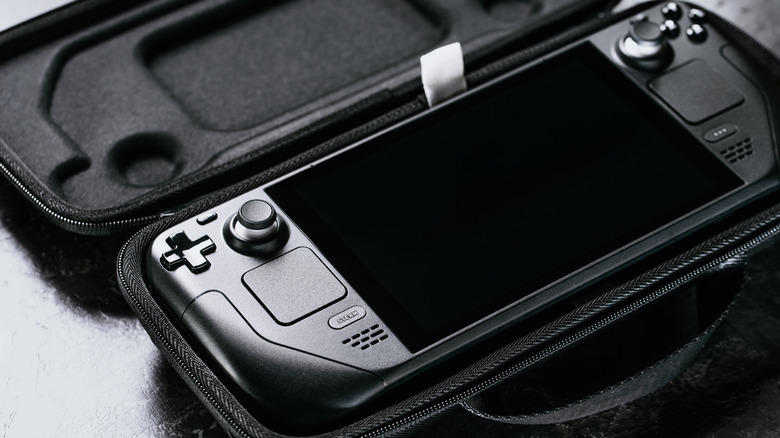
    Close up of a Steam Deck inside a carry case

    The Steam Deck is actually extremely customizable. If you don’t like the default control scheme, you can try community-created layouts, just like you would on a typical PC. Alternatively, you can use the built-in remapping functionality to set exactly what each button does. To access this, simply open a game, press the Steam button, and select Controller Settings. These settings are game-specific and won’t transfer to other titles.

    If you’d like to ensure your control scheme works no matter which game you’re playing, you’ll have to create a new template. Remap controls as before, but this time select Export Layout and choose New Template from the dropdown menu. Finally, name the template and save it. From now on, it should appear under User Created Templates and be accessible anytime.

    There’s no need to stop at a controller, either. Steam Deck owners can connect all kinds of peripherals, so why not level things up by connecting a good Bluetooth speaker or a pair of wireless headphones? This is also a great time to familiarize yourself with the Steam Deck’s lesser-known features, like quickly turning the trackpad into a mouse or adjusting the brightness. With just a little digging around in the menus, you can extend the device’s functionality far beyond what you first thought possible.

    controller Series Steam Xbox your
    Share. Facebook Twitter
    Previous ArticleThis Artist Creates Thought-Provoking Comics With Unexpected Twists (25 Pics)
    Next Article Brittany Aldean says husband Jason is ‘always there’ with advice as she builds venture of her own
    James

    Related Posts

    Your PlayStation 5 Can Play PS2 Discs, But You’ll Have To Do Some Extra Legwork

    November 2, 2026

    Tatiana Maslany’s Cult Sci-Fi Series On HBO Max Is Worth Revisiting

    November 1, 2026

    Muramasa Revenant Blades devs on why the game is returning now

    November 1, 2026

    Xbox Series X 1TB gets a big price cut for a limited time

    November 1, 2026

    3 Comments

    1. Pingback: Fortnite's Pirate Shop Makes the Item Shop Free for 14 Days as Players Near 5 Million - Comic Vibe

    2. Pingback: Legendary Sci-Fi Writer Harlan Ellison Wrote An Underrated Daredevil Story For Marvel - Comic Vibe

    3. Pingback: Your PlayStation 5 Can Play PS2 Discs, But You'll Have To Do Some Extra Legwork - Comic Vibe

    Leave A Reply Cancel Reply

    Our Picks

    Legendary Sci-Fi Writer Harlan Ellison Wrote An Underrated Daredevil Story For Marvel

    November 2, 2026

    Watch the Milwaukee Brewers make a surprise cameo on Saturday Night Live

    November 2, 2026

    CES 2027 entertainment tech: from AI adoption to AI revenue, Las Vegas from Jan. 5

    November 2, 2026

    Paige Spiranac unloads her Halloween content on America, Jenn Sterger as Wednesday Addams & Capturing Bigfoot

    November 2, 2026
    • Facebook
    • Twitter
    • Instagram
    • YouTube
    • TikTok
    • Telegram
    Don't Miss
    Digital Culture

    EXCLUSIVE: Inside the Massive Global Economy Behind FIFA x BTS

    By JamesJuly 19, 20260

    Global icons BTS are all set to headline the historic 2026 FIFA World Cup Final Halftime Show.

    Xbox Game Pass Could Drop Day One First

    July 19, 2026

    TV actor Abhinav Shukla claims porn contributes to global warming

    July 19, 2026

    Captain Marvel: Dark Past #4 Preview: Carol’s Mind Games

    July 19, 2026

    Subscribe to Updates

    Get the latest creative news from SmartMag about art & design.

    About Us
    About Us

    Comic Vibe is a pop-culture destination created for fans who live and breathe comics, movies, anime, TV shows, gaming, tech, cosplay, and collectibles.

    Our mission is to deliver engaging news, reviews, features, guides, and opinions that celebrate geek culture in all its forms. From the latest comic releases and blockbuster films to anime trends, gaming updates, cutting-edge tech, and collector culture, Comic Vibe brings everything together in one vibrant hub.

    Our Picks

    Legendary Sci-Fi Writer Harlan Ellison Wrote An Underrated Daredevil Story For Marvel

    November 2, 2026

    Watch the Milwaukee Brewers make a surprise cameo on Saturday Night Live

    November 2, 2026

    CES 2027 entertainment tech: from AI adoption to AI revenue, Las Vegas from Jan. 5

    November 2, 2026

    Subscribe to Updates

    Get the latest comics, anime, movies, TV, gaming, cosplay, and pop culture news delivered directly to your inbox. No spam—just the stories every fan should know.

    Facebook X (Twitter) Instagram YouTube TikTok
    • Home
    • Contact Us
    • Terms & Conditions
    • Advertise With Us
    • DMCA Policy
    • Privacy Policy
    • About Us
    © 2026 Comic Vibe. Designed by Comic Vibe.

    Type above and press Enter to search. Press Esc to cancel.