
Close Menu

    Subscribe to Updates

    Get the latest creative news from FooBar about art, design and business.

    What's Hot

    4 Netflix reboots that honor the originals instead of just feeling like a cash grab

    October 28, 2026

    How to Score Apple, Dyson, and Nintendo for Less Before Black Friday, Thanks to Back Market’s Refurbished Deals

    October 28, 2026

    Former BigBang member Seungri confirms he’s married, expecting 1st child

    October 28, 2026
    Facebook X (Twitter) Instagram
    Facebook X (Twitter) Instagram YouTube TikTok
    Comic Vibe
    Wednesday, October 28
    • Home
    • Comics
      • Comic Vibe News
    • Gaming
    • Movies
    • TV
    • Anime
    • Toys & Collectibles
    • Cosplay
    • Tech
    • Digital Culture
      • Creators & Fan Culture
      • Creator Economy & Fan-Driven Platforms
      • Digital Fandom & Online Communities
      • Metaverse & Virtual Worlds
      • NFTs & Digital Collectibles
      • Virtual Events & Online Conventions
      • Virtual Identity & Avatars
    • Shop
    Comic Vibe
    • Home
    • Contact Us
    • Terms & Conditions
    • Advertise With Us
    • DMCA Policy
    • Privacy Policy
    • About Us
    Home»Gaming»You can finally see who’s talking in voice chat on PlayStation 5 — here’s how
    Gaming

    You can finally see who’s talking in voice chat on PlayStation 5 — here’s how

    JamesBy JamesOctober 28, 20261 Comment3 Mins Read
    Facebook Twitter
    Share
    Facebook Twitter

    An update makes busy PS5 parties easier to follow, provided you know where to find the new toggle.

    For years, figuring out who’s speaking in a large PlayStation 5 party chat without opening the voice chat card has been a guessing game. Thankfully, the September 16, 2026 PS5 system software update (version 26.06-14.00.00) added an on-screen indicator to display the name of each player who’s currently talking.

    The September update also enabled enhanced PSSR upscaling by default on PS5 Pro, but the speaker indicator works on both the regular PS5 and PS5 Pro. You can also choose where it appears on-screen, though you’ll have to turn it on first since it’s not enabled by default. Also, if you used this option prior to September, you weren’t imagining it!

    How to use Display Who’s Speaking on PS5
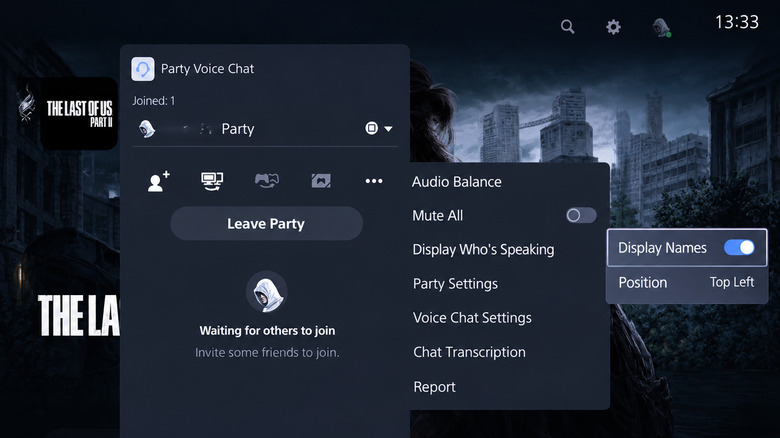
    PS5 Party Voice Chat menu shows Display Names enabled and Position set to Top Left.

    First, you’ll need to create or join a PlayStation party for voice chat. To make one, open Control Center by pressing the PS button. Then go to Game Base > Parties > Start Party and choose Open Party or Closed Party to control who can join. While in the voice chat, open Control Center again and go to the Voice Chat card. There, select the three-dot More button, then Display Who’s Speaking. Turn on Display Names, and the name of the person talking will show on your screen.

    You can also control the Position of this indicator so it doesn’t cover important game elements like your mini-map or health bar. To hide the speaker indicator, just turn off Display Names in the same way. If you can’t find the setting, go to Settings > System > System Software > System Software Update and Settings and select Update System Software to make sure you’re on the latest version.

    PlayStation parties can contain as many as 16 players, so identifying the person with the incredibly loud mic can be difficult. After you figure out who’s responsible, select their name in the Voice Chat card and choose Volume to control their individual volume. That setting carries over to other chats with that player, so you don’t have to adjust it every time you game with them.

    Why some PS5 players already had this feature
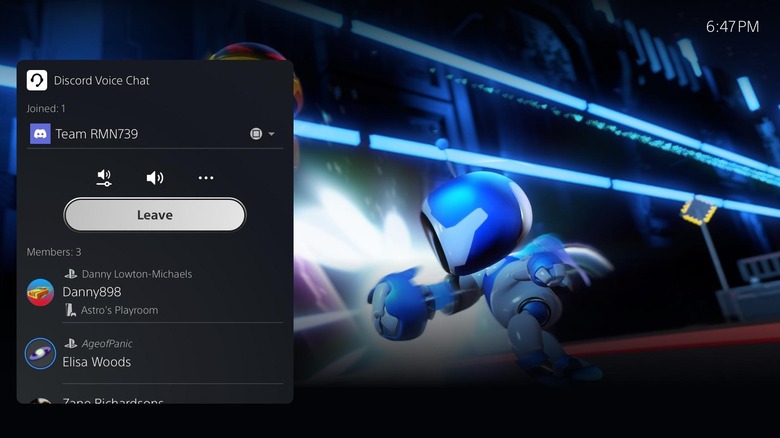
    A PS5 Discord Voice Chat panel shows participants alongside a scene from Astro's Playroom.

    The release of Display Who’s Speaking in September was not the first time you could take advantage of this feature. In fact, some players reported using it as early as November 2025, and shared screenshots of the setting, while others didn’t see it. A few folks even reported that they lost access to this feature after initially receiving it. Since Sony has not stated how the early availability was controlled, the September 16 update marked its official inclusion in the public release notes, rather than the first time anyone could use it.

    While Sony documents the indicator specifically for PlayStation party chat, some players have reported using the indicator with Discord on their PS5 in the same way. The feature doesn’t work with the voice chat built into games, though many titles have their own options for displaying speakers, so check their settings if this is something you want for game chat.

    It’s great to see this feature built into the PS5, though customization is limited. There are no settings to tweak the speaker display’s transparency or size. Xbox’s comparable party overlay can be adjusted for both position and transparency, which was announced all the way back in May 2017.

    chat Finally Talking Voice Whos
    Share. Facebook Twitter
    Previous ArticleBiggest Wolverine Sales Over the Last Year
    Next Article 31,000 Milwaukee Brewers fans watch Game 4 from American Family Field
    James

    Related Posts

    How to Score Apple, Dyson, and Nintendo for Less Before Black Friday, Thanks to Back Market’s Refurbished Deals

    October 28, 2026

    First Xbox COO Helen Chiang leaves company after three months in the role

    October 28, 2026

    Cities: Skylines – Expanded Edition (Nintendo Switch 2) Review

    October 28, 2026

    ‘Find the Original Game’ — Creator of Viral Needle in a Haystack Game Roasts Copycats With New ‘Mode’

    October 28, 2026

    1 Comment

    1. Pingback: Ruh-Roh! Revisiting the Scooby-Doo monsters that still give us the jeepers - Comic Vibe

    Leave A Reply Cancel Reply

    Our Picks

    4 Netflix reboots that honor the originals instead of just feeling like a cash grab

    October 28, 2026

    How to Score Apple, Dyson, and Nintendo for Less Before Black Friday, Thanks to Back Market’s Refurbished Deals

    October 28, 2026

    Former BigBang member Seungri confirms he’s married, expecting 1st child

    October 28, 2026

    Fortnite Treasure Hunt: map, skins, weapons… what we know about the new season

    October 28, 2026
    • Facebook
    • Twitter
    • Instagram
    • YouTube
    • TikTok
    • Telegram
    Don't Miss
    Movies

    NFL’s Kyle Juszczyk Reveals Why Taylor Swift, Travis Kelce’s Marriage Makes “So Much Sense”

    By JamesJuly 18, 20260

    Taylor Swift and Travis Kelce’s wedding was the best night ever, Kyle Juszcyzk and Kristin Juszczyk would never forget how they moved.

    ‘Ridiculous’ Netflix series true crime fans binge in one weekend

    July 18, 2026

    Absolute Vs Armageddon: Top 10 Wednesday-To

    July 18, 2026

    THE POP CULTURE NEWS BULLETIN 251: FEEL GOOD TV IS THE HEADLINES OF THE WEEK

    July 18, 2026

    Subscribe to Updates

    Get the latest creative news from SmartMag about art & design.

    About Us
    About Us

    Comic Vibe is a pop-culture destination created for fans who live and breathe comics, movies, anime, TV shows, gaming, tech, cosplay, and collectibles.

    Our mission is to deliver engaging news, reviews, features, guides, and opinions that celebrate geek culture in all its forms. From the latest comic releases and blockbuster films to anime trends, gaming updates, cutting-edge tech, and collector culture, Comic Vibe brings everything together in one vibrant hub.

    Our Picks

    4 Netflix reboots that honor the originals instead of just feeling like a cash grab

    October 28, 2026

    How to Score Apple, Dyson, and Nintendo for Less Before Black Friday, Thanks to Back Market’s Refurbished Deals

    October 28, 2026

    Former BigBang member Seungri confirms he’s married, expecting 1st child

    October 28, 2026

    Subscribe to Updates

    Get the latest comics, anime, movies, TV, gaming, cosplay, and pop culture news delivered directly to your inbox. No spam—just the stories every fan should know.

    Facebook X (Twitter) Instagram YouTube TikTok
    • Home
    • Contact Us
    • Terms & Conditions
    • Advertise With Us
    • DMCA Policy
    • Privacy Policy
    • About Us
    © 2026 Comic Vibe. Designed by Comic Vibe.

    Type above and press Enter to search. Press Esc to cancel.