

Just because you’ve built or bought a gaming PC doesn’t mean you fully understand the hardware inside, though there are essential tips every beginner should know. You’ll want to wrap your head around this knowledge to get the best performance out of your games, whether they’re AAA or indie. That means you need the right tools for the job, and with so many to choose from, it’s easy to get lost in the weeds with apps that often overcomplicate things or overlap with the OS’s built-in tools. With proper guidance, it’s easy enough to snag a complementary set of essential tools that every PC gamer should install, one of the many reasons why you should choose PC gaming over consoles.
First, verify your hardware. This is where CPU-Z and GPU-Z come in. From there, you’ll want software that collects data by monitoring your PC’s sensors so you have a performance record, making it easy to spot irregularities and troubleshoot them. That’s exactly what HWiNFO 64 brings to the table, and it can work in tandem with MSI Afterburner’s optional RivaTuner install. By combining these two apps, you can display an in-game overlay while benefiting from HWiNFO’s more detailed reports.
With the right tools, you can see how your hardware performs, game by game, with live stats. This lets you tune your graphics settings to get the most out of your hardware by using it correctly, improving performance and making the most of your hard-earned money.
CPU-Z and GPU-Z
Technically, these are two separate tools, but they indeed cover the most important hardware in your PC: your motherboard, CPU, GPU, and RAM. With CPU-Z, you can easily identify your CPU to confirm it is legitimate hardware, and you can also identify your motherboard and RAM. Better yet, the app also shows users their live CPU and memory frequencies, making it easy to see your clock speeds. So you cannot only verify your hardware, but also ensure your components run at their intended settings. Just keep in mind that you can only take snapshots of your hardware info; the app has no live logging despite its live reporting.
Jumping over to GPU-Z, you can use it to verify your GPU, identify the model and its specs, and check your video-memory capacity; you can also view GPU and memory clocks, not to mention temperatures. Watching the app’s output will give you an idea of your normal operating conditions, data that will help you troubleshoot should you run into issues when playing your games, perhaps with an overlay that reports your system’s stats, which is where the tools HWiNFO 64 and RivaTuner come into play (more about these below). And if you’d prefer to skip unnecessary bloat with as few installed tools as possible, you can even use GPU-Z to log your sensor readings, like if you wish to run the app in the background when gaming, to then pore over your logs when done to see if there were any outlying problems with your performance.
HWiNFO 64
If you want to log as many of your sensors as possible, HWiNFO 64 is the tool to use. It goes well beyond GPU-Z for GPU and video memory, and it also includes reports for your CPU and RAM, all in one app. Better yet, HWiNFO 64 can basically plug into the RivaTuner Statistics Server app (RTSS), greatly expanding its live overlay reports. So not only can you dig into your CPU/GPU temperatures, clock speeds, utilization, power readings, and fan speeds with HWiNFO 64, you can also cross-reference your GPU data with GPU-Z to make sure the reported stats line up.
Your main goal with HWiNFO 64 is to run its logging in the background before you start gaming, say, if you plan to open one of the more demanding titles you want to tame. When a game starts misbehaving, perhaps by skipping a few too many frames, you’ll have logs to help narrow down what might be limiting performance, be it your CPU, GPU, or memory. This way, you can better identify which component warrants a closer look.
So not only can HWiNFO 64 help to find any cooling issues with a particular piece of hardware, but since you can plug this info directly into RTSS, you can watch this data in real time with an overlay to get a better idea of what particular parts of a game are making your system buckle, so that you can either tune your game settings to de-stress your system, or figure out which components are worth replacing to bring your rig up to speed for demanding AAA gaming.
MSI Afterburner w/ RivaTuner Statistics Server
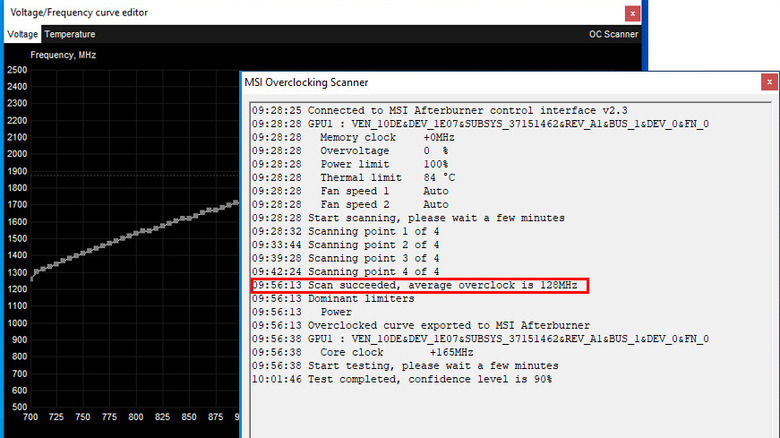
MSI Afterburner can not only monitor your hardware, but thanks to the packed-in app RivaTuner Statistics Server, you can display this info in real time with an in-game overlay. You can also use the app to adjust your GPU settings, whether you are using an AMD or Nvidia card. It’s handy for those who want to overclock or underclock their GPU, adjust fan speeds and set a custom fan curve. Setting your curve can mean the difference between sitting next to a loud jet engine that overaggressively cools at any sign of heat, and a mostly silent room thanks to the fact that you set a curve that ramps up when your games get demanding. Paired with the RTSS overlay connected to HWiNFO 64’s stats, you can watch in real time as your temps rise and your fan speeds change, making it easier to adjust them when you can see how they behave.
Once you’ve gotten the hang of trial-and-error tuning your fan curve, you can do the same with overclocking and underclocking, testing your new settings for instability in demanding games or GPU benchmarks. All silicon is slightly different, so it’s best to tune things yourself, rather than follow someone else’s specific settings that may cause your gear to buckle. The goal is to balance performance and stability, and these tools make it easier to monitor and test your changes—essentials every PC gamer should install to keep their gaming PC running smoothly.

1 Comment
Pingback: 5 TV Shows To Watch If You Like R.J. Decker - Comic Vibe