

Changing your name in Fortnite depends on which name the game is showing. On PC, Nintendo Switch, and mobile, that is your Epic Games display name. On PlayStation and Xbox, Fortnite shows your PSN Online ID or Xbox gamertag, so the name has to be changed on the console’s side.
Neither change happens inside Fortnite, and it comes with certain limitations. An Epic Games display name is free to change once every two weeks on Epic’s website. However, a PSN Online ID or Xbox gamertag is only free to change the first time.
How do you change your name in Fortnite?
To change your name in Fortnite, sign in at epicgames.com, open Account, type a new name in the Display name box, and select Continue. That changes the name shown on PC, Nintendo Switch, and mobile. On PlayStation and Xbox, change your PSN Online ID or Xbox gamertag in the console’s settings instead.
The table below shows how to change name in Fortnite on each platform.
| Platform | Name you see in Fortnite | Where to change it | Cost |
|---|---|---|---|
| PC | Epic Games display name | Account settings at epicgames.com | Free, once every two weeks |
| Nintendo Switch 2 and Nintendo Switch | Epic Games display name | Account settings at epicgames.com | Free, once every two weeks |
| iPhone, iPad, and Android | Epic Games display name | Account settings at epicgames.com | Free, once every two weeks |
| PlayStation 5 and PlayStation 4 | PSN Online ID | PlayStation settings or Sony’s Account Management site | First change free, later changes paid |
| Xbox Series X|S and Xbox One | Xbox gamertag | Xbox profile settings or Microsoft’s website | First change free, later changes paid |
How to change your Epic Games display name
These steps change your Fortnite display name on PC, Nintendo Switch, and mobile, and they work in any browser. Epic requires a verified email address on the account before it allows the change.
- Go to epicgames.com and select Sign in.
- If you normally play on a console, sign in with the PlayStation, Xbox, or Nintendo icon.
- Select your name or profile icon in the top-right corner, then select Account to open your Account settings page.
- Find the box labelled Display name. If your current name is shown with a pencil icon beside it, select the icon first.
- Enter your new display name, which has to be between three and 16 characters.
- Select Continue to change it.
Launch Fortnite again and check the name above your character. In addition to Fortnite, the same Epic Games display name appears in the Epic Games Launcher and in Epic’s other games, including Rocket League and Fall Guys. Check the spelling before you select Continue, as Epic won’t let you fix a typo for two weeks.
How to change your Fortnite name on PlayStation (PS5 and PS4)
Fortnite on PS5 and PS4 shows your PSN Online ID, so changing your Epic Games display name won’t change what you see on PlayStation. The Online ID is changed in the console’s settings. These are the steps on PS5:
- Go to Settings > Users and Accounts > Account > Profile > Online ID.
- Enter a new Online ID and select Confirm if it’s available.
- Choose whether to display your old Online ID next to the new one for 30 days.
- Select Order & Pay to confirm. Sony then signs you out of all your devices.
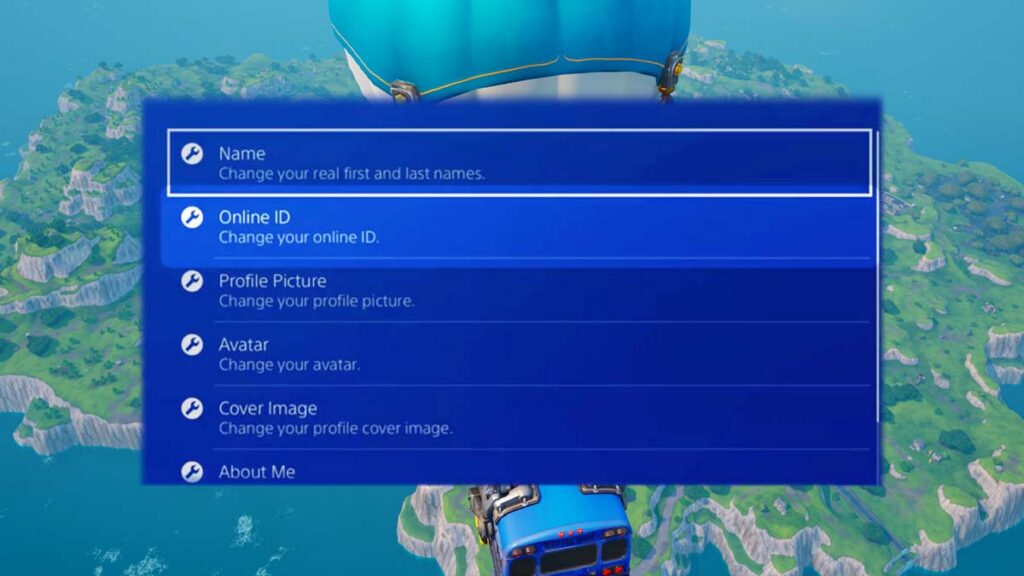
On PS4, the path is Settings > Account Management > Account Information > Profile > Online ID.
Sony only added Online ID changes in April 2019, more than a year and a half after Fortnite came out in 2017. The first change is free, and additional changes are paid. The fee was $9.99, or $4.99 for PlayStation Plus members, at launch, and the current price appears before you confirm.
How to change your Fortnite name on Xbox
Fortnite on Xbox Series X|S and Xbox One shows your Xbox gamertag, which is also your name across the rest of Xbox, so the change is made on your Xbox profile. These are the steps on the console:
- Press the Xbox button to open the guide and go to Profile & system.
- Select your profile, then select My profile.
- Select Customize profile, then select your gamertag.
- Enter the new gamertag and select Check availability.
- Select Change gamertag to confirm.
Microsoft also lets you change a gamertag online, and Xbox Support’s gamertag page links to that option. The first change is free, and Microsoft charges for each one after that, with the price shown before you confirm. Gamertags follow Microsoft’s rules, not Epic’s, and a name nobody else has can be up to 15 characters.
How to change your Fortnite name on Nintendo Switch, PC, and mobile
Fortnite on Nintendo Switch 2 and Nintendo Switch uses your Epic Games display name, the same as PC and mobile. Your Nintendo Account nickname isn’t used, so follow the Epic Games display name steps above on any device with a browser.
Epic Games display name vs PSN Online ID vs Xbox gamertag
Fortnite doesn’t have a username of its own. The name on your screen comes from one of three accounts, and each of them is run by a different company with its own rules.
- Epic Games display name: The name on your Epic Games account. Fortnite shows it on PC, Nintendo Switch, and mobile, and it’s the name other players type when they add friends on Fortnite.
- PSN Online ID: The name on your PlayStation account. Fortnite shows it when you play on PS5 or PS4.
- Xbox gamertag: The name on your Xbox profile. Fortnite shows it when you play on Xbox Series X|S or Xbox One.
- Epic Games account ID: A fixed code that identifies your account. It isn’t a name, other players can’t see it, and Epic says it can’t be changed.
Epic treats these names as independent. Changing your Epic Games display name doesn’t affect your PSN Online ID or gamertag, and the console name doesn’t have to match the one on your Epic account. That’s why a new Epic name can show up on your phone while your PS5 still shows the old one.
Which name do you need to change?
The name above your character in the Fortnite lobby is the one your platform uses, so check it before you change anything. That leaves three cases:
- You only play on PlayStation or Xbox: Change the console name. That’s the one on your screen.
- You only play on PC, Switch, or mobile: Change your Epic Games display name.
- You play on a console and another device: Change both. Using the same name on both accounts is the simplest setup, as you look the same on every platform.
Fortnite display name rules and limits
These rules apply every time you change your Fortnite display name, and Epic generally can’t make exceptions to them.
| Rule | What Epic says |
|---|---|
| How often you can change it | Once every two weeks, and Player Support can’t shorten the wait |
| Length | Between three and 16 characters |
| Duplicate names | Not allowed. A name used on another Epic Games account is unavailable |
| Names on inactive accounts | Player Support can’t free them up, whatever the status of the account |
| Not allowed in a name | Vulgarity, hate speech, and offensive language. Direct references to Epic Games employees, products, services, or characters. Private information (phone numbers, addresses, etc.) |
| Names that break the rules | Can be rejected, or reset to a random name later |
Epic’s rules page doesn’t list which characters are allowed, so the Display name box is the only reliable test for spaces and symbols. Think twice before giving up a name you like. A name becomes available again once the account using it gives it up.
A Fortnite name change doesn’t change anything else on the account. Your skins, V-Bucks, progress, and purchases stay where they are, as they belong to the Epic Games account and not to the name on it. Your friends list carries over too. However, anyone adding you from now on has to search for the new name.
Fortnite name change not working? Try these fixes
When a Fortnite name change doesn’t go through, the cause is usually one of the following:
- The Display name box shows a lock icon: Epic says this likely means the name was changed in the last two weeks. Hover over the i icon beside your current name to see the date of the last change.
- Epic asks for a verified email: On the Account settings page, select the ” Click here” to resend link in the yellow notification, then select Verify Your Email in the message Epic sends. Check the spam folder if nothing arrives.
- The name isn’t accepted: Another Epic Games account is already using it, or it breaks one of the rules above.
- PlayStation or Xbox still shows the old name: Consoles show the PSN Online ID or gamertag, so an Epic change doesn’t show up there. Change the console name instead.
- The display name can’t be customized at all: The account is probably a Cabined Account, as Epic’s Parental Controls don’t include a display name setting. A parent has to finish the setup from Epic’s email titled Your Child Created an Epic Games Account, which can be resent from the account page under Request Parental Permission.
- Fortnite still shows the old name on PC, Switch, or mobile: Close the game completely and launch it again. If nothing changes, confirm on the Account settings page that the new name was saved.
- The name changed on the wrong account: A console can be linked to a different Epic Games account than the one you edited. In Fortnite’s Settings, open the Account and Privacy tab and compare the Epic Games account ID with the one on your Account settings page.
- Epic’s Linked accounts page shows an old console name: Epic says this is expected and that the information can take a while to sync between platforms.
- A new PSN Online ID hasn’t appeared after a week: Sony lists this as a reason to contact PlayStation Support.
Why did Fortnite change my name?
Epic replaces display names without asking in three situations, and each one has its own fix.
- Cabined Account: Epic introduced Cabined Accounts in December 2022 for players under 13 or under their country’s age of digital consent. They get an auto-generated display name until a parent completes the account setup, and Epic reserves the previous name so it can be restored.
- Rule violation: Epic resets a name that breaks its Community Guidelines to a random one and sends an email about it. The old name won’t be accepted again, although the decision can be appealed on Epic’s Sanctions and Appeals page.
- HiddenID name: Accounts with no date of birth on file have their personal information removed, and a temporary hidden ID name applied. Logging in to the account restores it.
A name change leaves everything in your Locker untouched, so it’s a good moment to check how much your Fortnite account is worth. In the meantime, our list of free Fortnite skins you can claim right now can add a few more items to it.
Frequently Asked Questions
How do you change your Fortnite username?
Fortnite doesn’t have a separate username. What players call a Fortnite username is an Epic Games display name on PC, Nintendo Switch, and mobile, a PSN Online ID on PlayStation, or an Xbox gamertag on Xbox.
Can you change your Fortnite name for free?
Changing an Epic Games display name is free, and Epic allows it once every two weeks. A PSN Online ID or Xbox gamertag is free to change the first time. Sony and Microsoft charge for further changes and show the price before you confirm.
How often can you change your Fortnite name?
An Epic Games display name can be changed once every two weeks.
Why is my Fortnite name different on PlayStation or Xbox?
Fortnite shows your console account’s name when you play on a console, and it doesn’t have to match your Epic Games display name.
Does changing your Fortnite name delete skins or progress?
Changing your name doesn’t remove anything. Skins, V-Bucks, progress, and purchases belong to your Epic Games account, and the account ID behind it can’t be changed.

1 Comment
Pingback: Fortnite Is Coming to Linux via EAC Linux v2, but Not Steam Deck Yet - Comic Vibe